EasyManua.ls Logo

Sonoro Prestige SO-330 - User Manual

Sonoro Prestige SO-330
54 pages
Print Icon
To Next Page IconTo Next Page
Loading...
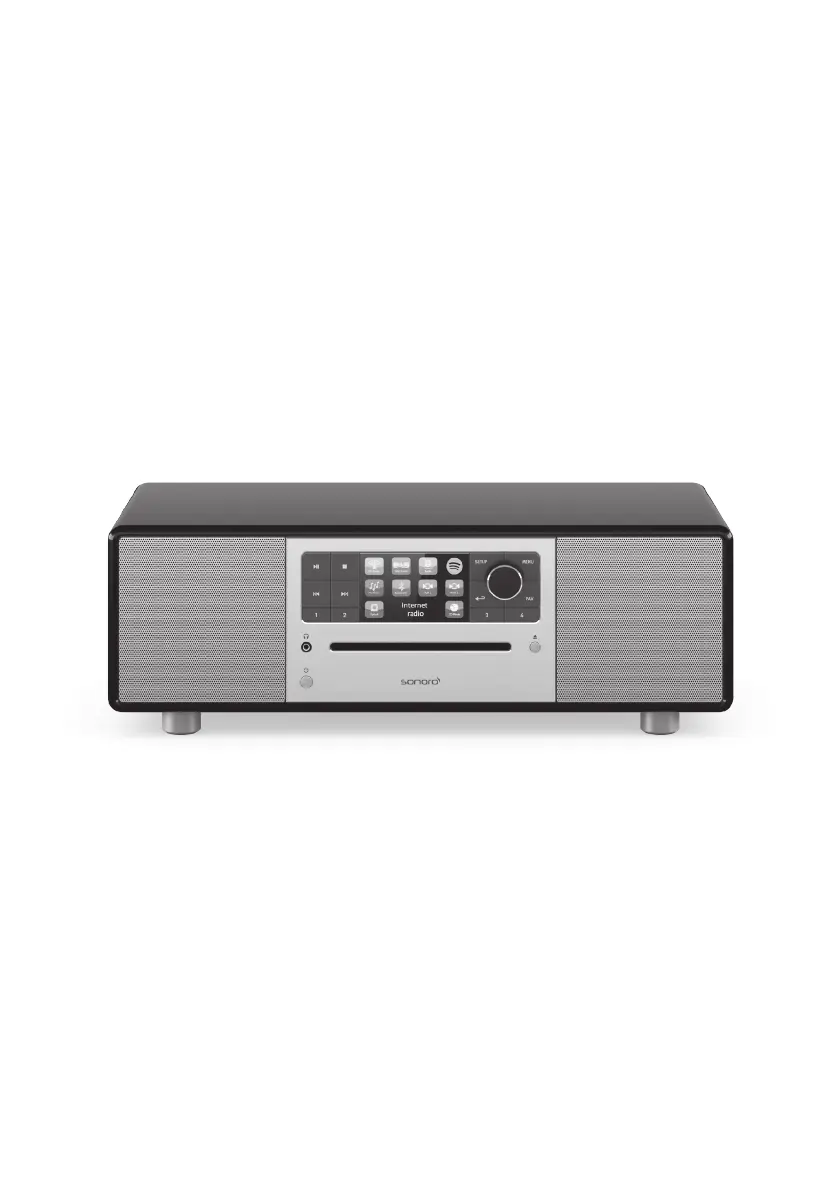
PRESTIGE
SO-330
2-WAY ALL-IN-ONE MUSIC SYSTEM WITH
INTEGRATED SUBWOOFER, INTERNET RADIO,
MULTIROOM, CD-PLAYER, DAB+ & BLUETOOTH®
Operating Manual

Questions and Answers

  • J
    Jennifer ThomasAug 16, 2025
    Why is there no sound coming from my Sonoro Prestige SO-330, or why is the sound quality poor?
    • Z
      zdavisAug 16, 2025
      If your Sonoro Media Converter isn't producing any sound or the sound quality is poor, try the following: * Adjust the volume to ensure it's not muted. * Select the correct playback mode. * Unplug any connected headsets. * If using FM/DAB or Internet radio, extend/adjust the antenna or check your Wi-Fi connection. * Keep the device away from other electronics to avoid interference. * When using Optical Input, ensure that you select PCM as the output source on the external device.
  • S
    stephenlaneAug 19, 2025
    What to do if my Sonoro Prestige SO-330 cannot connect to my Wi-Fi network?
    • A
      anna37Sep 12, 2025
      If your Sonoro Media Converter isn't connecting to Wi-Fi, verify that your router is powered on and functioning correctly. Also, confirm that your router supports WPS and that you're using the correct setup method (PBC or PIN). If needed, configure the Wi-Fi settings again.
  • A
    Adam HurstAug 22, 2025
    Why does the remote control for my Sonoro Prestige SO-330 not work, or only work sometimes?
    • R
      Ronald YoungAug 22, 2025
      If the remote control for your Sonoro Media Converter isn't working or is only working intermittently: * Try reducing the distance between the remote and the device. * Replace the battery in the remote.
  • C
    Carl MartinAug 26, 2025
    How to improve the Wi-Fi signal strength on my Sonoro Prestige SO-330 Media Converter?
    • A
      Austin JonesAug 26, 2025
      If your Sonoro Media Converter has insufficient Wi-Fi signal strength, try placing it closer to the router or adjusting the position of the Wi-Fi antenna.
  • L
    luis62Aug 28, 2025
    Why does my Sonoro Prestige SO-330 Media Converter have no power?
    • J
      Joseph ReedAug 28, 2025
      If your Sonoro Media Converter is not receiving power, make sure the power cable is properly connected.
  • J
    Joshua GonzalezAug 30, 2025
    What to do if my Sonoro Prestige SO-330 has no response?
    • C
      Casey RamirezAug 31, 2025
      If your Sonoro Media Converter is not responding, disconnect and reconnect the power plug, and then turn the device on again. This should resolve any errors.
  • T
    Taylor FernandezSep 3, 2025
    Why won't my Sonoro Prestige SO-330 play CDs?
    • D
      dunnerinSep 3, 2025
      If your Sonoro Media Converter isn't playing CDs, ensure that the CD format is supported. If it is, clean the CD or try a different CD to rule out damage.
  • L
    Lisa LewisSep 6, 2025
    Why is my USB device not working with my Sonoro Media Converter?
    • G
      Geoffrey HudsonSep 6, 2025
      If your Sonoro Media Converter isn't recognizing the USB device, ensure that the files and file system on the USB device are supported. Also, check the USB cable.
  • M
    Meghan WilliamsonSep 9, 2025
    Why does the Internet radio station on my Sonoro Media Converter sometimes not work?
    • M
      Mr. Greg SharpSep 9, 2025
      Some Internet radio stations only support a limited number of listeners, or the station may not be broadcasting at the moment. Try again later.
  • L
    lovegabrielaSep 12, 2025
    Why do some Internet radio stations disappear from the station list on my Sonoro Media Converter?
    • P
      Patricia SuttonSep 12, 2025
      If some Internet radio stations disappear from the station list on your Sonoro Media Converter, it means the station has stopped broadcasting. Check again later; if the station starts broadcasting again, it will reappear on the list.

Summary

Getting to know your PRESTIGE

Controls and ports

Details the physical buttons, jacks, and display on the front, rear, and bottom of the device.

Technical data

Specifies the technical specifications and dimensions of the PRESTIGE unit.

Getting started

Unpacking PRESTIGE

Instructions for safely removing the PRESTIGE from its packaging and initial checks.

Performing initial setup

Guides the user through the first-time configuration of the PRESTIGE system.

FM Radio mode

DAB Radio mode

Internet Radio mode

Spotify Mode

My Music Mode

Bluetooth Mode

Pairing

Instructions for pairing Bluetooth-enabled devices with the PRESTIGE.

CD Mode

Operation

Covers playback of audio CDs, CD-R, and CD-RW discs.

Alarm

Setting the alarm

Guides on setting alarm time, frequency, mode, and volume.

System settings

Network

Covers network setup, Wi-Fi configuration, and connection management.

Multiroom

Details how to configure and manage multiroom system settings.

Using UNDOK app to control PRESTIGE

Troubleshooting

Sonoro Prestige SO-330 Specifications

General IconGeneral
TypeHome audio mini system
Cassette deckNo
Product colorBlack, Wood colour
Country of originGermany
Disc loading typeFront
Optical disc playerYes
Number of optical discs1 discs
Impedance75 Ω
Speaker type2-way
Subwoofer typeActive subwoofer
RMS rated power- W
Number of subwoofers1
Subwoofer driver diameter (imperial)4 \
Supported radio bandsDAB, DAB+, FM
Power sourceAC
Input voltage100 - 240 V
Input frequency50 / 60 Hz
Display typeTFT
Backlight colorMulticolor
Headphone connectivity3.5 mm
Card reader integrated-
Audio formats supportedMP3
Equalizer modesBass
Weight and Dimensions IconWeight and Dimensions
Depth258 mm
Width450 mm
Height153 mm
Weight7200 g
Package typeBox