The Sonos PLAY:5 (gen 1) is a wireless speaker designed for larger rooms, offering a robust sound experience and seamless integration with the Sonos ecosystem. It allows users to control and enjoy music throughout their home using any Sonos controller.
Function Description:
The PLAY:5 (gen 1) is a wireless speaker that delivers high-fidelity stereo sound. It features five custom-designed drivers: two mid-range drivers, two tweeters, and a sub-woofer, each powered by a dedicated amplifier. This configuration ensures clear sound reproduction with distinct left and right channel separation. The device is designed to be always on, consuming minimal electricity when not actively playing music. It can be easily integrated into an existing Sonos system or set up as a new system. The PLAY:5 also includes an analog audio input for connecting external sources like portable music players or CD players, and a 3.5mm headphone jack for private listening, which automatically mutes the built-in speakers when headphones are plugged in.
Important Technical Specifications:
- Audio:
- Amplifier: Five Class-D digital amplifiers delivering 80W of total output.
- Speakers: Five-driver system: two tweeters, two 3" mid-range drivers, and one 3.5" woofer. Each driver is individually powered.
- Headphone: Auto-detecting 3.5 mm headphone connection.
- Audio Line-In: Auto-detecting 3.5mm audio line-in connection (2V).
- Stereo Pair Setting: Allows grouping two PLAY:5s in the same room, with one serving as the left channel and the other as the right channel.
- Audio Formats Supported: Compressed MP3, AAC (without DRM), WMA without DRM (including purchased Windows Media downloads), AAC (MPEG4), AAC+, Ogg Vorbis, Apple Lossless, Flac (lossless) music files, as well as uncompressed WAV and AIFF files. Native support for 44.1kHz sample rates, with additional support for 48kHz, 32kHz, 24kHz, 22kHz, 16kHz, 11kHz, and 8kHz sample rates. MP3 supports all rates except 11kHz and 8kHz. Note: Apple "Fairplay", WMA DRM and WMA Lossless formats are not currently supported; previously purchased Apple "Fairplay" DRM-protected songs may be upgraded.
- Music Services Supported: Compatible with various music services including Apple Music™, Deezer, Google Play Music, Pandora, Spotify, and Radio by TuneIn, as well as downloads from DRM-free track services. Service availability varies by region.
- Operating Systems (for stored files): Windows XP SP3 and higher; Macintosh OS X 10.6 or later; NAS (network-attached storage) devices supporting CIFS.
- Networking:
- Wireless Connectivity: Connects to home WiFi network with any 802.11 b/g/n, 3x3 MIMO, dual-band (2.4GHz/5GHz) router. Sonos communicates over a 2.4GHz home network supporting 802.11 b/g/n wireless technology; 5GHz networks are not supported in a completely wireless Sonos setup.
- SonosNet™ Extender: Extends and enhances SonosNet, a secure AES encrypted, peer-to-peer wireless mesh network, to reduce WiFi interference.
- Network Bridging: 2-port switch (10/100Mbps, auto MDI/MDIX) for connecting Ethernet devices through SonosNet.
- Internet Connectivity: Required for Internet radio, online music services, and software updates (DSL, cable modem, or LAN-based high-speed Internet connection required).
- General:
- Power Supply: 100 - 240 VAC, 50/60 Hz, auto-switchable.
- Dimensions (H x W x D): 8.50 x 14.40 x 4.80 in. (217 x 365 x 123 mm).
- Weight: 9.15 lbs. (4.15kg).
- Operating Temperature: 32° to 104° F (0° to 40° C).
- Storage Temperature: 4° to 158° F (-20° to 70° C).
- Product Finish: White with light metallic grille; black with graphite grille.
- Front Panel Buttons: Volume up (+), Volume down (-), Play/Pause.
- Front Panel LED Indicators: Status indicator and Mute status.
- Back Panel: Acoustic port/handle, Ethernet ports (2), AC power (Mains) input, Analog audio in, Headphone jack.
Usage Features:
- Setup: Simple setup process guided by instructions packaged with the PLAY:5. For existing Sonos systems, the PLAY:5 can be added through the Sonos app (mobile or Mac/PC) by selecting "Add a Player or SUB" from the Settings or Manage menu.
- Controls: Front panel buttons for Play/Pause, Volume up, and Volume down. Press Play/Pause once to start/stop streaming, twice to skip to the next track.
- Music Playback: Access to Internet radio, various music services, and local music libraries (from computers or NAS devices). Wireless playback from iOS and Android devices is supported, allowing users to stream music stored on their mobile devices. Google Play Music app can directly stream to Sonos.
- Stereo Pairing: Two PLAY:5s can be configured as a stereo pair for a wider soundstage, with one unit acting as the left channel and the other as the right. Optimal placement suggests 8 to 10 feet apart, with the listening position 8 to 12 feet from the speakers.
- Line-In Functionality: Connect external audio sources via the 3.5mm analog audio input. The device is automatically detected upon plugging in. Line-in level and source name can be adjusted via the Sonos app.
- Headphone Use: Plug in standard 3.5mm headphones for private listening; the PLAY:5's speakers will automatically mute. Volume can be adjusted via the Sonos app.
- Equalization Settings (Trueplay™): The PLAY:5 includes Trueplay tuning, which uses an iOS device's microphone to measure acoustic distortion in a room and adapt the speaker's sound for optimal performance. Users can also manually adjust bass, treble, balance, and loudness settings through the Sonos app.
- Placement: Recommended placement is 3 to 12 inches (8-30 cm) from a wall, across the room from the listening position. The acoustic port should not be blocked. Caution is advised when placing near older CRT televisions or monitors to avoid picture discoloration. The PLAY:5 is not water-resistant.
Maintenance Features:
- Software Updates: The Sonos system is designed for free, online software updates, requiring registration during setup.
- Cleaning: Clean only with a dry, soft cloth. Avoid household cleaners or solvents, as they can damage the finish.
- Power Cord Protection: Protect the power cable from being walked on or pinched, especially at plugs and where it exits the apparatus.
- Servicing: Refer all servicing to Sonos qualified service personnel. Do not open Sonos products due to risk of electric shock; unauthorized repairs will void the warranty.
- Heat Sources: Do not install near radiators, heat registers, stoves, or other heat-producing apparatus.
- Environmental Protection: Do not expose to rain or moisture, or to dripping or splashing liquids. Do not place liquid-filled objects (e.g., vases) on the apparatus.
- Troubleshooting (Warning Mode): If the status indicator shows solid orange and volume automatically reduces, it indicates warning mode. Steps include pressing Pause, checking for blocked vents (if applicable), ensuring room temperature is below 104°F/40°C, providing shade if in direct sunlight, and allowing the player to cool before restarting. If issues persist, contact Customer Support.

 Need help?
 General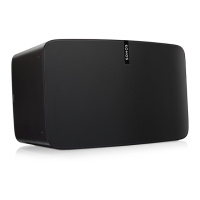

 To Next Page