EasyManua.ls Logo

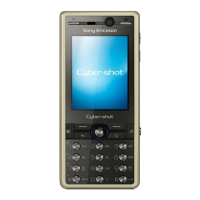
Sony Ericsson K810i Cyber-shot - User Manual

Sony Ericsson K810i Cyber-shot
52 pages
Print Icon
To Next Page IconTo Next Page
Loading...
Congratulations on your purchase of the Sony Ericsson
K810i Cyber-shot™. Get the best pictures and share
them online, in seconds. For additional phone content,
go to www.sonyericsson.com/fun.
Register now to get a suite of tools, free online storage,
special offers, news and competitions at
www.sonyericsson.com/myphone.
For product support, go to www.sonyericsson.com/
support.
Question and Answer IconNeed help?

Do you have a question about the Sony Ericsson K810i Cyber-shot and is the answer not in the manual?

Summary

Getting started

Making and receiving calls

Basic procedures for initiating and answering phone calls.

Calling

Call procedures

Steps for making, receiving, answering, and ending calls.

Emergency and video calls

Procedures for making emergency calls and video calls.

Messaging

Text and picture messages

Creating, sending, and managing text (SMS) and picture (MMS) messages.

Imaging

Camera and video functions

Taking pictures, recording videos, and using camera settings.

Entertainment

Connectivity

Internet and data

Browsing the web, using RSS feeds, and managing data.

Sony Ericsson K810i Cyber-shot Specifications

General IconGeneral
BrandSony Ericsson
ModelK810i Cyber-shot
CategoryDigital Camera
LanguageEnglish