This is the Internet version of the user's guide. © Print only for private use.
8
Getting started
of the phone are turned off, preventing disturbance
of sensitive equipment, for example, in an
aeroplane or in a hospital. You cannot make calls,
receive calls, or send messages, etc. You can only
use the WALKMAN player. If you have selected
Music only, you can still receive calendar and task
reminders, and the alarm can still signal.
To deactivate the start-up menu
1 } Settings } the General tab } Start-up menu.
2 Select Don´t show.
To make and receive calls
You can make and receive calls when the phone
is open or closed.
1 When open, enter the phone number (with
international prefix and area code if
applicable)
} Call to make the call. } End call
to end the call.
2 When open or closed, } Contacts and select
the contact to call. Use or to select
a number } Call.
3 When the phone rings } Answer or } Busy
to reject the call. This can be done in either
open or closed mode.
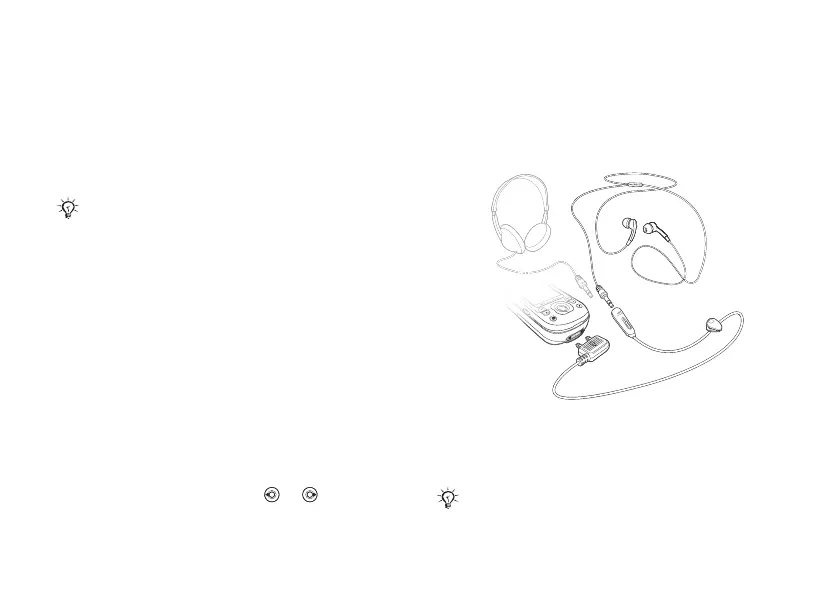
Stereo handsfree headset
You can connect compatible accessories using
a 3.5 mm jack, such as headphones, to your stereo
handsfree headset.
Always follow regulations and any flight crew
instructions with respect to onboard use of electronic
devices.
You can still answer calls and use the microphone
when other compatible accessories are in use.




 To Next Page