masterpage:Left
lename[E:\SEM_Janet\DATA_HT-
950DP\J9041386_25497361115950DPUS\2549736111\GB03CON_HT-5950DP-U.fm]
model name1[HT-5950DP]
model name2[HT-6900DP]
-
16
US
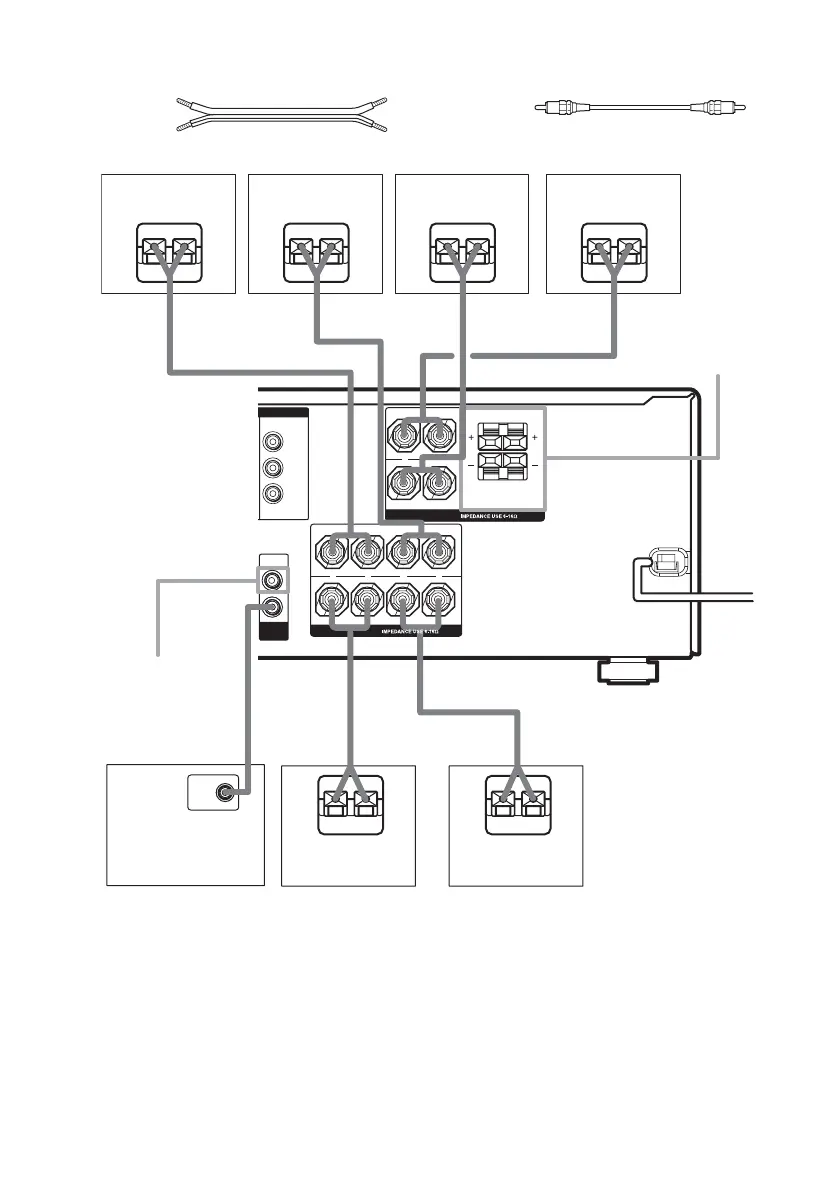
Required cords
A Speaker cords (supplied)
(+)
B Monaural audio cord (supplied)
Black
(–)
* (HT-9900M and HT-6900DP only) If you have an additional front speaker system, connect them to the
SPEAKERS FRONT B terminals. You can select the front speakers you want to use with the SPEAKERS
(OFF/A/B/A+B) button. For details, see “Selecting the speaker system” (page 41).
** (HT-9900M and HT-6900DP only) If you have an additional sub woofer, you can connect it to the other SUB
WOOFER terminal.
FRONT A
CENTER FRONT B
MONITOR
OUT
T VIDEO
Y
P
B
/C
B
/B–Y
P
R
/C
R
/R–Y
LR
LR
LR
+ +
––
–
SPEAKERS
VOLTAGE SELECTOR
SUB
WOOFER
A
Ee
A
Ee
A
Ee
E
e
A
B
E
e
A
SPEAKERS
FRONT B*
SUB
WOOFER**
Ee
A
SURROUND
SURROUND BACK
+
LR
SPEAKERS
AUDIO
OUT
INPUT
Sub woofer
Center speaker Surround back
speaker
Front speaker
(Left)
Front speaker
(Right)
Surround speaker
(Right)
Surround speaker
(Left)
GB01COV_HT-5950DP-U.book Page 16 Thursday, January 13, 2005 3:28 PM


 To Next Page