Getting Started
masterpage:Right
lename[E:\SEM_Janet\DATA_HT-
950DP\J9041386_25497361115950DPUS\2549736111\GB03CON_HT-5950DP-U.fm]
model name1[HT-5950DP]
model name2[HT-6900DP]
-
17
US
Installing the speakers on the
wall
You can install your front, surround and
surround back speakers on the wall.
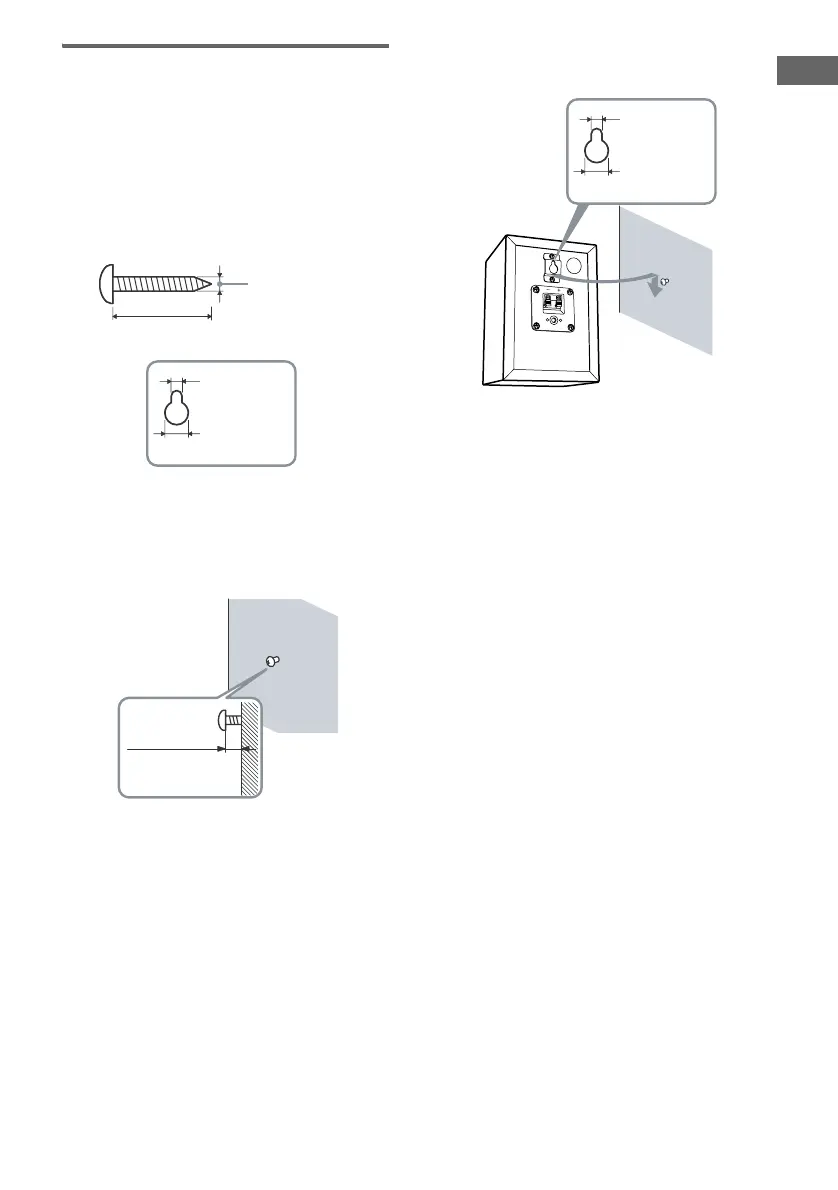
1 Prepare screws (not supplied) that are
suitable for the metal hook on the back
of each speaker. See the illustrations
below.
2 Fasten the screws to the wall. The
screws should protrude 5 to 7 mm (7/32
to 9/32 inch).
3 Hang the speakers on the screws.
Notes
• Use screws that are suitable for the wall material and
strength. As a plaster board wall is especially fragile,
attach the screws securely to a beam and fasten them
to the wall. Install the speakers on a vertical and flat
wall where reinforcement is applied.
• Contact a screw shop or installer regarding the wall
material or screws to be used.
• Sony is not responsible for accident or damage
caused by improper installation, insufficient wall
strength or improper screw installation, natural
calamity, etc.
more than 4 mm
(5/32 inch)
more than 25 mm (1 inch)
Metal hook on the back of the speaker
4.6 mm
(3/16 inch)
10 mm
(13/32 inch)
5 to 7 mm
(7/32 to 9/32
inch
)
Metal hook on the back of the speaker
4.6 mm
(3/16 inch)
10 mm
(13/32 inch)
GB01COV_HT-5950DP-U.book Page 17 Thursday, January 13, 2005 3:28 PM


 To Next Page