ILCE-7SM3
5-060-467-41(1)
EN
11
\\Win-473\camera\CX85000(OT)UUD_IM\Multi\04_Compose\5060467411_14lang\5060467411ILCE7SM3CEC\01EN-ILCE7SM3CEC\030BAS.indd
DTP data saved: 2023/12/27 17:47
PDF file created: 2024/01/19 12:00
EN
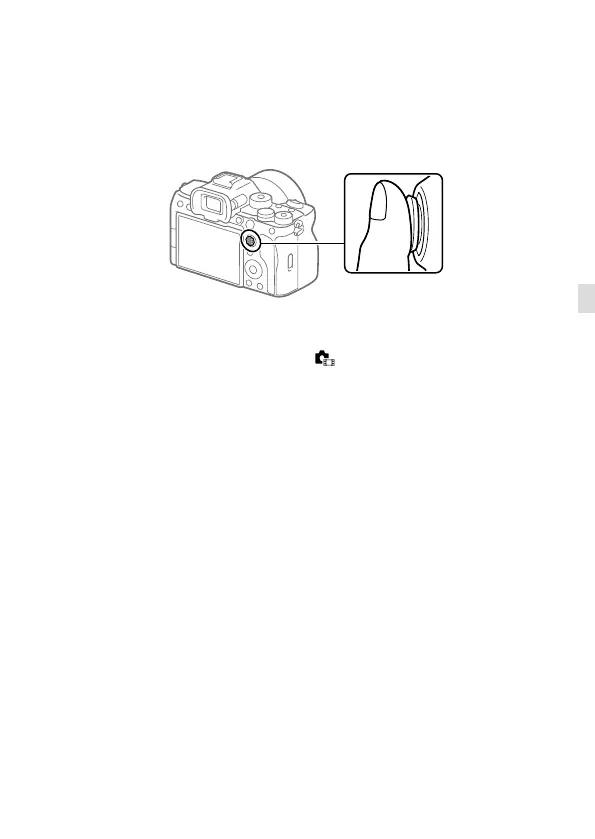
Multi-selector
You can move the focus area by pushing the multi-selector up/down/left/
right. You can also assign a function to be activated when you press the
center of the multi-selector.
• Put your finger right on top of the multi-selector to manipulate it more
precisely.
• You can move the focus area when [ Focus Area] is set to the
following parameters:
– [Zone]
– [Spot: L]/[Spot: M]/[Spot: S]
– [Expand Spot]
– [Tracking: Zone]
– [Tracking: Spot L] / [Tracking: Spot M] / [Tracking: Spot S]
– [Tracking: Expand Spot]
• The [Focus Standard] function is assigned to the center of the multi-
selector in the default settings.



 To Next Page