ILCE-7SM3
5-060-467-41(1)
EN
10
\\Win-473\camera\CX85000(OT)UUD_IM\Multi\04_Compose\5060467411_14lang\5060467411ILCE7SM3CEC\01EN-ILCE7SM3CEC\030BAS.indd
DTP data saved: 2023/12/27 17:47
PDF file created: 2024/01/19 12:00
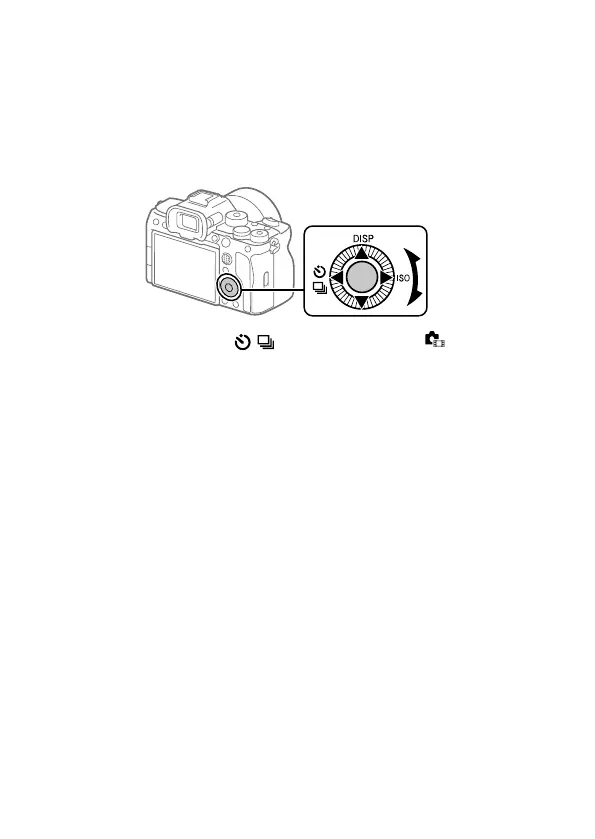
Control wheel
On the menu screen or the screen displayed by pressing the Fn button,
you can move the selection frame by turning the control wheel or by
pressing the top/bottom/left/right side of the control wheel. Your
selection is confirmed when you press the center of the control wheel.
• The DISP (Display Setting), / (Drive Mode), and ISO ( ISO)
functions are assigned to the top/left/right side of the control wheel.
In addition, you can assign selected functions to the left/right/bottom
side and the center of the control wheel, and to the rotation of the
control wheel.
• During playback, you can display the next/previous image by pressing
the right/left side of the control wheel or by turning the control wheel.



 To Next Page