ILCE-7SM3
5-060-467-41(1)
EN
7
\\Win-473\camera\CX85000(OT)UUD_IM\Multi\04_Compose\5060467411_14lang\5060467411ILCE7SM3CEC\01EN-ILCE7SM3CEC\020PRE.indd
DTP data saved: 2023/12/27 17:47
PDF file created: 2024/01/19 12:00
EN
2
Select the desired language and then press the center of the
control wheel.
3
Follow the instructions on the camera screen to connect the
camera with your smartphone and perform the initial setup.
• You can also configure or change the initial settings later from the
MENU of the camera.
Pairing the camera with your smartphone later
(Smartphone Connection)
For details on the connection method, refer to the
following Help Guide URL:
https://rd1.sony.net/help/ilc/2410_pairing/h_zz/
6: Shooting still images
1
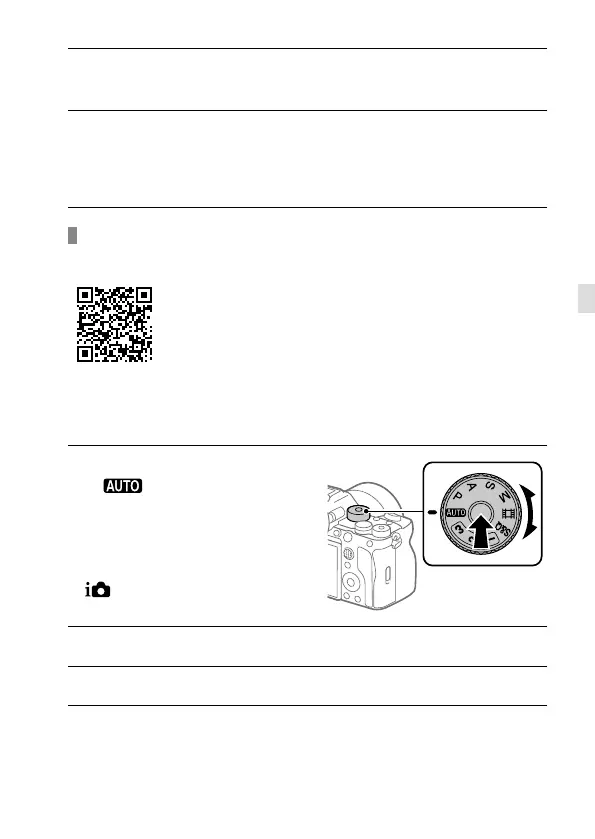
Turn and set the mode dial
to
(Auto Mode) while
pressing the lock release
button in the center of the
dial.
The shooting mode will be set to
(Intelligent Auto).
2
Press the shutter button halfway down to focus.
3
Press the shutter button all the way down.



 To Next Page