ILCE-7SM3
5-060-467-41(1)
EN
71
\\Win-473\camera\CX85000(OT)UUD_IM\Multi\04_Compose\5060467411_14lang\5060467411ILCE7SM3CEC\01EN-ILCE7SM3CEC\090PAR.indd
DTP data saved: 2023/12/27 17:47
PDF file created: 2024/01/19 12:01
EN
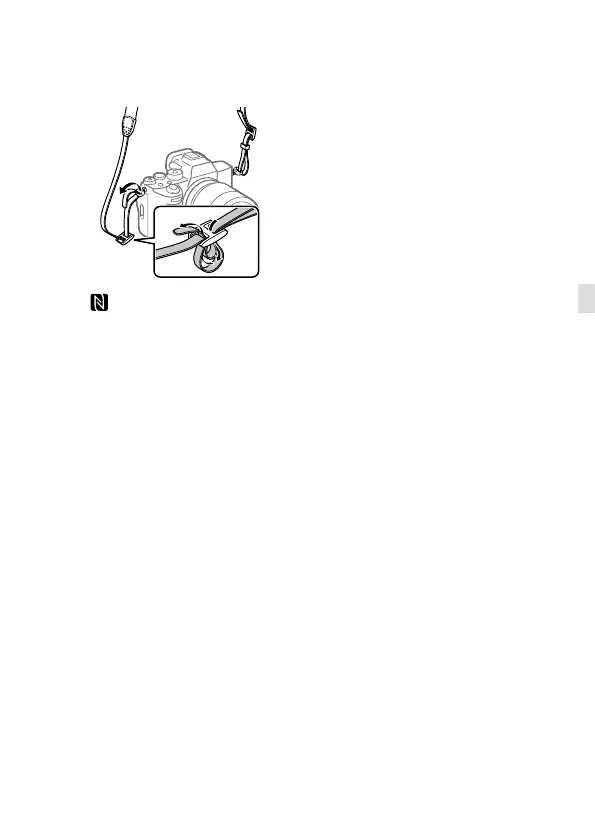
Hooks for shoulder strap
Attach both ends of the strap
onto the camera.
(N-Mark)
• The camera cannot be
connected to a smartphone
using the NFC function if the
camera’s system software
(firmware) is Ver.3.0 or later.
• NFC (Near Field
Communication) is an
international standard
of short-range wireless
communication technology.
SLOT 1 (Memory card slot 1)
(5)
SLOT 2 (Memory card slot 2)
(5)
* For details on compatible
accessories for the Multi/Micro
USB Terminal, visit the Sony
website, or consult your Sony
dealer or local authorized Sony
service facility.
Notes on USB terminals
You can use either the USB Type-C
terminal or the Multi/Micro USB
Terminal for USB communications.
However, you cannot conduct
USB communications with both
terminals simultaneously.
Use the USB Type-C terminal to
supply power and charge the
battery pack.
This camera cannot be powered
via the Multi/Micro USB terminal.
• You can use accessories for
the Multi/Micro USB Terminal,
such as a remote commander
(sold separately), while
supplying power or performing
remote shooting using the
USB Type-C terminal.
Notes on the terminal cover
Ensure that the terminal cover is
closed before use.



 To Next Page