ILCE-7SM3
5-060-467-41(1)
EN
5
\\Win-473\camera\CX85000(OT)UUD_IM\Multi\04_Compose\5060467411_14lang\5060467411ILCE7SM3CEC\01EN-ILCE7SM3CEC\020PRE.indd
DTP data saved: 2023/12/27 17:47
PDF file created: 2024/01/19 12:00
EN
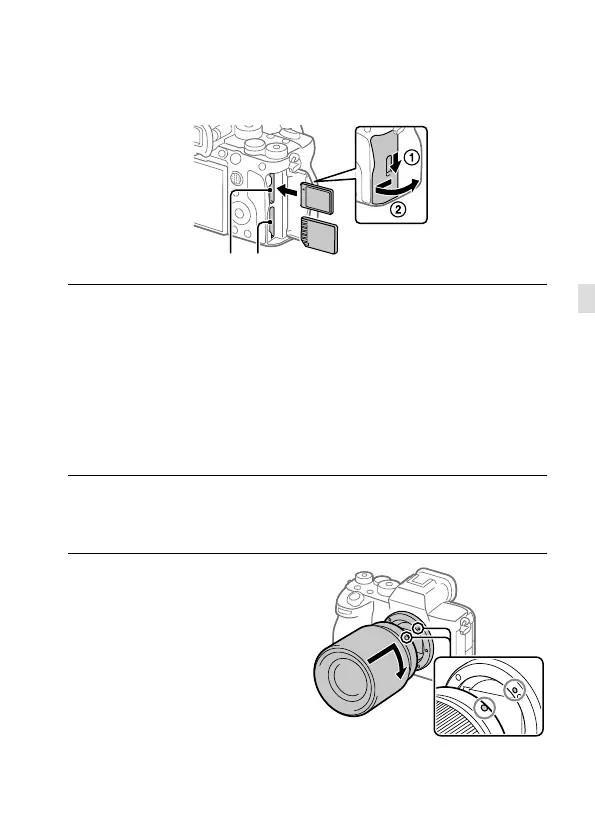
3: Inserting a memory card into the
camera
Slot 1 Slot 2
Open the memory card cover and insert the memory card into
Slot1, paying attention to the orientation of the memory card.
Then, close the cover.
• Both Slot 1 and Slot 2 of this camera support CFexpress Type A memory
cards and SD memory cards. The Slot 1 is used in the default settings.
For details on the setting method, refer to the “Help Guide.”
• When you use a memory card with this camera for the first time, format
the card using the camera in order to stabilize the performance of the
memory card.
4: Attaching a lens
1
Mount the lens by aligning
the two white index marks
(mounting indexes) on the
lens and camera.



 To Next Page