D:\_SONY TV\AS\SY21_AS_CEP_RG_131\01GB\5024552131_01GB.fm master page: Right
XR-83A9xJ / 65A9xJ / 55A9xJ
5-024-552-13(1)
5
GB
Remote Control and TV
The remote control shape, layout, availability
and function of remote control buttons may
vary depending on your region/country/TV
model/TV settings.
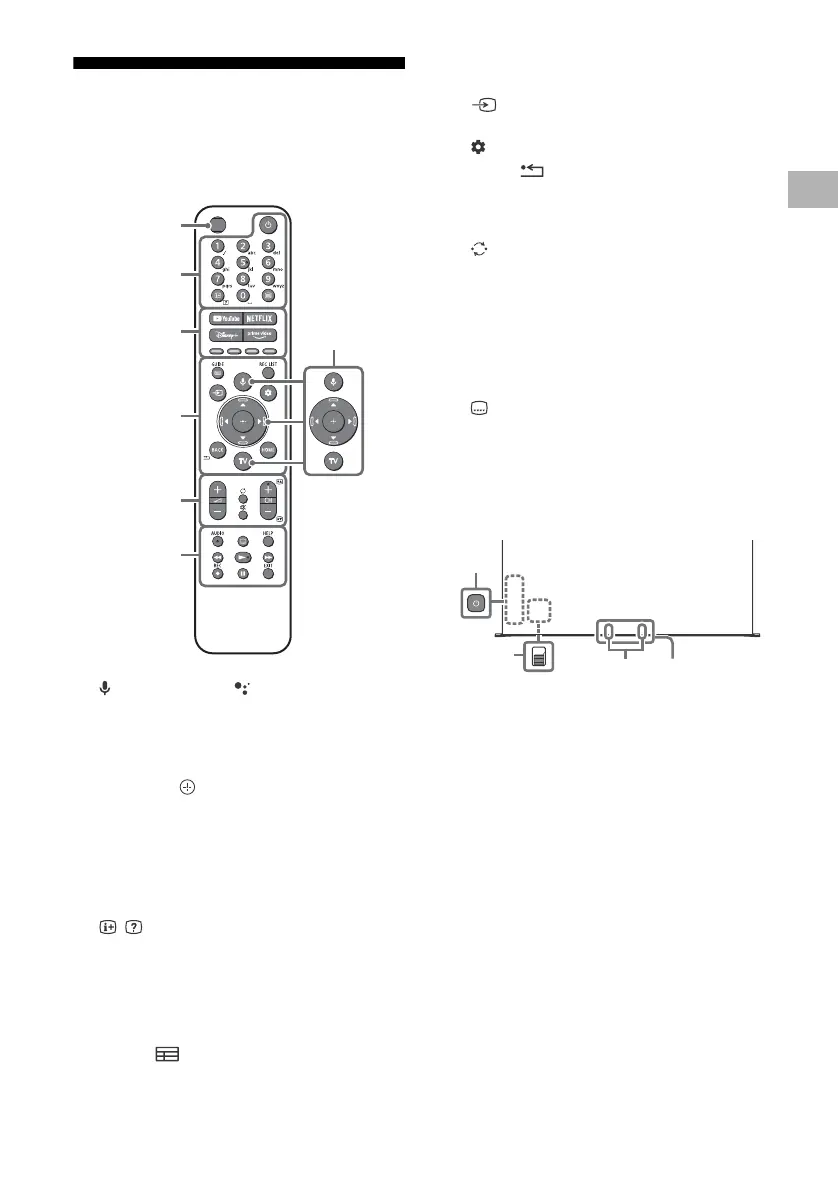
(Microphone) / (Google Assistant):
Use Google Assistant*
2
*
3
or voice search*
3
.
For hints on how to control your TV, press
the microphone button on the remote
control and say “voice hints”.*
2
////: On screen menu navigation
and selection.
TV: Display TV channel list or switch to
input.
(Power)
Number buttons
/ (Info/Text reveal):
Display
information.
(Text): Display text information.
YouTube™ / NETFLIX / Disney+ / Prime
Video / Colour buttons
GUIDE/ : Display the digital programme
guide of TV or TV box*
4
.
REC LIST: Display the Rec list of USB HDD*
5
/
DVR*
4
.
(Input select): Display and select the
input source, etc.
(Quick settings): Display Quick Settings.
BACK/
HOME
+/– (Volume)
(Jump)
(Mute)*
6
CH +/–//: Select the channel, or next
() / previous () page.
AUDIO: Select the sound of multilingual
source or dual sound (depend on
programme source).
(Subtitle setting)
HELP:
Display the Help menu.
///
REC:
Record the currently viewed
programme on USB HDD*
5
/DVR*
4
.
EXIT
(Power)
(It can be found by removing the side cover
(XR-83A9xJ only).)
BUILT-IN MIC SWITCH: Turn on/off the
built-in MIC. (It can be found by removing
the side cover)
Built-in MIC*
2
*
3
*
7
: To enable the built-in
MIC, press the microphone button on the
remote control and follow the on-screen
instructions.
Remote Control sensor / Ambient light
sensor / LED
Ȫ
ȫ
Ȭ
ȭ
Ȯ
ȩ
MIC / Light
sensor*
1











 To Next Page