C:\4688165121\4688165121ILCA99M2AP2\01GB-ILCA99M2AP2\100MEN.indd
2016/09/01 10:27
ILCA-99M2
4-688-165-12(1)
GB
63
MENU items/List of iconsMENU items/List of icons
GB
63
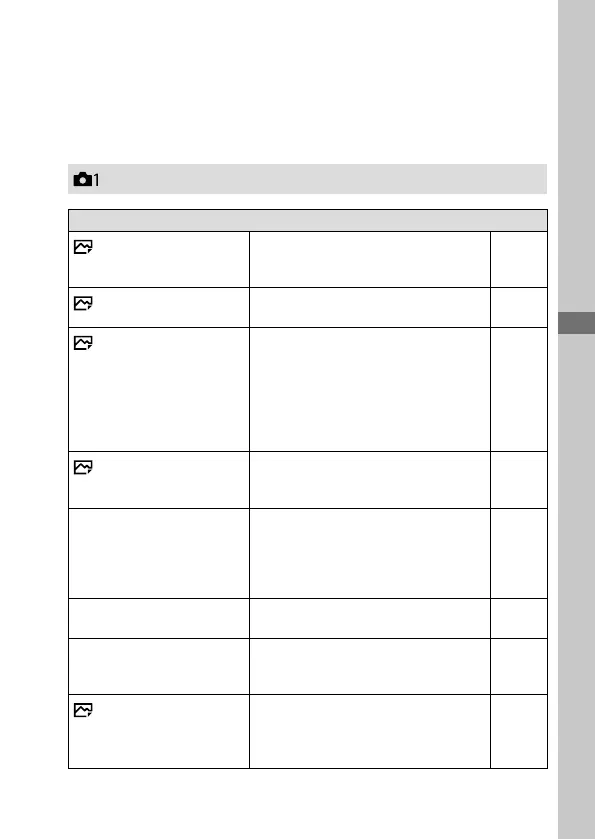
List of MENU items
For details on each MENU items, refer to the reference page in the last
column or the Help Guide.
(Camera Settings1)
Quality/Image Size
Quality
Sets the image quality for still images.
(RAW/ RAW & JPEG/ Extra fine/
Fine/ Standard)
49
RAW File Type
Selects the file type for RAW images.
(Compressed/ Uncompressed)
Help
Guide
Image Size
Selects the size of still images.
(L: 42M/ M: 18M/ S: 11M (3:2)
L: 36M/ M: 15M/ S: 8.9M (16:9)
L: 18M/ M: 11M/ S: 4.5M (APS-C
size, 3:2)
L: 15M/ M: 8.9M/ S: 3.8M (APS-C
size, 16:9))
48
Aspect Ratio
Selects the aspect ratio for still
images.
(3:2/ 16:9)
Help
Guide
APS-C/Super 35mm
Sets whether to record in APS-C-
equivalent size for still images and
Super 35 mm-equivalent size for
movies.
(On/ Auto/ Off)
Help
Guide
Panorama: Size
Selects the size of panoramic images.
(Standard/ Wide)
Help
Guide
Panorama: Direction
Sets the shooting direction for
panoramic images.
(Right/ Left/ Up/ Down)
Help
Guide
Long Exposure NR
Sets noise reduction processing for
shots with a shutter speed of 1 second
or longer.
(On/ Off)
Help
Guide


 To Next Page