EasyManua.ls Logo

Sony AIWA AVJ-X33 - User Manual

Sony AIWA AVJ-X33
76 pages
Print Icon
To Next Page IconTo Next Page
Loading...
SERVICE MANUAL
AVJ-X33
AEP Model
UK Model
E Model
Australian Model
•AVJ-X33 is composed of the following models.
As service manuals are issued for each component model,
please refer to them.
COMPONENT MODEL NAME
AVJ-X33
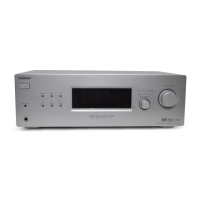
DVD RECEIVER CX-VX33
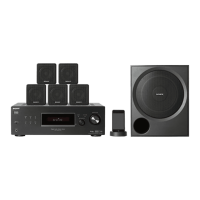
SATELLITE SPEAKER SSX-VX33S
SUB WOOFER SSX-VX33W
SPECIFICATIONS
Supplied accessories Speakers (5)
Subwoofer (1)
Remote Commander (remote) RM-Z20012 (1)
Operating Instructions (1)
Speakers-Connection and Installation (card) (1)
Video cable (1) (E3, E32, AUS, SP)
Speaker cables (6)
Size AAA (R03) batteries (2)
AM loop antenna (1)
FM antenna (1)
Ferrite core (1)
Foot pads (20)
Plug adapter (1) (E3, E32, SP)
Design and specifications are subject to change without
notice.
• Abbreviation
AUS : Australian model
E3 : 240 V AC area in E model
E32 : 110 – 240 V AC area in E model
CET : East European & Russian model
RU : Russian model
SP : Singapore model
Ver 1.0 2004. 10
DVD HOME THEATRE SYSTEM
Sony Corporation
Personal Audio Company
Published by Sony Engineering Corporation
9-879-236-01
2004J04-1
© 2004. 10
Part No. Description Remark
2-050-638-21 MANUAL, INSTRUCTION (ENGLISH) (UK)
2-050-638-41 MANUAL, INSTRUCTION (ENGLISH,RUSSIAN) (RU)
2-050-638-51 MANUAL, INSTRUCTION (ENGLISH,FRENCH,SPANISH,
TRADITIONAL CHINESE) (SP)
2-050-638-61 MANUAL, INSTRUCTION (ENGLISH) (AUS)
2-050-638-71 MANUAL, INSTRUCTION (ENGLISH,FRENCH,ARABIC,
PERSIAN) (E3)
2-050-638-81 MANUAL, INSTRUCTION (ENGLISH,SPANISH,FRENCH)
(E32)
2-159-427-01 MANUAL, INSTRUCTION (ENGLISH,FRENCH,SPANISH)
(CET)
2-159-427-11 MANUAL, INSTRUCTION (GERMAN,ITALIAN,POLISH)
(CET)
2-159-427-21 MANUAL, INSTRUCTION (HUNGARIAN,CZECH) (CET)
2-159-427-31 MANUAL, INSTRUCTION (ENGLISH,FRENCH,SPANISH)
(AEP)
2-159-427-41 MANUAL, INSTRUCTION (GERMAN,ITALIAN,POLISH)
(AEP)
2-159-427-51 MANUAL, INSTRUCTION (HUNGARIAN,CZECH) (AEP)
9-885-069-40 SPEAKER CABLE ASSY (NLB1-91-001)
9-885-069-41 ATENNA, FM
9-885-069-42 ANTENNA, AM
9-885-069-60 CABLE, VIDEO (E3,E32,AUS,SP)
9-885-071-46 REMOTE COMMANDER (RM-Z20012)
ACCESSORIES
Question and Answer IconNeed help?

Do you have a question about the Sony AIWA AVJ-X33 and is the answer not in the manual?

Overview

This document is a service manual for the Sony AVJ-X33 DVD Home Theatre System, specifically covering the CX-VX33 DVD Receiver component. It provides detailed information for service and maintenance, including specifications, disassembly procedures, troubleshooting guides, test modes, electrical adjustments, diagrams, exploded views, and a parts list.

The AVJ-X33 system comprises the CX-VX33 DVD Receiver, SSX-VX33S Satellite Speakers, and SSX-VX33W Subwoofer. This manual focuses on the CX-VX33 DVD Receiver.

Function Description:

The CX-VX33 is a DVD receiver designed to be the central unit of a home theatre system. It integrates a DVD player, an AM/FM tuner, and an amplifier to drive multiple speakers, including satellite speakers and a subwoofer. It supports various audio and video input/output options, allowing connection to a TV, external audio sources, and microphones for karaoke. The unit can play DVDs, VCDs, and CDs, including MP3 discs.

Important Technical Specifications (General):

  • Power Supply: 220-240 V AC, 50/60 Hz
  • Power Consumption: 70 W (no more than 1 W in power saving mode)
  • Mass:
    • AEP, UK, CET, SP models: 4.9 kg
    • E3, E32, AUS, RU models: 4.7 kg
  • External Dimensions (W x H x D): 430 x 70 x 370.5 mm
  • Operating Conditions:
    • Temperature: 5-35°C
    • Operation Status: Horizontal
    • Operating Humidity: 5-85%

Important Technical Specifications (CD/DVD):

  • Laser: Semiconductor laser
    • Wavelength 650 nm for VCD and DVD
    • Wavelength 780 nm for CD
  • Emission Duration: Continuous
  • Signal System:
    • PAL 625/50, NTSC 525/60 (AEP, UK, CET, SP)
    • NTSC (E32)
    • PAL, NTSC (E3, AUS, RU)
  • Frequency Response (audio): 2 Hz - 20 kHz (±1.0 dB)
  • Signal-to-Noise Ratio (audio): More than 75 dB (1 kHz, NOP, 20 kHz LPF/A-Filter)
  • Dynamic Range (audio): More than 70 dB
  • Harmonic Distortion (audio): 0.5% (1 kHz, at 12 W position) (20 kHz LPF/A-Filter)

Important Technical Specifications (Video):

  • VIDEO (AUDIO IN) Sensitivity: 800 mV, Impedance: 50 kilohms
  • MIC (phone jacks) Sensitivity: 4 mV, Impedance: 10 kilohms
  • SCART (AUDIO IN) Sensitivity: 800 mV, Impedance: 50 kilohms (AEP, UK, CET, RU models)
  • Video Output: 1.0 V (p-p), 75 Ω, negative sync., RCA jack (AEP, UK, CET, RU models: EURO AV (TO TV))
  • S VIDEO OUT:
    • (Y) 1.0 V (p-p), 75 ohms, negative sync.
    • Mini DIN 4-pin x 1
    • (C) 0.286 V (p-p), 75 ohms (E3, E32, AUS, SP models)
  • COMPONENT VIDEO OUT:
    • (Y) 1.0 V (p-p), 75 ohms, negative sync., RCA jack x 1
    • (PB/CB)/(PR/CR) 0.7 V (p-p), 75 ohms, RCA jack x 2 (E3, E32, AUS, SP models)

Important Technical Specifications (Tuner):

  • FM Tuning Range: 87.5-108 MHz
  • FM Intermediate Frequency: 10.7 MHz
  • FM Signal-to-Noise Ratio: 60 dB (Mono)
  • AM (MW) Tuning Range: 522-1,611 kHz
  • AM Intermediate Frequency: 450 kHz

Important Technical Specifications (Amplifier):

  • Stereo Mode: 50 W + 50 W (8 Ω at 1 kHz, THD 10%)
  • Surround Mode:
    • Front: 50 W + 50 W
    • Centre*: 50 W
    • Surround*: 50 W + 50 W (8 Ω at 1 kHz, THD 10%)
    • Subwoofer*: 80 W (4 Ω at 50 Hz, THD 10%)
    • PHONES: (32 Ω, 25 mW)
    • (*Depending on the sound mode settings and the source, there may be no sound output.)

Usage Features:

  • Front Panel Controls:
    • I/ (POWER) indicator: Switches the DVD Receiver ON and OFF.
    • STANDBY indicator: Lights red when the receiver is in Standby mode (off).
    • Disc Tray: For inserting discs.
    • OPEN/CLOSE: Opens or closes the disc tray.
    • STOP: Stops playback of a disc.
    • PAUSE (II): Pauses playback of a disc temporarily.
    • PLAY: Plays back a disc.
    • VOLUME Control: Adjusts sound level.
    • MIC VOL (MIN/MAX): Adjusts microphone volume.
    • MIC1, MIC2: For connecting microphones.
    • Display window: Shows playing status, repeat playback mode, radio mode, stereo mode, tuner status, disc type (CD, MP3, VCD2.0), SLEEP timer, sound format (DOLBY PROLOGIC II), surround format, BASS ON mode, total playing time/elapsed time/frequency/remaining time/current status/title number/surround mode/volume, and title indication.
    • Remote Sensor: Receives signals from the remote control.
    • Reverse SKIP (4): For DVD (go to beginning of current chapter/track or previous chapter/track) and RADIO (select preset station).
    • Forward SKIP (1): For DVD (go to next chapter/track) and RADIO (select preset station).
    • FUNCTION: Selects the Receiver's source (FM, AM, VIDEO, TV, CD/DVD).
    • PHONES: For connecting headphones.
  • Remote Control:
    • OPEN/CLOSE: Opens and closes the disc tray.
    • TV/VIDEO: Selects the TV's source.
    • 0-9 numerical buttons: Selects numbered options in a menu.
    • >10/TV ENTER: Used to control TV.
    • Playback Control Buttons (PLAY, PAUSE, STOP): Controls disc playback.
    • PRESET-/+: Selects tuner programs or navigates chapters/tracks.
    • SLOW I/TUNING-/+: For picture search, slow playback, or tuning stations.
    • DVD TOP MENU: Displays the disc's Title menu.
    • +/// (left/right/up/down): Selects options in menus.
    • ENTER: Acknowledges menu selection.
    • TV: Controls TVs with the Remote.
    • REPEAT: Repeats chapter, track, title, or all.
    • SLEEP: Sets the unit in Sleep mode.
    • PROGRAM: Enters or exits program edit mode.
    • DIMMER: Changes display window brightness.
    • KARAOKE: Displays the Karaoke menu audio channel.
    • CLEAR: Removes a track number on the program menu.
    • DVD SETUP: Accesses or removes DVD setup menu.
    • TVI/: Switches TV ON/OFF and DVD Receiver ON/OFF.
    • DISPLAY: Displays remaining time, RDS service program, or On-Screen display.
    • MUTING: Silences speakers.
    • A.F.D. (AUTO FORMAT DIRECT): Selects sound mode (A.F.D. AUTO, PRO LOGIC, PLII MOVIE, PLII MUSIC).
    • MODE: Selects sound mode (FLAT, ROCK, POP, JAZZ, CLASSIC, NEWS, LINK).
    • BASS: Switches BASS ON/OFF.
    • VOLUME (+/-): Adjusts speaker volume.
    • DVD MENU: Accesses menu on a DVD disc.
    • RETURN: Returns the setup menu.
    • FM MODE: Changes between MONO and STEREO.
    • AUDIO: Selects audio language (DVD) or audio channel (CD).
    • TUNER MENU: Memorizes radio station frequency.
    • SUBTITLE: Selects a subtitle language.
    • TUNER/BAND: Selects tuner as listening choice (FM/AM).
    • ANGLE: Selects DVD camera angle.
    • TV VOL +/-: Adjusts TV's volume.
    • TV CH +/-: Selects TV's channel.
  • Rear Panel Connections:
    • AC Power Cord: Plugs into the power source.
    • EURO AV OUTPUT (TO TV): Connects to a TV set.
    • MONITOR OUT (VIDEO): Connects to a TV with video input.
    • VIDEO (AUDIO IN R/L): Connects audio output of an external source.
    • AM LOOP ANTENNA CONNECTORS: Connects the AM Loop antenna.
    • FM ANTENNA CONNECTOR: Connects the FM antenna.
    • SPEAKER CONNECTORS: Connects the six supplied speakers.
    • MONITOR S VIDEO OUT (DVD ONLY): Connects to a S Video Input on TV (for DVD viewing only).
    • COMPONENT VIDEO OUT (Y PB/CB PR/CR): Connects to a TV with Y PB/CB PR/CR inputs (for DVD viewing only).

Maintenance Features:

  • Notes on Chip Component Replacement:
    • Never reuse a disconnected chip component.
    • Be aware that the minus side of a tantalum capacitor may be damaged by heat.
  • Flexible Circuit Board Repairing:
    • Keep soldering iron temperature around 270°C.
    • Do not touch the same conductor of the circuit board more than three times.
    • Be careful not to apply force on the conductor when soldering or unsoldering.
  • Unleaded Solder:
    • Boards requiring unleaded solder are marked with the lead-free mark (LF).
    • Unleaded solder melts at a temperature about 40°C higher than ordinary solder.
    • Ordinary soldering irons can be used, but the iron tip needs to be applied to the solder joint for a slightly longer time.
    • Soldering irons with a temperature regulator should be set to about 350°C.
    • Caution: The printed pattern (copper foil) may peel away if the heated tip is applied for too long.
    • Unleaded solder is more viscous (sticky, less prone to flow) than ordinary solder, so use caution to prevent solder bridges.
    • It is best to use only unleaded solder, but it can be added to ordinary solder.
  • Safety-Related Component Warning: Components identified by a mark or dotted line with a mark on schematic diagrams and in the parts list are critical for safe operation. Replace these components with Sony parts whose part numbers appear as shown in the manual or supplements.
  • Notes on Handling the Optical Pick-Up Block or Base Unit:
    • The laser diode in the optical pick-up block may suffer electrostatic breakdown.
    • Pay attention to electrostatic breakdown during repair and use the procedure in the printed matter included with repair parts.
    • The flexible board is easily damaged and should be handled with care.
  • Notes on Laser Diode Emission Check:
    • The laser beam is concentrated and focused on the disc reflective surface by the objective lens.
    • When checking laser diode emission, observe from more than 30 cm away from the objective lens.
    • This product is a CLASS 1 LASER product.
  • DVD Processor Reset Procedure:
    • A step-by-step guide to reset the DVD Processor to default factory settings using the remote commander and on-screen menu.

Sony AIWA AVJ-X33 Specifications

General IconGeneral
BrandSony
ModelAIWA AVJ-X33
CategoryHome Theater System
LanguageEnglish

Related product manuals