19
BDP-S5500/BDP-S4500/BDP-S1500
4-549-800-11(2)
master page=right
E:\SONY
DVD\SD140038\4549800112_GB\030STU.fm
Getting Started
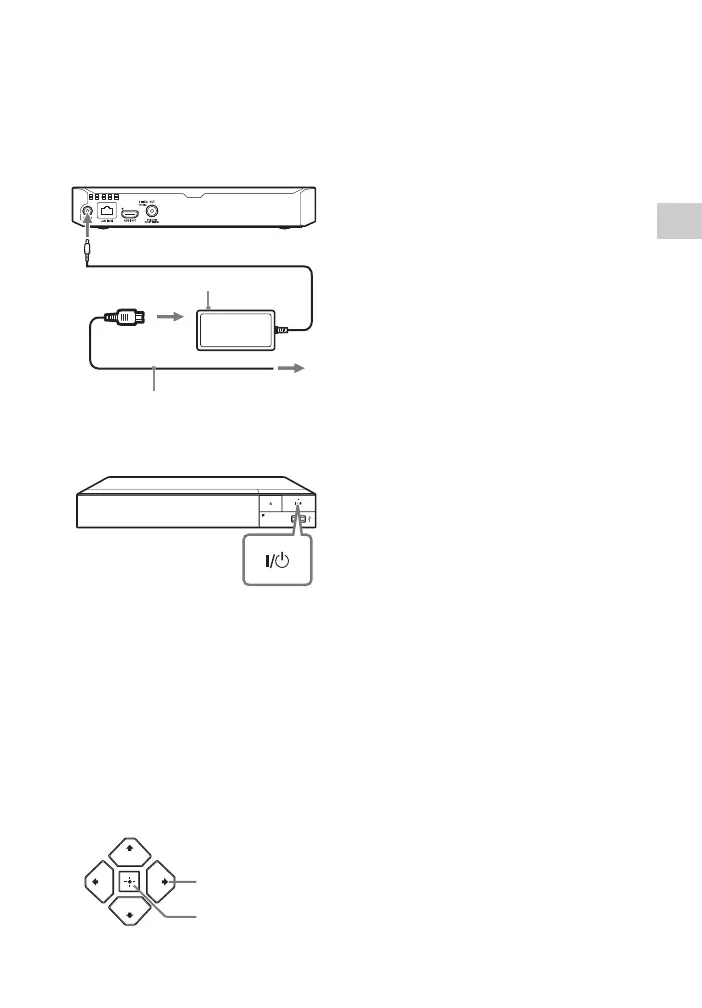
2 Connect the supplied AC adaptor
and AC power cord (mains lead)
in the numeric order shown
below. When removing them, do
so in reverse order.
3 Press [/1 to turn on the player.
4 Turn on the TV and set the input
selector on your TV. This will
show the signal from the player
on your TV screen.
5 Perform [Easy Initial Settings].
Follow the on-screen instructions to
make the basic settings using
</M/m/, and ENTER on the
remote.
b
• When [Easy Initial Settings] is complete,
select [Easy Network Settings] to use the
network functions of the player.
• To enable wireless connection, set [Internet
Settings] in [Network Settings] to [Wireless
Setup(built-in)] (BDP-S5500 only).
• To disable wireless connection, set [Internet
Settings] in [Network Settings] to [Wired
Setup] (BDP-S5500 only).
to mains
AC adaptor (supplied)
AC power cord (mains lead)
(supplied)
2
3
1
to DC IN 12 V
ENTER
</M/m/,





 To Next Page