18
BDP-S5500/BDP-S4500/BDP-S1500
4-549-800-11(2)
master page=left
E:\SONY
DVD\SD140038\4549800112_GB\030STU.fm
Step 2: Preparing for
Network Connection
If you are not going to connect the player
to a network, proceed to “Step 3: Easy
Setup” (page 18).
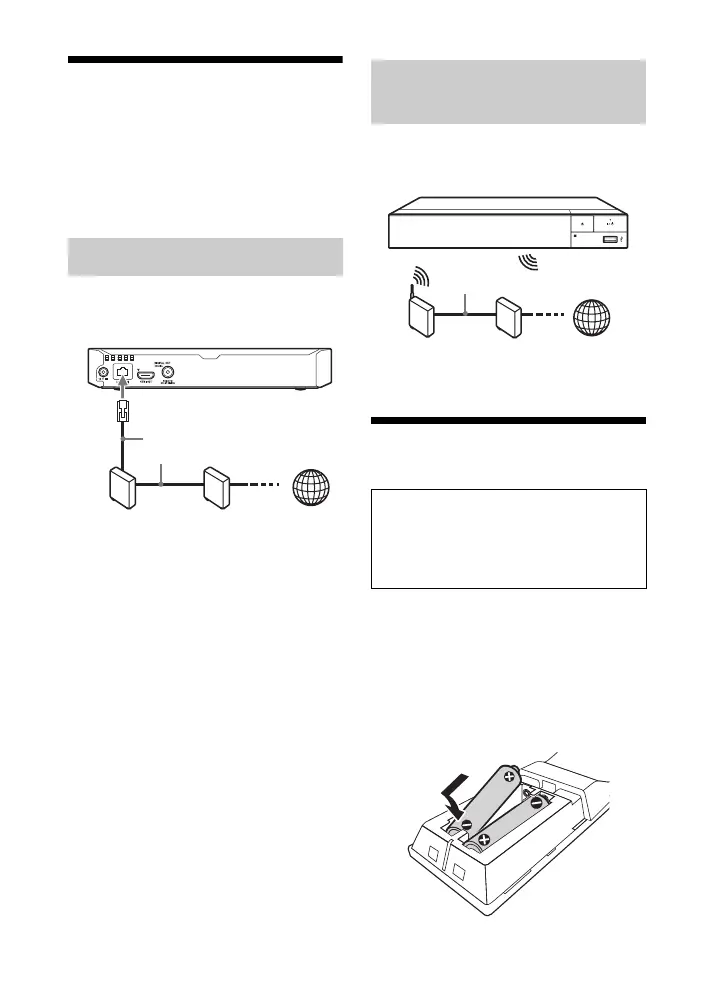
Use a LAN cable to connect to the LAN
(100) terminal on the player.
z
The use of a shielded and straight interface
cable (LAN cable) is recommended.
Use the wireless LAN that is built into
the player.
Step 3: Easy Setup
1 Insert two R03 (size AAA)
batteries by matching the 3 and
# ends on the batteries to the
markings inside the battery
compartment of the remote.
Wired Setup
ADSL modem/
Cable modem
Broadband
router
LAN cable
(not supplied)
Internet
Wireless Setup (BDP-S5500
only)
When turned on for the first time
Wait for a short while before the
player turns on and starts [Easy
Initial Settings].
Wireless LAN
router
ADSL modem/
Cable modem
Internet
LAN cable (not supplied)





 To Next Page