7-14
BX58/S480/S483/S580
Version Up (using Update DISC)
(
r
r
r
r
r
r
Outline:
update software using DISC
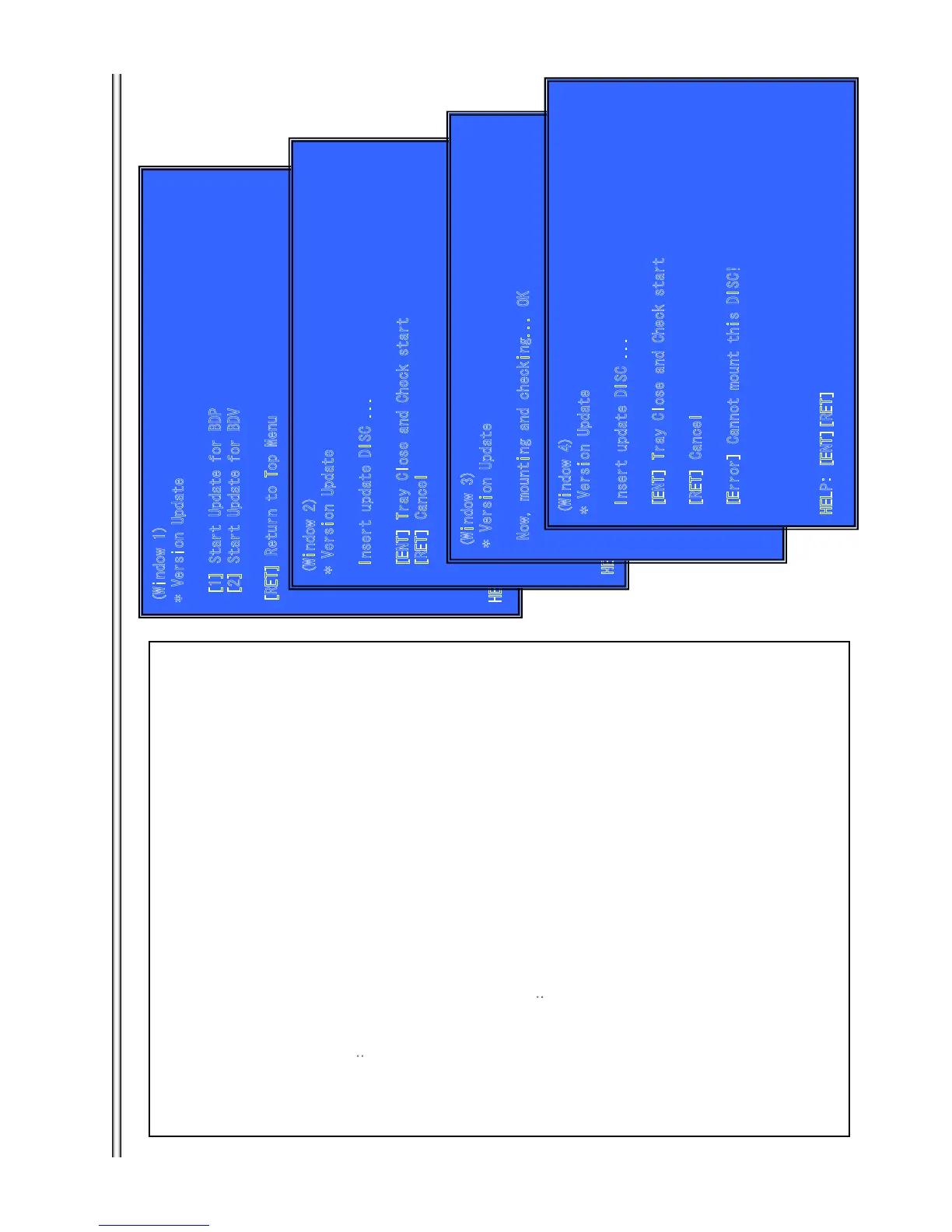
(Window 1)Version Up Menu
Operation:
[1] Start Update for BDP →(Tray Open and go to window 2)
[2] Start Update for BDV (not used)
[UP] Move Up cursor
[DOWN] Move Down cursor
[ENT] Activate the selected cursor.
[RET] Return to Service Top Menu.
(Window 2)Place the Update Disc
Operation
[ENT] Tray Close and check DISC.
[RET] Cancel Update (Tray Close and return to window 1)
(Window 3) Disc Check and OK (Right DISC)
Operation: start update sequence automatically and reboot.
After reboot, please open tray and eject Update Disc manually.
(Window 4) Disc Check and NG (not update DISC)
Operation: [Error] ・・・(error message) and wait.
open tray automatically.
Front Panel Display
DISC Insert V-INSCD
Can’t Mount V-NODSC
DISC Check NG V-CHKNG
DISC Check OK V-CHKOK
)
( )






 To Next Page