On
replacement
of
parts
In the events that this player is repaired,
repaired parts may be collected for reuse or
recycling purposes.
On
connecting
to
the
HOM
I
OUT
jack
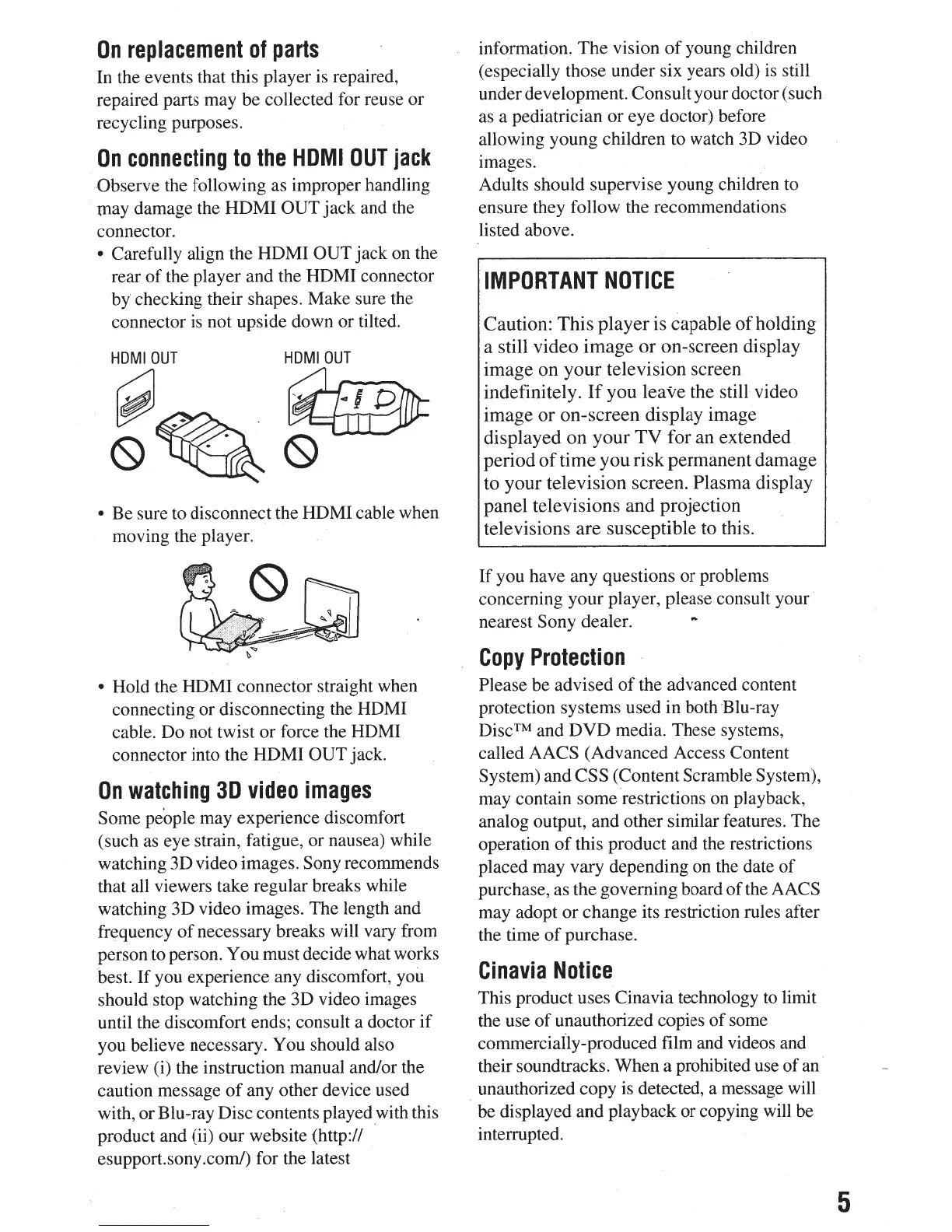
-Observe the following as improper handling
· may damage the HDMI
OUT
jack and the
connector.
•
Carefully align the HDMI OUT
jack on the
rear
of
the player and the HDMI connector
by
checking their shapes. Make sure the
connector is not upside down or tilted.
HDMIOUT HDMIOUT
~
. .
··~
(9~(9
•
Be sure to disconnect the HDMI cable when
moving the player.
•
Hold the HDMI connector straight when
connecting or disconnecting the HDMI
cable. Do not twist or force the HDMI
connector into the HDMI OUT jack.
On
watching
3D
video
images
Some
people may experience discomfort
(such
as
eye strain, fatigue, or nausea) while
watching 3D video images. Sony
recommends
that all viewers take regular breaks while
watching 3D video images. The length and
frequency
of
necessary breaks will vary from
person to person. You must decide what works
best.
If
you experience any discomfort, you
should stop watching the 3D video images
until the discomfort ends; consult a doctor
if
you believe necessary.
You
should also
review (i) the instruction manual and/or the
caution message
of
any other device used
with, or Blu-ray Disc contents played with this
product and (ii) our website (http://
esupport.sony.com/) for the latest
information.
The
vision
of
young children
(especially those under six years old) is still
under development. Consult your doctor (such
as a pediatrician
or
eye doctor) before
allowing young children to watch 3D video
images.
Adults should supervise young children to
ensure they follow the recommendations
listed above.
IMPORTANT
NOTICE
Caution:
This
player
is capable
of
holding
a still
video
image
or
on-screen
display
image
on
your
television
screen
indefinitely.
If
you
leave
the still video
image
or
on-screen
display image
displayed
on
your
TV
for
an
extended
period
of
time
you
risk
permanent
damage
to
your
television
screen.
Plasma
display
panel
televisions
and
projection
televisions
are
susceptible
to this.
If
you have any questions or problems
concerning your player, please consult your
nearest
Sony
dealer.
Copy
Protection
,
Please
be advised
of
the advanced content
protection systems used in both
'Blu-ray
Disc™
and
DVD
media. These systems,
called
AACS
(Advanced Access Content
System) and CSS
(Content Scramble System),
may contain some restrictions on playback,
analog output, and other similar features. The
operation
of
this product and the restrictions
placed may vary depending on the date
of
purchase, as the governing board
of
the
AACS
may adopt or change its restriction rules after
the time
of
purchase.
Cinavia
Notice
This product uses Cinavia technology
to
limit
the use
of
unauthorized copies
of
some
commercially""produced
film and videos and
their soundtracks. When a prohibited use
of
an
_
unauthorized copy is detected, a message will
be displayed and playback or copying will be
interrupted.
5






 To Next Page