Sony BDV-E690/E490/E290/E190 [GB] 4-418-867-11 (1)
13
Presetting radio stations
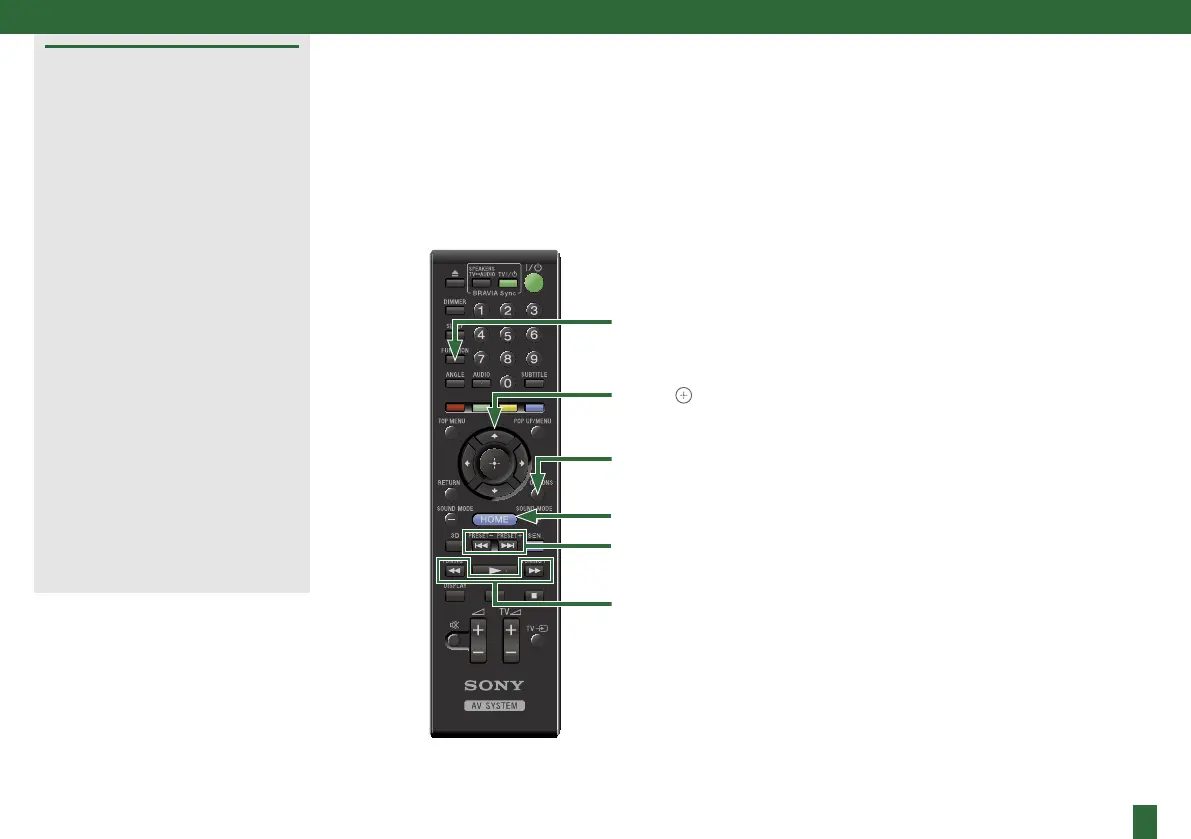
1 Press FUNCTION repeatedly
until “FM” appears in the front
panel display.
2 Press and hold TUNING +/–
until auto scanning starts.
3 Press OPTIONS.
4 Press / to select [Preset
Memory], then press .
5 Press / to select the preset
number you want, then press
.
6 Repeat Steps 2 to 5 to store
other stations.
Selecting a preset station
1 Press FUNCTION repeatedly
until “FM” appears in the front
panel display.
2 Press PRESET +/– repeatedly to
select the preset station.
FUNCTION
TUNING +/–
OPTIONS
PRESET +/–
HOME
///,


 To Next Page