20
US
Getting Started
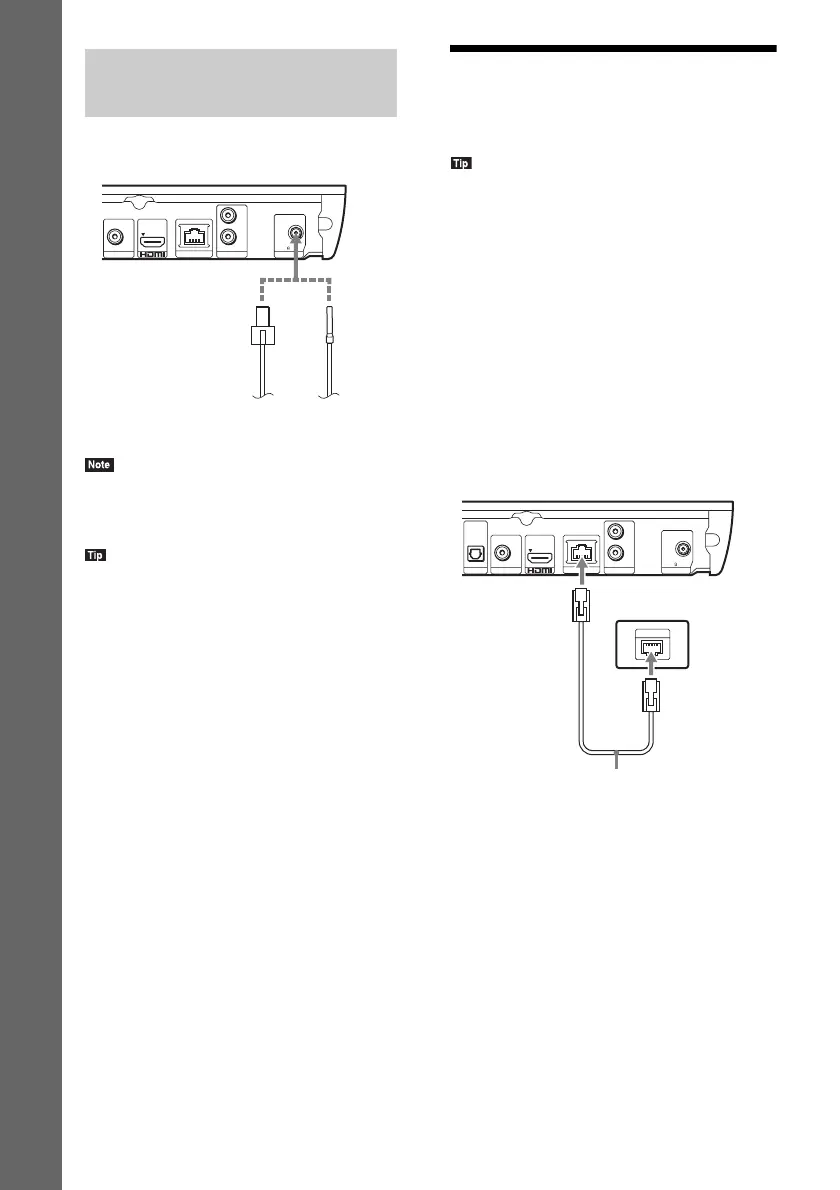
• Be sure to fully extend the FM wire antenna (aerial).
• After connecting the FM wire antenna (aerial), keep
it as horizontal as possible.
• If you have poor FM reception, use a 75-ohm coaxial
cable (not supplied) to connect the unit to an outdoor
FM antenna (aerial).
Step 3: Preparing for
Network Connection
• To connect the system to your network, perform
[Easy Network Settings]. For details, see “Step 4:
Performing the Easy Setup” (page 22).
For BDV-E390/BDV-E385/BDV-T39
Select the method based on your LAN (Local
Area Network) environment.
• If you use a wireless LAN
The system has built-in Wi-Fi, and you can
connect the system to the network by making
the network settings.
• If you use other than a wireless LAN
Connect to the network by making a LAN
cable connection as follows.
Connecting the antenna
(aerial)
FM COAXIAL
75
L
R
OUT ARC
VIDEO OUT
LAN (100)
AUDIO IN ANTENNA
or
FM wire antenna (aerial)
(supplied)
Rear panel of the unit
LAN
TV
OPTICAL
DIGITAL IN
FM COAXIAL
75
L
R
OUT ARC
VIDEO OUT
LAN (100)
AUDIO IN ANTENNA
Broadband router
LAN cable (not supplied)
Rear panel of the unit












 To Next Page