Playback
73
US
When the sound does not match the pictures on
the TV screen, you can adjust the delay between
the picture and sound.
1 Press A/V SYNC.
“A/V SYNC” appears in the front panel
display.
2 Press X/x to adjust the delay between
the picture and sound.
You can adjust from 0 ms to 300 ms in 25
ms increments.
Note
• Depending on the input stream, A/V SYNC may not
be effective.
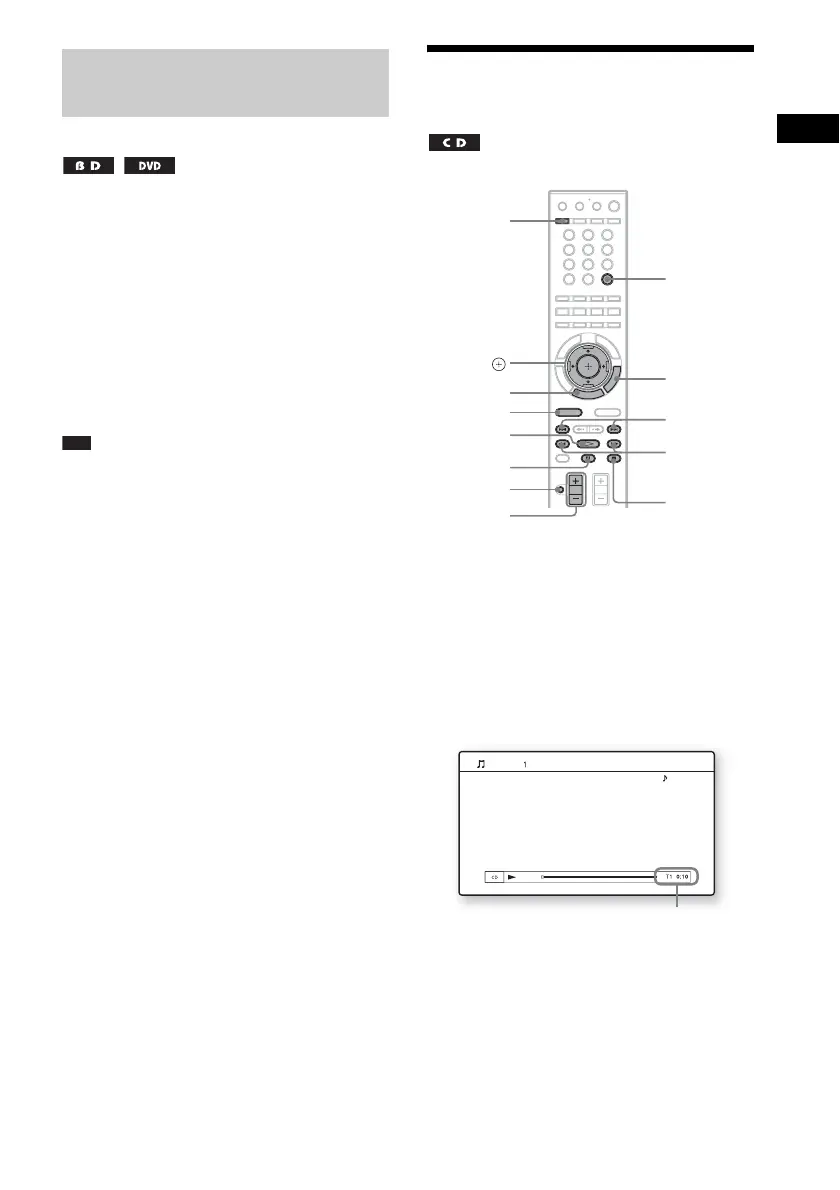
Playing a CD
1 Press FUNCTION repeatedly until “BD/
DVD” appears in the front panel
display.
2 Load a CD.
The Music Player screen appears.
3 Press H.
Playback starts.
4 Adjust the volume by using VOLUME
+/–.
The volume level appears on the TV screen
and in the front panel display.
Adjusting the delay between
the picture and sound
(A/V SYNC)
321
654
987
0
FUNCTION
x
H
X
./>
MUTING
VOLUME
+/–
m/M
C/X/x/c,
HOME
OPTIONS
TIME
A
Music CD
Stereo
Current track number and elapsed time


 To Next Page