19
GB
BDV-NF7220
4-485-836-E1(1)
D:\NORM'S JOB\SONY HA\SO130046\BDV-
N9200_7200_5200_E3200\4485836E11_ZE (NF7220)\040GET.fm
masterpage:
Right
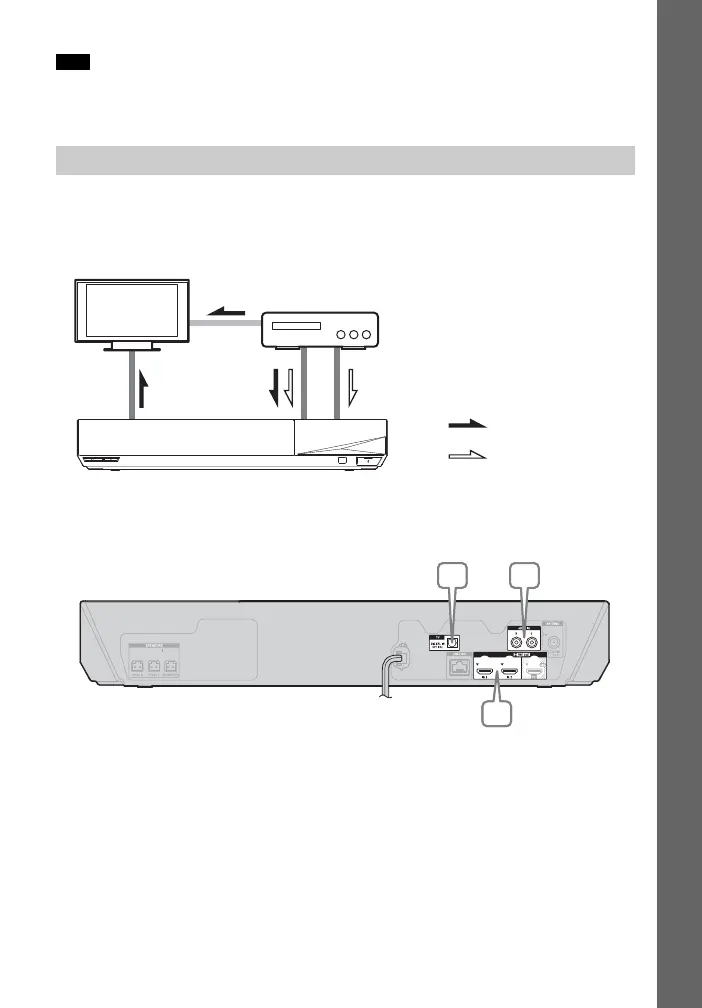
To enjoy TV sound, select “TV” function for connection B or “AUDIO” function for
connection C.
Connect the system, TV and other equipment as follows.
You cannot enjoy the audio and video of the connected equipment on the TV
through this system when the system is off or in standby mode.
* This connection is unnecessary for connection A (HDMI connection).
Select one of the following connection methods according to the jack type of the
equipment.
Note
Connecting the other equipment
System
Signal flow
TV
: Audio signal
: Video signal
Equipment
(Set-top box, VCR, PlayStation®, or
digital satellite receiver, etc.)
Video out*
A
B, C
CB
A
CB
A


 To Next Page