8. 17.
Conneting the receiver to PC
To PC
PC
USB
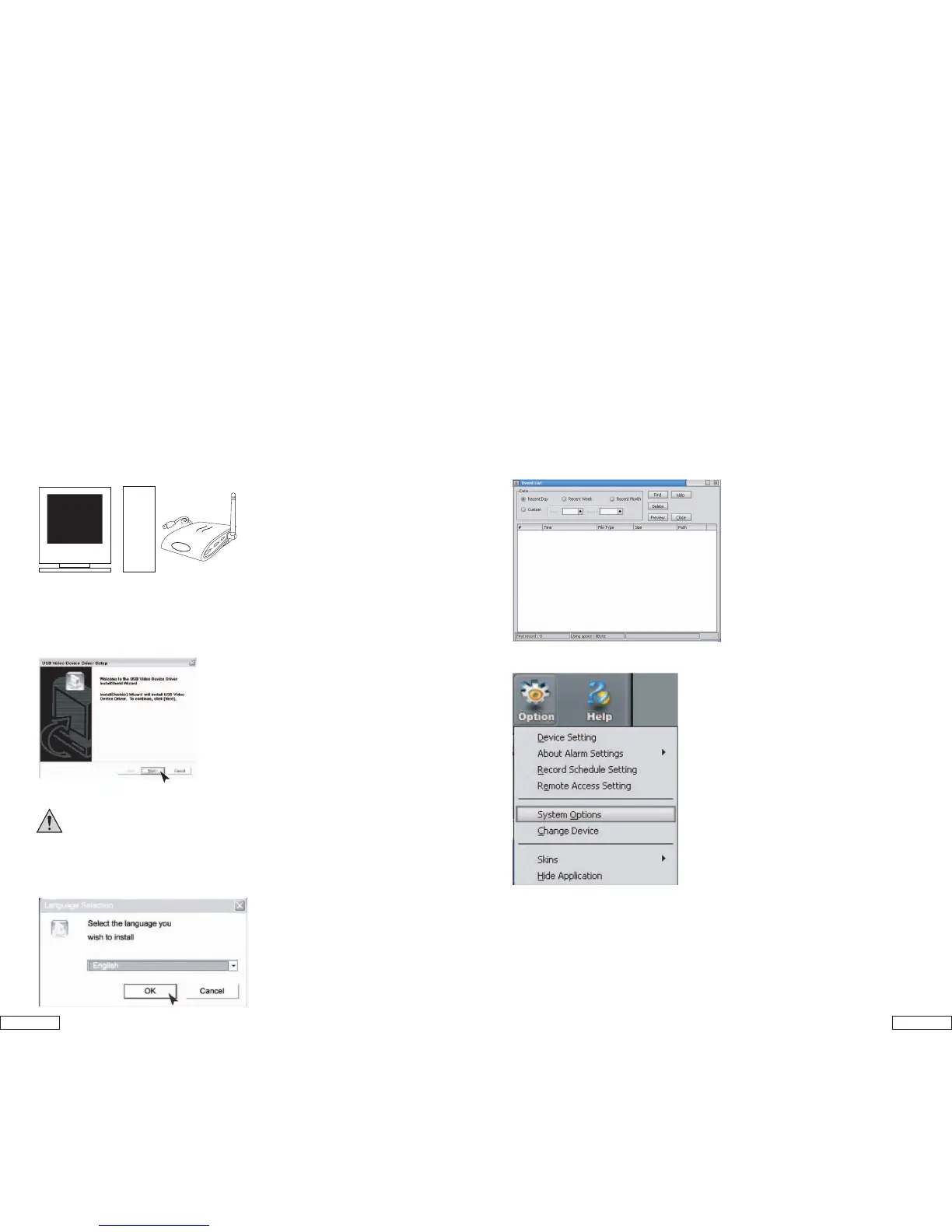
1. Plug the USB cable into the USB socket of computer
2. Insert the CD-ROM provided and Install CamGuard software and Driver
- Pentium IV or above
- 256MB RAM or above
- USB 2.0 port
- CD-ROM drive (for installing driver & software)
- Color Monitor or LCD Display
- Windows XP or above
Insert the CD-ROM, install the following software in chronological order:
1. Install driver:
//driver/installshield/setup.exe
2. Restart your computer.
3. Install Camguard, put in registration name and code on CD sleeve,
System Requirements
Software installation:
1). Double click on CamGuard installation program.
2). Select the language you wish to install, and press [Ok].
CamGard Security System (Home Edition)
Event List
List of event by “Recent Day”, “Recent Week”, and “Recent Month”
You can also browse the even by selecting the “Year/ Month”.
System Options
Drag down the menu from “Option” to “system options”
USB Video Device Setup
1). Click [Next] to install the USB Video/Audio Device Driver.
2). Click [Finish] when installation is finished.
IMPORTANT! After the software installs, please restart the
computer manually!


 To Next Page