44
Changing the lithium battery
When replacing the lithium battery, keep the
battery pack or other power source attached.
Otherwise, you will need to reset the date and
time.
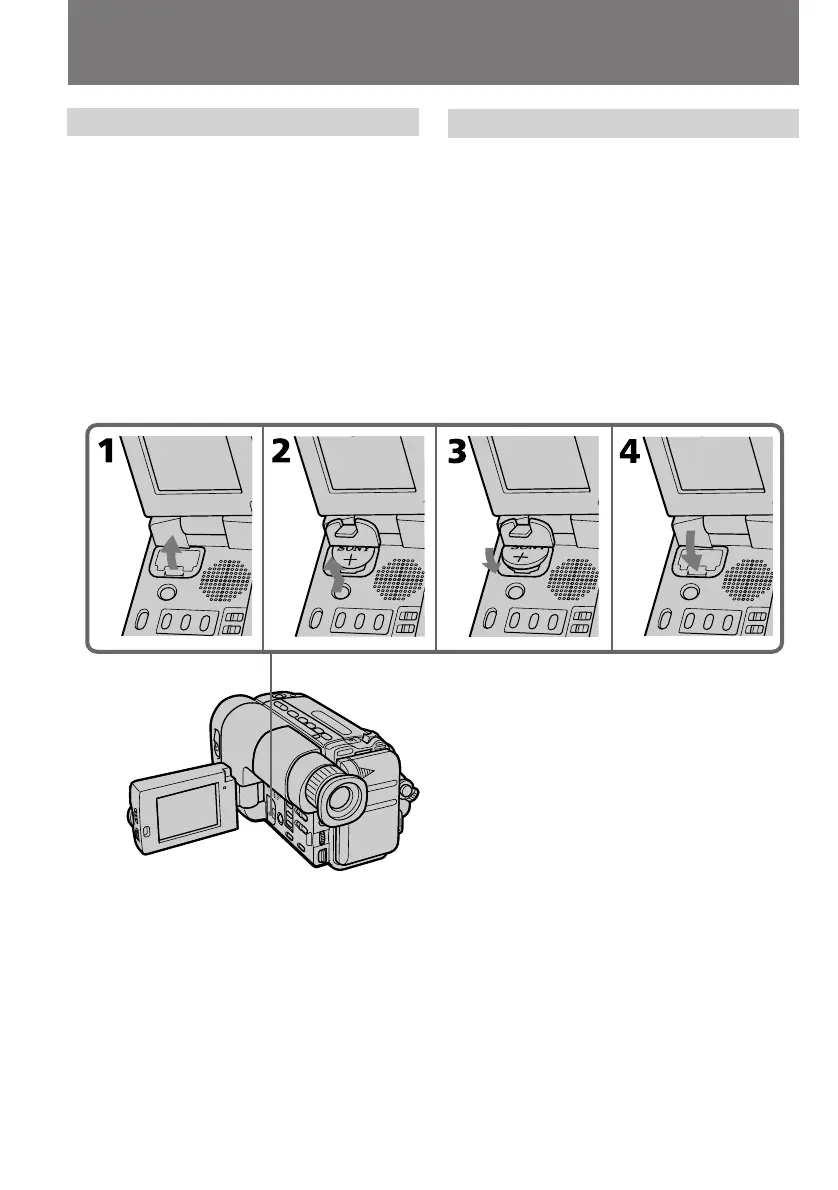
(1) Open the lid of the lithium battery
compartment.
(2) Push the battery in once and pull it out from
the holder.
(3) Install the new lithium battery with the
positive (+) side facing out.
(4) Close the lid.
Замена литиевой батарейки
При замене литиевой батарейки держите
батарейный блок или другой источник
питания присоединенным. Иначе Вам
придется переустанавливать дату и время.
(1) Откройте крышку отсека литиевой
батарейки.
(2) Нажмите батарейку один раз и вытащите
ее из держателя.
(3) Установите новую литиевую батарейку
положительной (+) стороной, обращенной
наружу.
(4) Закройте крышку.
Changing the lithium battery
in the camcorder
Замена литиевой батарейки в
видеокамере



 To Next Page