EasyManua.ls Logo

Sony CDX-A250 - User Manual

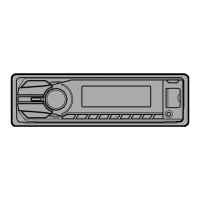
Sony CDX-A250
28 pages
Print Icon
To Next Page IconTo Next Page
Loading...
Operating Instructions
CDX-A250
To cancel the demonstration (DEMO) display, see page 9.
© 2007 Sony Corporation
2-650-614-61 (1)
GB
CS
FM
/
AM
Compact Disc Player

Questions and Answers

  • T
    Tonya HigginsSep 16, 2025
    What does FAILURE mean on my Sony CDX-A250 Car Receiver and how to fix it?
    • J
      Jennifer MilesSep 16, 2025
      If your Sony Car Receiver displays “FAILURE”, the connection of speaker/amplifier is incorrect. See the supplied installation/connections manual to check the connection.
  • T
    Tracy MorrisSep 17, 2025
    What does NO AF mean on my Sony Car Receiver and how to fix it?
    • E
      Erica NguyenSep 17, 2025
      If your Sony Car Receiver displays “NO AF”, there is no alternative frequency for the current station. Press (SEEK) –/+ while the station name is flashing.
  • S
    Shawn AndersonSep 18, 2025
    What does NO ID3 mean on my Sony CDX-A250 Car Receiver and how to fix it?
    • W
      William CarterSep 18, 2025
      If your Sony Car Receiver displays “NO ID3”, ID3 tag information is not written in the MP3 file, so add ID3 tag information.
  • H
    Hannah BentonSep 18, 2025
    What does NO INFO mean on my Sony CDX-A250 Car Receiver and how to fix it?
    • C
      Carolyn SaundersSep 19, 2025
      If your Sony Car Receiver displays “NO INFO”, text information is not written in the ATRAC3/ATRAC3plus or WMA file, so add text information.
  • C
    Chelsea ReedSep 23, 2025
    What does NO MUSIC mean on my Sony Car Receiver and how to fix it?
    • S
      Sara SullivanSep 23, 2025
      If your Sony Car Receiver displays “NO MUSIC”, the disc is not a music file, so insert a music CD.
  • F
    francisco71Sep 23, 2025
    What does OFFSET mean on my Sony CDX-A250 Car Receiver and how to fix it?
    • C
      Courtney FinleySep 23, 2025
      If your Sony Car Receiver displays “OFFSET”, there may be an internal malfunction. Check the connection. If the error indication remains on in the display, consult your nearest Sony dealer.
  • M
    melissamendezSep 23, 2025
    What does READ mean on my Sony CDX-A250 Car Receiver and how to fix it?
    • C
      campbellmarkSep 23, 2025
      If your Sony Car Receiver displays “READ”, the unit is reading all track and group information on the disc. Wait until reading is complete and playback starts automatically.
  • M
    Matthew RichardsonAug 23, 2025
    What to do if there is no sound from my Sony CDX-A250?
    • M
      mendezmeganAug 23, 2025
      If you're experiencing no sound from your Sony Car Receiver, here are a few things to check: * First, make sure the volume isn't set too low and increase it if necessary. * Next, verify that the ATT function is deactivated. * Finally, for a 2-speaker system, ensure the fader control “FAD” is properly adjusted.
  • C
    Charles WallerSep 6, 2025
    Why do some MP3/WMA files take longer to play on my Sony CDX-A250?
    • T
      thomaswolfeSep 6, 2025
      If some MP3/WMA files take longer to play on your Sony Car Receiver, it could be due to a disc recorded with a complicated tree structure; use a simpler disc structure. It may also be a disc recorded in Multi Session, so use a single session recorded disc. Also, if the disc is one to which data can be added, use a finalized disc.
  • K
    Krystal WhiteSep 5, 2025
    Why is preset tuning not possible on my Sony CDX-A250?
    • J
      Jennifer FarrellSep 5, 2025
      If preset tuning is not possible on your Sony Car Receiver, store the correct frequency in the memory. The broadcast signal may be too weak, so try to improve the signal reception.

Summary

Getting Started and Panel Operations

Resetting and Setting the Unit

Procedures for resetting the unit and setting the clock.

Front Panel Operations

Steps for detaching and attaching the front panel, including caution alarms.

Attaching the Front Panel

Controls and Basic Operations

Main Unit Controls

Identification and function of controls on the main unit.

Card Remote Commander Controls

Identification and function of controls on the card remote commander.

CD and Radio Operations

CD Playback Features

Display items, repeat, and shuffle play settings for CD playback.

Radio Reception and Tuning

Storing, receiving, and automatically tuning radio stations.

Other Functions

Sound Settings Adjustment

Adjusting sound characteristics (BAL/FAD/SUB) and customizing equalizer curves (EQ3).

Setup Item Adjustment

Procedure for adjusting various setup items including clock, beep, AUX, dimmer, and demo settings.

Using Optional Equipment

Auxiliary Audio Device Connection

Connecting and using portable audio devices via the AUX input.

Volume Level Adjustment

Procedure to adjust volume levels between the unit and connected portable audio devices.

Additional Information

Precautions and Disc Handling

General precautions, disc handling guidelines, and notes on CD-R/CD-RW discs.

Disc Compatibility and File Formats

Information on copyright protection, DualDiscs, and MP3/WMA file formats.

File Format Details

MP3;WMA File Playback

Explanation of playback order and notes on MP3/WMA files.

ATRAC CD Information

Details on ATRAC3plus format and ATRAC CD creation.

Maintenance

Replacing the lithium battery of the card remote commander

Procedure for replacing the battery in the card remote commander.

Servicing and Specifications

Fuse Replacement and Unit Removal

Procedures for fuse replacement, connector cleaning, and removing the unit.

Technical Specifications

Specifications for the CD player and FM tuner sections.

Specifications and Troubleshooting

Unit Specifications

Specifications for AM tuner, power amplifier, general unit, and accessories.

Troubleshooting Common Issues

Solutions for general issues and CD playback problems.

Troubleshooting Error Messages

General Error and Message Troubleshooting

Troubleshooting for various error messages like ERROR, FAILURE, OFFSET, and READ.

File Information and Playback Errors

Troubleshooting for messages like NO ID3, NO INFO, NO MUSIC, and playback limit indicators.

Sony CDX-A250 Specifications

General IconGeneral
MP3 playbackYes
Tuner typeSSIR-EXA
Supported radio bandsFM, LW, MW
Product colorBlack
Ready for iPodNo
Frequency range10 - 20000 Hz
Equalizer bands quantity3
Signal-to-Noise Ratio (SNR)120 dB
Key illumination colorRed
Number of optical discs1 discs
Weight and Dimensions IconWeight and Dimensions
Dimensions (WxDxH)178 x 178 x 50 mm

Related product manuals