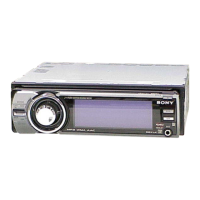
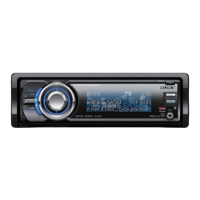
This document describes the Sony FM/AM Compact Disc Player (models CDX-G2080IM, CDX-G2070UI, CDX-G2050UI), a car audio system designed for playing CDs, FM/AM radio, and connecting iPod/USB devices and other portable audio players.
Function Description
The device serves as a central audio unit for a car, offering multiple playback options:
- FM/AM Radio: Allows tuning into and storing radio stations across various bands (FM1, FM2, FM3, AM1, AM2). It supports Radio Data System (RDS) for displaying program types (PTY) and setting the clock time (CT).
- CD Player: Plays standard Compact Discs (CDs) and MP3/WMA files recorded on CD-R/CD-RW discs.
- iPod/USB Device Playback: Connects to iPods, iPhones, and MSC (Mass Storage Class)-type USB devices (such as USB flash drives, digital media players, and Android™ phones) for audio playback. It supports "Made for iPod" and "Made for iPhone" compatibility, allowing direct control of the iPod (Passenger control) from the unit or vice-versa.
- Portable Audio Device Connection: Features an AUX input jack (stereo mini jack) for connecting other portable audio devices.
Important Technical Specifications
Tuner Section:
- FM Tuning Range: 87.5 – 108.0 MHz (50 kHz step), 87.5-108.0 MHz (100 kHz step), 87.5 – 107.9 MHz (200 kHz step). Selectable tuning steps: 50 kHz/100 kHz/200 kHz.
- AM Tuning Range: 531 - 1,602 kHz (9 kHz step), 530 - 1,710 kHz (10 kHz step). Selectable tuning steps: 9 kHz/10 kHz.
- Usable Sensitivity (FM): 8 dBf
- Selectivity (FM): 75 dB at 400 kHz
- Signal-to-Noise Ratio (FM Stereo): 80 dB
- Separation (FM): 50 dB at 1 kHz
- Frequency Response (FM): 20 – 15,000 Hz
- Sensitivity (AM): 26 μV
CD Player Section:
- Signal-to-Noise Ratio: 95 dB
- Frequency Response: 10 – 20,000 Hz
- Wow and Flutter: Below measurable limit
- Corresponding Codec: MP3 (.mp3), WMA (.wma)
USB Player Section:
- Interface: USB (Full-speed)
- Maximum Current: 1 A
- Maximum Recognizable Data: 128 folders (albums), 512 files (tracks) per folder.
- Corresponding Codec: MP3 (.mp3), WMA (.wma)
Power Amplifier Section:
- Speaker Impedance: 4 – 8 ohms
- Maximum Power Output: 55 W × 4 (at 4 ohms)
General:
- Power Requirements: 12 V DC car battery (negative ground).
- Dimensions (W/H/D): Approx. 178 mm × 50 mm × 177 mm (unit), Approx. 182 mm x 53 mm × 160 mm (mounting).
- Mass: Approx. 1.2 kg.
Usage Features
The unit features a control dial, number buttons, and dedicated function buttons for intuitive operation.
Getting Started:
- Detachable Front Panel: The front panel can be detached to prevent theft. A caution alarm sounds if the ignition is turned off without detaching the panel.
- FM/AM Tuning Step: The tuning step can be adjusted according to regional standards (e.g., 50K/9K, 100K/10K, 200K/10K). This setting is accessible when the unit is turned off.
- Clock Setting: The clock can be manually adjusted. RDS-CT (Clock Time) function can automatically set the clock from RDS transmissions.
- AUTO OFF Function: If the car's ignition lacks an ACC position, the AUTO OFF function can be set (30 seconds, 30 minutes, 60 minutes) to automatically shut off the unit and prevent battery drain.
Radio Listening:
- Automatic Storing (BTM): Stores stations in order of frequency on number buttons.
- Manual Tuning: Allows fine-tuning or automatic scanning for stations.
- Manual Storing: Stores desired stations by pressing and holding a number button.
- RDS (Radio Data System): Displays program types (PTY) and allows searching for stations broadcasting specific program types (NEWS, AFFAIRS, SPORT, MUSIC genres, etc.).
Playback:
- Disc Playback: Insert a disc (label side up) to start playback.
- iPod/USB Playback: Connects via the USB port. Supports various iPod/iPhone models and MSC-type USB devices.
- Quick-BrowZer™: A search function for tracks by name during CD or USB playback, allowing navigation through search categories.
- Repeat and Shuffle Play: Offers modes for repeating tracks/albums or shuffling playback.
- Jump Mode: Allows skipping through items in 10% increments of the total number of items during browsing.
- Passenger Control (iPod): Enables direct operation of the iPod from the iPod itself while connected, though volume is still controlled by the unit.
Settings:
- DEMO Mode: The demonstration display (DEMO) that appears when the unit is off can be canceled.
- GENERAL Setup: Includes settings for CLOCK-ADJ, TUNER-STP, CAUT ALM (caution alarm), BEEP sound, AUTO OFF, AUX-A (AUX Audio display), and CT (Clock Time).
- SOUND Setup:
- EQ3 PRESET: Selects from various equalizer curves (XPLOD, VOCAL, EDGE, CRUISE, SPACE, GRAVITY, BOLLYWD, CUSTOM, OFF). Settings can be memorized per source.
- EQ3 SETTING: Adjusts custom equalizer settings (LOW, MID, HIGH).
- BALANCE: Adjusts sound balance (RIGHT-15 to LEFT-15).
- FADER: Adjusts relative sound level (FRONT-15 to REAR-15).
- LOUDNESS: Reinforces bass and treble at low volumes.
- SW LEVEL (Subwoofer Level): Adjusts subwoofer volume level.
- AUX VOL (AUX Volume Level): Adjusts volume level for connected auxiliary devices to match other sources.
- DISPLAY Setup:
- DEMO (Demonstration): Activates/deactivates the demonstration display.
- BLK OUT (Black Out): Turns off illumination automatically after 5 seconds of inactivity.
- DIMMER: Changes display brightness.
- AUTO SCR (Auto Scroll): Automatically scrolls long display items.
- M.DISPLAY (Motion Display): Shows moving patterns on the display.
Remote Commander (RM-X211): Provides remote control for various functions, including power, source selection, volume, tuning, menu navigation, and playback controls.
Maintenance Features
- Replacing the Lithium Battery: The remote commander uses a CR2025 lithium battery. Instructions are provided for replacement, including warnings about proper polarity and handling.
- Cleaning the Connectors: The connectors between the main unit and the front panel should be cleaned with a cotton swab to ensure proper function.
- General Precautions:
- Allow the unit to cool down if the car has been parked in direct sunlight.
- Avoid leaving the front panel or audio devices in the car under high temperatures.
- Prevent moisture condensation by removing discs and allowing the unit to dry.
- Do not splash liquid on the unit or discs.
- Wipe discs with a cleaning cloth from the center outwards; avoid solvents.
- Do not use non-standard shaped discs (heart, square, star) or discs with labels/stickers, as they may cause malfunction or damage.
- For CD-R/CD-RW discs, ensure good recording quality, correct finalization, and ISO9660 Level 1/Level 2, Joliet/Romeo, or multi-session format compatibility.
- For safety, turn off the ignition and remove the key before cleaning connectors.
- Do not touch connectors directly with fingers or metal objects.

 Need help?
 General

 To Next Page