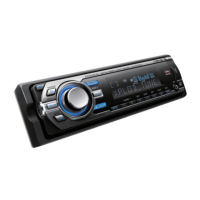
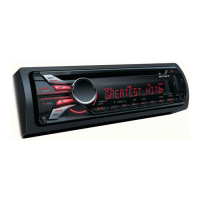
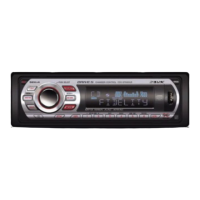
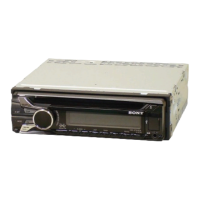
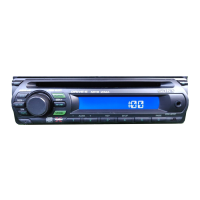
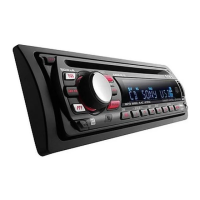
This document describes the Sony CDX-GT626UI/CDX-GT620UI/CDX-GT62UMI FM/AM Compact Disc Player, a car audio system designed for playing CDs, USB devices, and iPods, with additional features like App Remote control and RDS.
Function Description
The Sony CDX-GT626UI/CDX-GT620UI/CDX-GT62UMI is a versatile car audio system that serves as an FM/AM tuner, a CD player, and a media player for USB devices and iPods. It offers various sound settings and setup options to customize the audio experience. The device can be controlled directly from the main unit, via an optional remote commander (RM-X211), or through an App Remote application on a connected iPhone.
Key functions include:
- FM/AM Tuning: Allows switching between FM and AM bands, storing and receiving stations, and utilizing RDS (Radio Data System) for program types and clock synchronization.
- CD Playback: Supports playback of CD-DA, CD-R/CD-RW discs containing MP3/WMA/AAC files.
- USB Device Playback: Enables playback of MP3/WMA/AAC files from USB mass storage class devices.
- iPod Playback: Provides direct control and playback of iPods, including passenger control mode.
- App Remote: Allows control of the unit via a connected iPhone, offering two-way music control.
- Sound Settings: Features an "Advanced Sound Engine" for sophisticated sound adjustments, including EQ7 Preset, Customizing the equalizer curve, Optimizing sound by Time Alignment, Adjusting the listening position, and DM+ Advanced for enhancing compressed digital sound.
- Setup Menu: Offers various system settings, including Auto Off, Clock Adjustment, Caution Alarm, and Beep sound control.
Important Technical Specifications
FM Tuner Section:
- Tuning Range: 87.5 – 108.0 MHz (at 50 kHz step), 87.5 – 108.0 MHz (at 100 kHz step), 87.9 – 107.9 MHz (at 200 kHz step).
- FM Tuning Step: 50 kHz/100 kHz/200 kHz switchable.
- Antenna (aerial) Terminal: External antenna (aerial) connector.
- Intermediate Frequency: 25 kHz.
- Usable Sensitivity: 8 dBf.
- Selectivity: 75 dB at 400 kHz.
- Signal-to-noise Ratio: 80 dB (stereo).
- Separation: 50 dB at 1 kHz.
- Frequency Response: 20 – 15,000 Hz.
AM Tuner Section:
- Tuning Range: 531 – 1,602 kHz (at 9 kHz step), 530 – 1,710 kHz (at 10 kHz step).
- AM Tuning Step: 9 kHz/10 kHz switchable.
- Antenna (aerial) Terminal: External antenna (aerial) connector.
- Intermediate Frequency: 9,125 kHz or 9,115.5 kHz/4.5 kHz (at 9 kHz step), 9,115 kHz or 9,125 kHz/5 kHz (at 10 kHz step).
- Sensitivity: 26 µV.
CD Player Section:
- Signal-to-noise Ratio: 120 dB.
- Frequency Response: 10 – 20,000 Hz.
- Wow and Flutter: Below measurable limit.
USB Player Section:
- Interface: USB (Full-speed).
- Maximum Current: 1 A.
Power Amplifier Section:
- Output: Speaker outputs.
- Speaker Impedance: 4 – 8 ohms.
- Maximum Power Output: 52 W x 4 (at 4 ohms).
General:
- Outputs: Audio outputs terminal (front, rear/sub switchable). Power antenna (aerial)/Power amplifier control terminal (REM OUT).
- Inputs: Remote controller input terminal. AUX input jack (stereo mini jack). USB port.
- Power Requirements: 12 V DC car battery (negative ground).
- Dimensions: Approx. 178 × 50 × 177 mm (w/h/d).
- Mounting Dimensions: Approx. 182 × 53 × 160 mm (w/h/d).
- Mass: Approx. 1.2 kg.
- Supplied Accessories: Remote commander: RM-X211. Parts for installation and connections (1 set).
- Optional Accessories: USB connection cable for iPod: RC-100IP.
Usage Features
The device is designed for intuitive use with a combination of physical buttons and a rotary control dial.
Getting Started:
- Switching FM/AM Tuning Step: The FM/AM tuning step can be factory-set to 50 kHz (FM)/9 kHz (AM) or 100 kHz (FM)/10 kHz (AM). This setting is adjusted via the "TUNER-STP" option in the setup menu.
- Canceling DEMO Mode: The demonstration display can be turned off by pressing MENU and selecting "DISPLAY" to "OFF".
- Setting the Clock: A 12-hour digital indication. The clock is set by pressing MENU, selecting "CLOCK-ADJ," and then adjusting the hour and minute using the control dial.
- Detaching the Front Panel: The front panel can be detached for security by pressing and holding SOURCE/OFF, then pressing the panel release button. A caution alarm sounds if the ignition is turned off without detaching the panel.
Location of Controls:
- The main unit features a central control dial for navigation and selection, along with dedicated buttons for SOURCE/OFF, SEEK+/-, ZAP, PAUSE, DSPL, and numeric buttons.
- The RM-X211 Remote Commander provides similar controls, including power, source selection, volume, track/station navigation, and menu access.
Radio:
- Storing and Receiving Stations: Stations can be stored manually or automatically using Best Tuning Memory (BTM). Manual storage involves tuning to a station and holding a numeric button.
- Tuning Automatically: Pressing SEEK +/- searches for the next available station.
- RDS (Radio Data System): Displays program information (NEWS, AFFAIRS, INFO, SPORT, etc.) and allows tuning by program type (PTY). It also supports CT (Clock Time) for automatic clock synchronization.
CD Playback:
- Insert a disc (label side up) to start playback. Press the eject button to remove the disc.
- Supports MP3 (.mp3), WMA (.wma), and AAC (.m4a) codecs.
USB Devices:
- Connect a USB mass storage class device to the USB port. Playback starts automatically.
- Supports MP3 (.mp3), WMA (.wma), and AAC (.m4a) codecs.
iPod:
- Connect an iPod to the USB port using an RC-100IP cable. Playback starts automatically.
- Supports direct iPod control and a "Passenger control" mode, allowing the passenger to control the iPod directly.
App Remote:
- Download the "App Remote" application from the App Store. Connect an iPhone to the USB port.
- Allows two-way music control, displaying source information and offering various playback operations.
Searching and Playing Tracks:
- Playing Tracks in Various Modes: Tracks can be played repeatedly (TRACK, ALBUM, PODCAST, ARTIST, PLAYLIST, GENRE) or in random order (SHUF ALBUM, SHUF DISC, SHUF PODCAST, SHUF ARTIST, SHUF PLAYLIST, SHUF GENRE, SHUF DEVICE).
- Searching by Name (Quick-BrowZer™): Allows searching for tracks by name using categories.
- Searching by Listening to Track Passages (ZAPPIN™): Plays short passages of tracks to help identify desired music.
Sound Settings and Setup Menu:
- EQ7 Preset: Selects from 7 equalizer curves (XPLOD, VOCAL, EDGE, CRUISE, SPACE, GRAVITY, CUSTOM, OFF).
- Customizing the Equalizer Curve: Allows manual adjustment of 7 bands (63 Hz, 160 Hz, 400 Hz, 1 kHz, 2.5 kHz, 6.3 kHz, 16.0 kHz).
- Optimizing Sound by Time Alignment: Adjusts the sound output position (FRONT L, FRONT R, FRONT, ALL) and subwoofer position (NEAR, NORMAL, FAR).
- Adjusting the Listening Position: Fine-tunes the listening position with an adjustable range of "+3" to "-3" relative to "CENTER".
- DM+ Advanced: Enhances the sound of digitally compressed music.
- Subwoofer Control: Adjusts subwoofer level, phase, and low pass filter frequency/slope.
- Balance/Fader: Adjusts left/right balance and front/rear fader.
- Loudness: Reinforces bass and treble at low volume levels.
- ALO (Automatic Level Optimizer): Adjusts playback volume level.
- Rear Bass Enhancer (RBE ENH): Enhances bass from rear speakers.
- Rear Out/Sub Out (SW DIREC): Switches between rear speaker output and subwoofer output.
- Adjusting Setup Items: Includes settings for Clock-Adj, Tuner-Stp, Caution Alarm, Beep, Auto Off, Aux Vol, and BTM.
Using Optional Equipment:
- Auxiliary Audio Equipment: Connects portable audio devices to the AUX input jack. Volume can be adjusted via the unit.
Maintenance Features
Replacing the Lithium Battery of the Remote Commander:
- The remote commander uses a CR2025 lithium battery. When the battery becomes weak, the range of the remote commander shortens.
- To replace, slide the battery holder out, remove the old battery, and insert a new CR2025 battery with the (+) side up.
- Notes on Lithium Battery: Keep out of reach of children. Consult a doctor if swallowed. Wipe with a dry cloth. Observe polarity. Do not hold with metallic tweezers.
Cleaning the Connectors:
- The unit may not function properly if the connectors between the unit and the front panel are dirty.
- To clean, detach the front panel, wipe the connectors with a cotton swab, and then reattach.
Precautions:
- Parking: Do not park the car in direct sunlight.
- Front Panel/Audio Devices: Do not leave the front panel or audio devices in the car under high temperatures.
- Power Antenna: Extend automatically.
- Moisture Condensation: If moisture condensation occurs inside the unit, remove the disc and wait for about an hour for it to dry out.
- Maintaining Sound Quality: Do not splash liquid onto the unit or discs.
- Notes on Discs: Do not expose discs to direct sunlight or heat sources. Wipe discs with a cleaning cloth from the center out. Do not use solvents. This unit is designed to play Compact Disc (CD) standard discs. DualDiscs and some music discs with copyright protection technologies may not be playable.
- Discs that this unit CANNOT play: Discs with labels/stickers, irregularly shaped discs, damaged discs, or discs with severe scratches.
- Notes on CD-R/CD-RW Discs: The maximum number of folders is 150, and files is 300. Displayable characters for folder/file names are 32 (Joliet)/64 (Romeo). Multi-session discs begin with a CD-DA session.
- Discs that this unit CANNOT play (CD-R/CD-RW): Poor quality, unreadable, or finalized incorrectly. CD-R/CD-RW other than those recorded in MP3/WMA/AAC format.
Troubleshooting:
- A comprehensive troubleshooting guide is provided to help resolve common issues. This includes solutions for power problems, sound issues, radio reception, CD/USB playback, and App Remote connectivity.
- If the unit is turned off and the display disappears, the unit cannot be operated with the remote commander unless SOURCE/OFF is pressed on the unit or a disc is inserted.

 Need help?

 To Next Page
 General