8
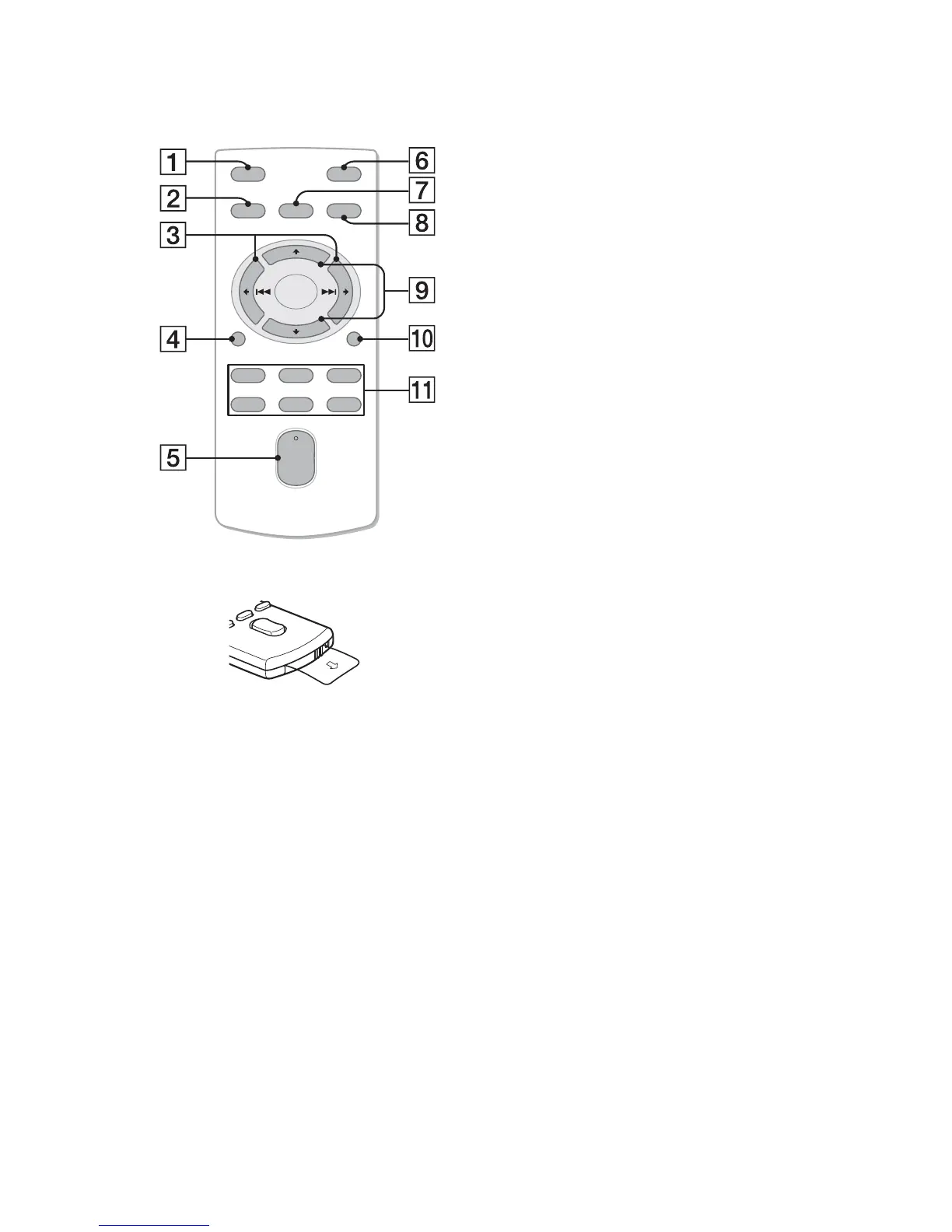
RM-X151 Remote
commander
Remove the insulation film before use.
OFF button
To turn off the power; stop the source.
SOURCE button*
1
Press to turn on the power.
Press repeatedly to change to another
source (Radio/CD/USB/Pandora® via
USB/AUX).
()/ () buttons
To control Radio/CD/USB/Pandora®
via USB, the same as –/+ on
the unit.
Setup items can be operated by .
DSPL (Display) button
To change display items.
VOL (Volume) +*
2
/– button
ATT (Attenuate) button
To attenuate the sound. To cancel, press
again.
SEL (Select) button
To enter the SOUND menu directly
(press); to enter setup mode (press and
hold).
To exit the SOUND menu/setup mode
(press).
MODE button*
1
Press to select the radio band (FM/AM).
Press and hold to enter/cancel the
passenger control (iPod); enter the
bookmark mode (Pandora® via USB).
(+)/ (–) buttons
To control CD/USB/Pandora® via USB,
the same as / on the unit.
Setup items can be operated by .
SCRL (Scroll) button
To scroll the display item.
Number buttons
To receive stored stations (press); store
stations (press and hold).
*1 If a SiriusXM Vehicle Tuner is connected:
when is pressed, the connected
device (“SIRIUSXM”) will appear on the
display. Press to select the desired
SiriusXM Vehicle Tuner band.
*2 This button has a tactile dot.
OFF
DSPL
SCRL
SEL
SOURCE
MODE
132
465
AT T
VOL
+
–
+
–


 To Next Page