17
Getting started
CECH-2501A 4-198-819-11(1) US
US
de is
deo with
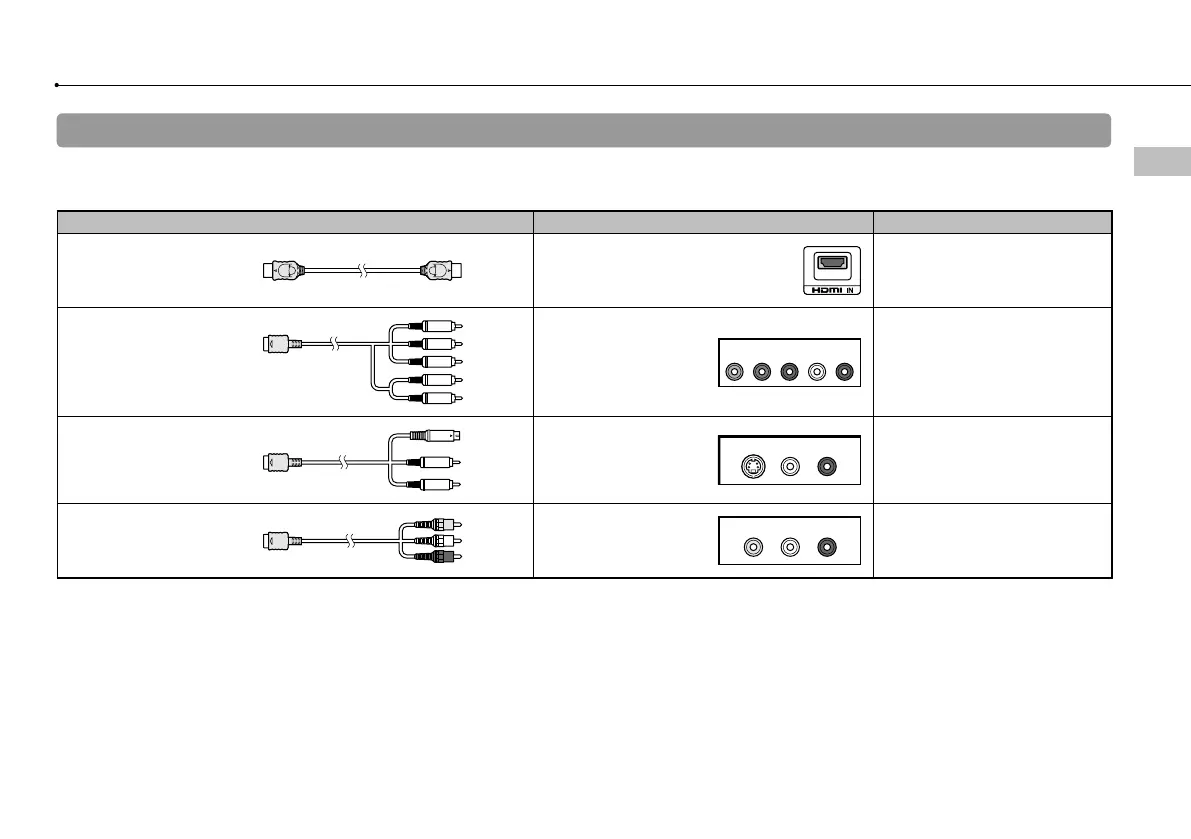
Video output cable types
The resolution displayed on the TV varies depending on the input connectors on the TV and the type of cable in use. Select a cable to match the TV
in use.
Cable type Input connector on the TV Supported video modes*¹
HDMI Cable*²
(sold separately)
HDMI IN connector
1080p / 1080i / 720p / 480p
Component AV Cable
(sold separately)
Component VIDEO IN
connector
YLRPR/CRPB/CB
COMPONENT VIDEO IN AUDIO IN
1080p / 1080i / 720p / 480p / 480i*
3
S VIDEO Cable
(sold separately)
S VIDEO IN connector
S VIDEO L
-
AUD I O
-
R
480i*
3
AV Cable
(supplied)
VIDEO IN connector
(composite)
VIDEO L
-
AUD I O
-
R
480i*
3
*
1
Depending on the type of TV or content to be played, some video modes may not be supported.
If a device that is not compatible with the HDCP (High-bandwidth Digital Content Protection) standard is connected to the system using an HDMI cable, video and/or
audio cannot be output from the system.
Copyright-protected Blu-ray video discs can only be output at 1080p using an HDMI cable connected to a device that is compatible with the HDCP (Highband-width
Digital Content Protection) standard.
*
2
Connect the system to the TV using an HDMI cable (sold separately). An HDMI cable can output both video and audio and enables you to enjoy digital-quality
video and audio.
*
3
The video output setting on the system will display as [Standard (NTSC)].



 To Next Page