32
CECH-2501A 4-198-819-11(1) US
Connecting to the Internet
If network settings are already completed, the PS3™ system will
automatically connect to the Internet when the system is turned on. The
connection will remain active as long as the system is on.
Using the Internet browser
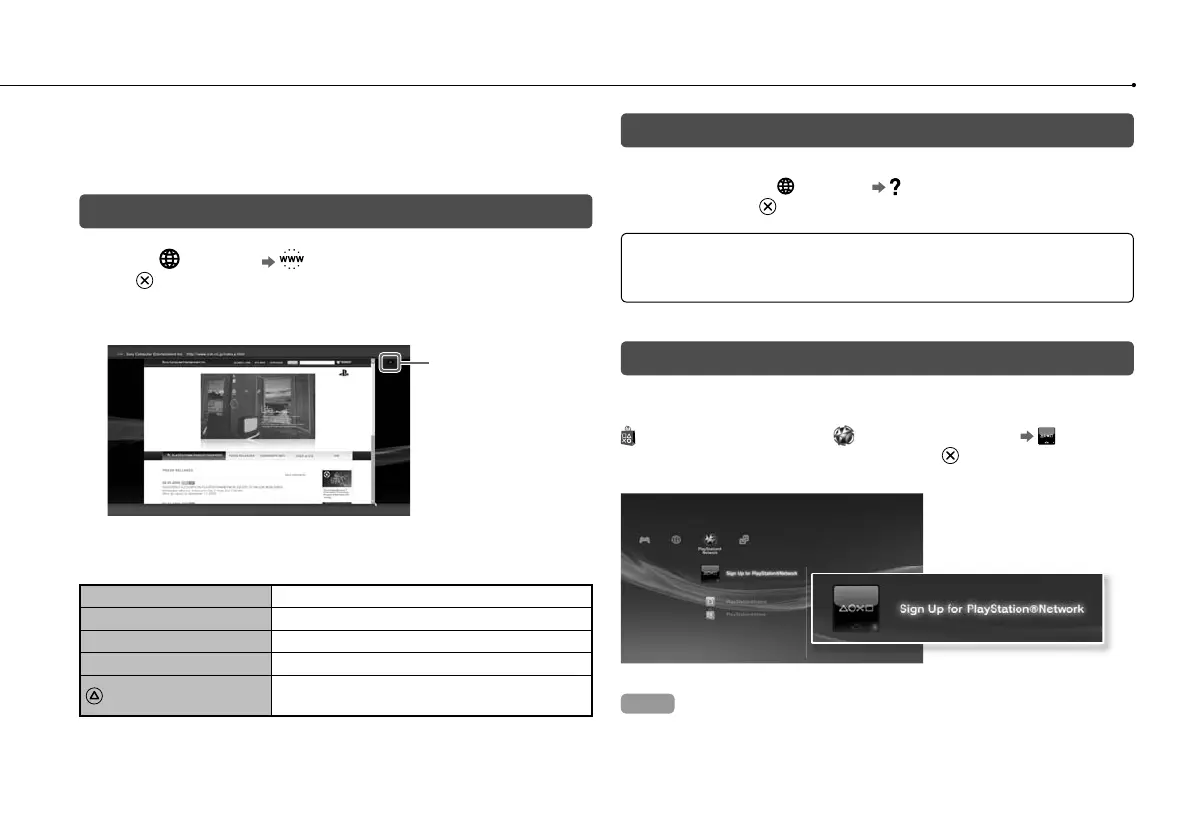
1 Select (Network) (Internet Browser), and then press
the button.
The Internet browser opens. A busy icon is displayed while the page is
loading.
Busy icon
Basic operations of the Internet browser
Directional buttons
Move the pointer to a link.
Right stick
Scroll in the desired direction.
L1 button
Go back to the previous page.
START button
Enter an address.
button
Switch between displaying and not displaying
the menu.
Viewing the user’s guide
You can use the Internet browser to view the online user’s guide for the
PS3™ system. Select (Network) (Online Instruction Manuals),
and then press the
button.
Online user’s guide http://manuals.playstation.net/document/
This guide contains detailed information about using the PS3™ system
software.
Creating a PlayStation
®
Network account
By creating a PlayStation
®
Network account, you can enjoy
communicating with your Friends or download games or videos from
(PlayStation
®
Store). Select (PlayStation
®
Network) (Sign Up
for PlayStation
®
Network), and then press the button. The screen for
creating an account will be displayed.
Hints
An Internet connection is required to create an account.
PlayStation
®
Network service content may vary depending on the region.
You can also create a PlayStation
®
Network account at
http://www.us.playstation.com.
PS3
By upda
security
version o
System
This site
Use
the
Notice
Duri
n
is ca
dam
a
Duri
n
contr
Dep
e
upda
After
earli
e
Chec
You can
(Syst
displaye







 To Next Page