EasyManua.ls Logo

Sony CFD-444L - SERVCIE MODE (service program); Step 1 (Service Mode Setting Method)

Sony CFD-444L
56 pages
Print Icon
To Next Page IconTo Next Page
To Previous Page IconTo Previous Page
Loading...
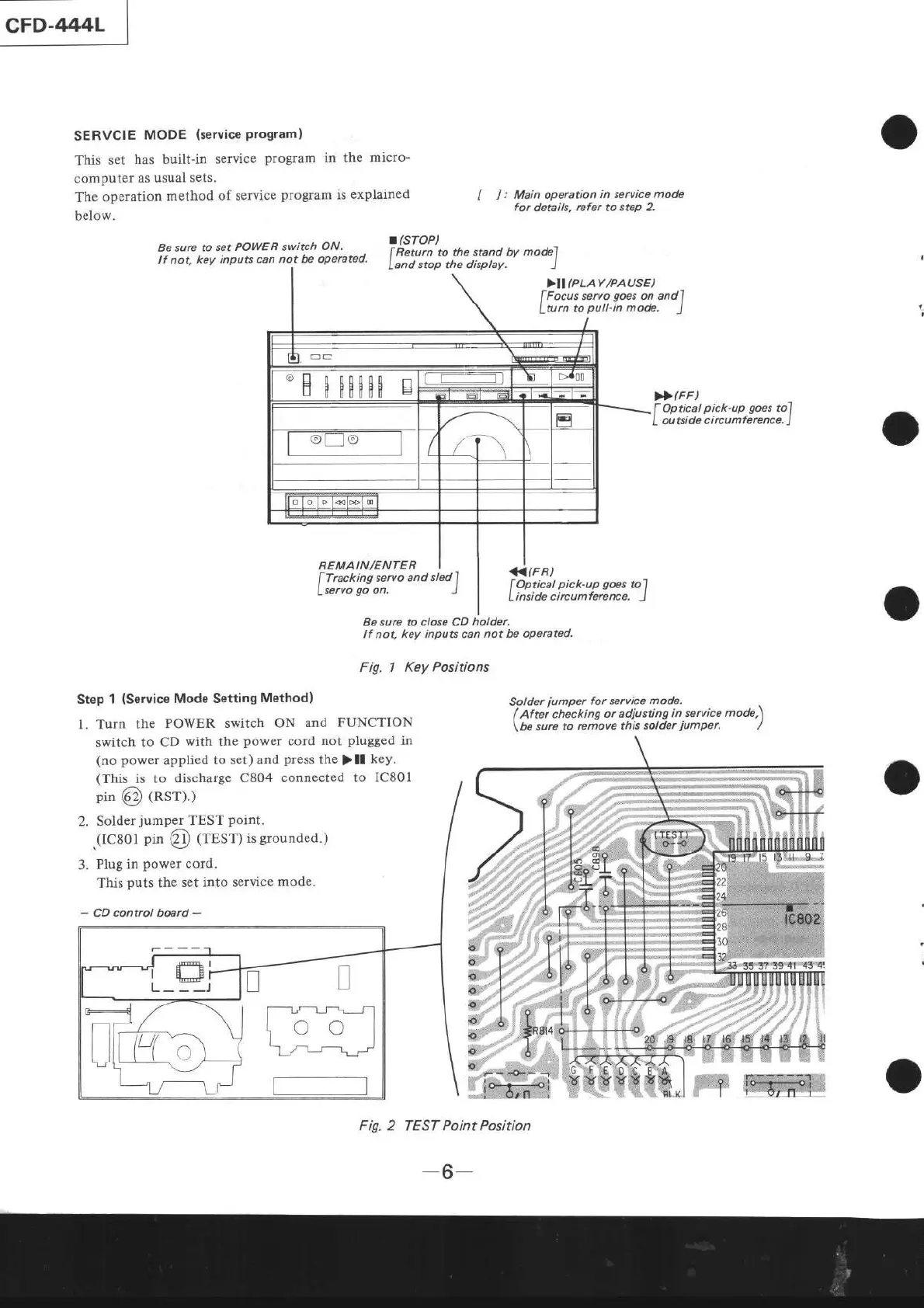
SERVCIE
MODE
(service
Program)
This
set
has built-in
service
program
in the
micro-
computer
as usual
sets.
The
operation
method
of service
program
is
explained
below.
Be sure to
set
POWER switch
ON,
lf not.
key inpu$
can not be operctecl.
REMAIN/ENTER
[
]
:
Main operation
in service mode
for
details. rcfer to
step 2.
.(sToP)
f
Rewrn to the
stand
W
mode"l
Land
stop the display.
l
>II(PLAY/PAUSE)
fFocus
servo
goes
on
andl
Lturn
to
pull-in
mode.
J
),>
(FF
)
f
Opticat
pick-up goes
to1
L
outside circumference.
J
f
Tracking
servo and
sledf
Lservo
go
on, )
Be sure to close CD
holder.
lf
not, key inputs can
not
be
operated.
Fig. 1
Key Positions
<(FR)
fOptical
pick.up goes
tol
Linside
circumference.
J
Step
1
(Service
Mode Setting
Method)
l. Turn
the
POWER
switch ON
and FUNCTION
switch to
CD
with
the
power
cord
not
plugged
in
(no power
applied
to set)
and
press
the
)
lf
key.
(This
is to
discharge
C804
connected to IC801
pin
Q)
(RSr).)
2.
Solder
jumper
TEST
point.
(IC801
pin
@
trrsrl
is
grounded.)
Plug
in
power
cord.
This
puts
the
set into service
mode.
-
CD control board
-
Solder
jumper
for service
mode.
I
Aftei
chécking
or adiusting
in service
mode,\
\be
sure to
remove
this solder
iumper'
/
Fig. 2 TEST Point Position
'H
H00H00
s
\
co
I
ll
t-J
- 'L_r-
-6-