EasyManua.ls Logo

Sony CFD-444L - RECORDER SECTION

Sony CFD-444L
56 pages
Print Icon
To Next Page IconTo Next Page
To Previous Page IconTo Previous Page
Loading...
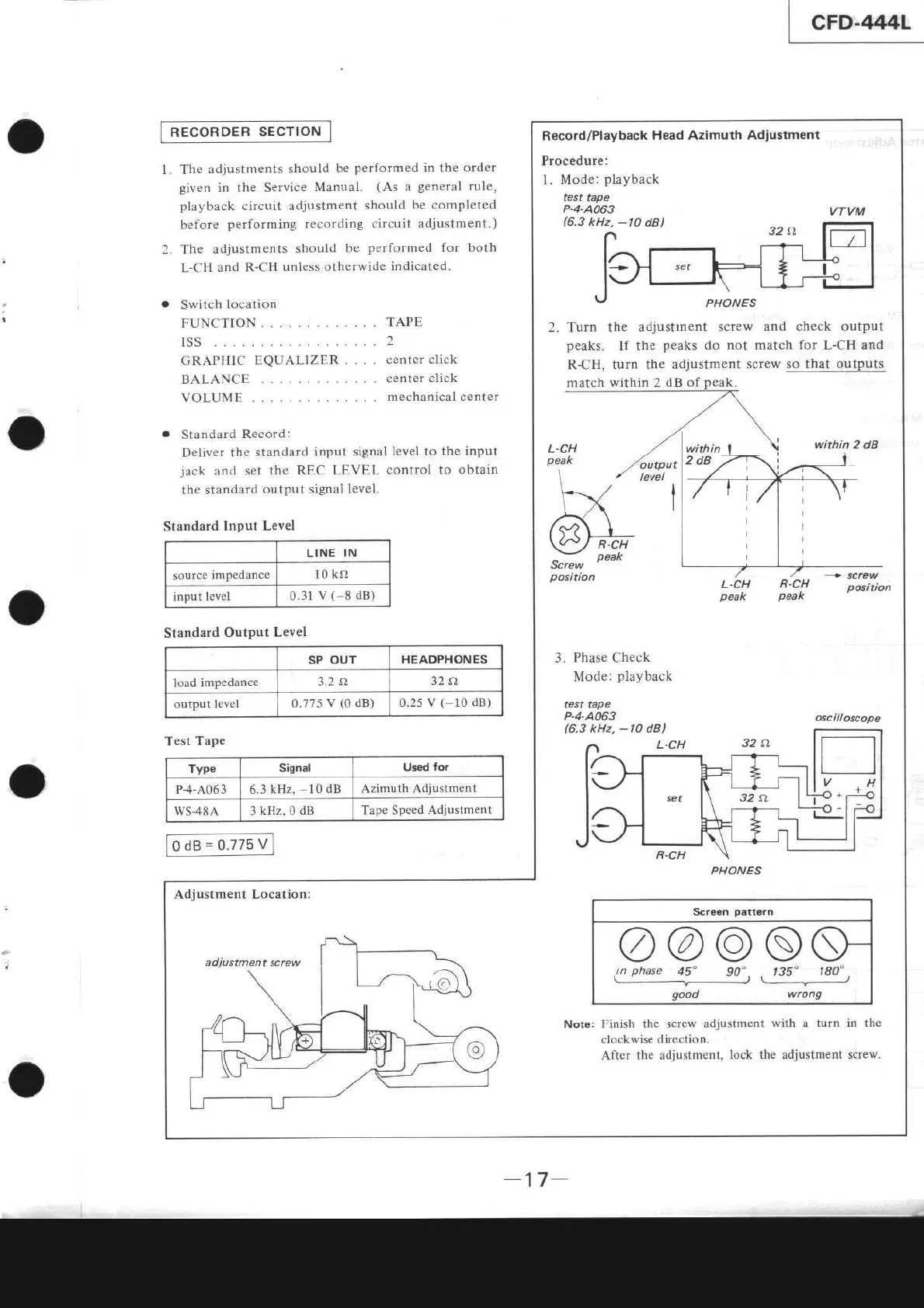
RECORDER
SECTION
l. The
adjustments
should
be
performed
in
the
order
given
in the Seryice
Manual.
(As
a
general
rule,
playback
circuit adjustment
should be completed
before
performing
recording
circuit adjustment.)
2. The
adjustments
should
be
performed
for
both
L-CH
and
R-CH unless
otherwide indicâted.
.
Switch
location
FUNCTION
ISS...
GRAPHIC EQUALIZER
BALANC
E
VOLUME
TAPE
2
center
click
center
click
mechanical center
o
Standard
Record:
Deliver the
standard
input signal
level to the input
jack
and
set the
REC LEVEL
control to
obtain
the
standârd
output
signal level.
Standard
Input
Level
LINE IN
source
impedance
10
kç)
input level
0.31
v
(-8
dB)
Record/Playback
Head Azimuth
Adiustment
Procedure:
l. Mode:
playback
test
tape
P.4.A063
(6.3
kHz,
-10
dB)
VTVM
2.Turn the
adjustlnent screw
and check output
peaks.
If
the
peaks
do not match
for
L-CH and
R-CH, turn
the adjustment
screw so that outputs
L.CH
peak
output
level
I
I
within
2dB
Screw
position
R.CH
peak
L.CH
R.CH
peak
peak
position
3. Phase Check
Mode:
playback
test tape
P-4-A063
(6.3
kHz,
-10
dBl
L.CH
osc il loscope
Adjustment Location:
adjustment screw
Scrgan
patt€rn
@@ose
in
phase
45"
90",
135"
180'
,
good wrong
Note:
Finish the screw adjustment
with
a lurn
in the
clockwise di.rection.
After
the adjustmenl,
lock the adjustment screw.
PHONES
tl
+
PHONES
Standard
Output
Level
SP
OUT
HEADPHONES
load
impedance
3.2
a
32a
output level
0.775
V
(0
dB) 0.2s
v( 10
dB)
Test Tâpe
Type
Signal
Usêd
fot
P-4-A063 6-3
kHz,
-10
dB Azimuth
Adjustment
ws48A
3
kHz,
0
dB
Tape Speed Adjustment
-17
-