EasyManua.ls Logo

Sony CFD-444L - Tape Speed Adjustment; CD SECTION

Sony CFD-444L
56 pages
Print Icon
To Next Page IconTo Next Page
To Previous Page IconTo Previous Page
Loading...
Tape
Speed
Adiustment
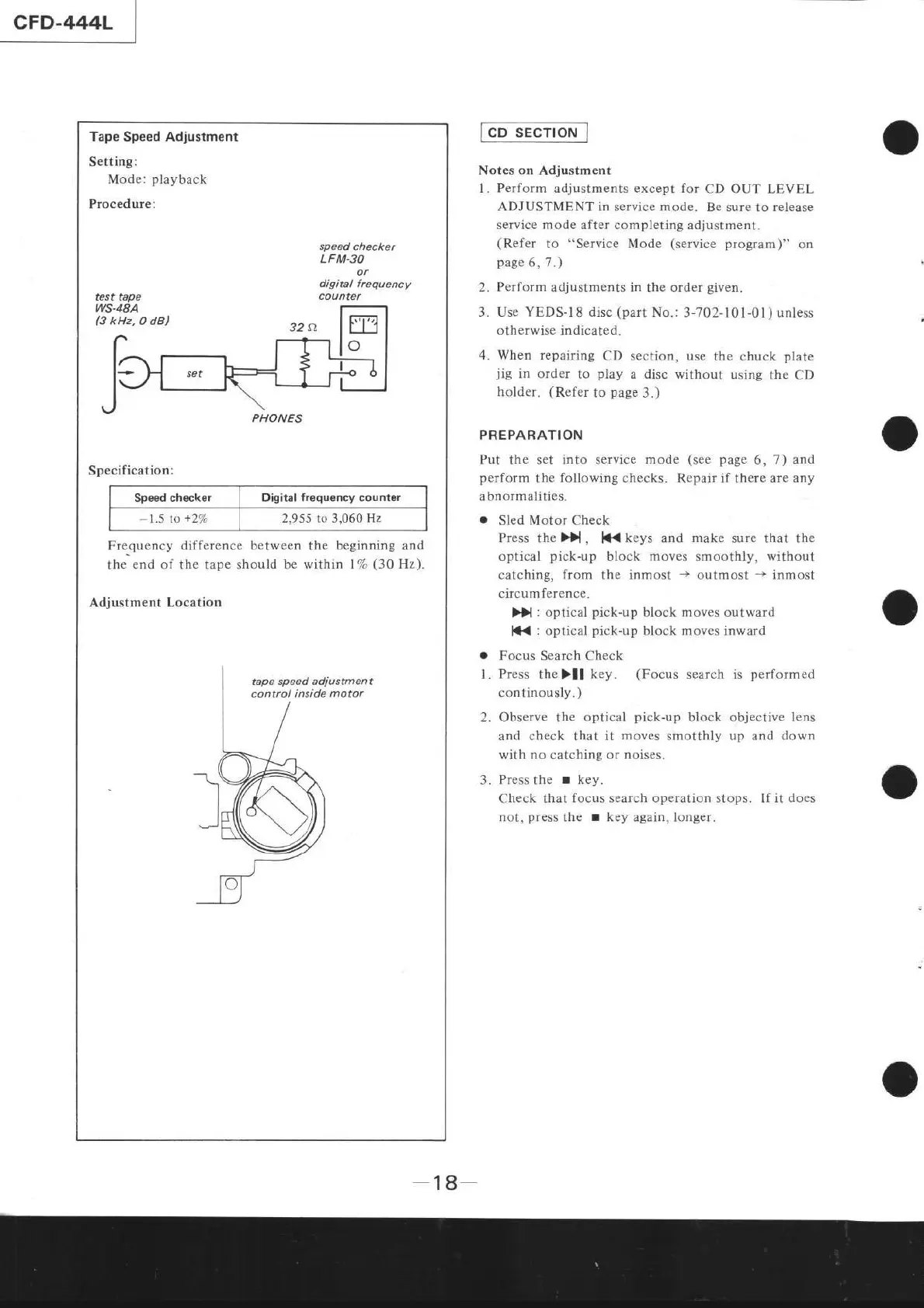
Setting:
Mode:
playback
Procedure:
test tape
ws-48A
B
kHz,
O dB)
speed checker
LFM.3O
or
digital freguency
counter
Specification:
Speed
checker Digital
frequonciy
counter
-1.5
to
+27o
2,955 to 3,060
Hz
Fre-quency
difference between
the
beginning and
the
end of
the
tape should be within l7o
(30
Hz).
Adjustment
Locâtion
PHONES
l-p
sEcrroN
1
Notes
on
Adjustment
1. Perform adjustments except for
CD
OUT
LEVEL
ADJUSTMENT in service mode.
Be sure
to
release
service
mode
after completing
adjustment.
(Refer
to "Service Mode
(service
program)"
on
page
6,
7
.)
2.
Perform
adjustments in the order
given.
3. Use YEDS-1
8
disc
(part
No.: 3-702- l0
l
-01
)
unless
otherwise indicated.
4. When repairing
CD section, use
the chuck
plate
jig
in order
to
play
â disc
without using
the
CD
holder.
(Refer
to
page
3.)
PREPARATION
Put the set into service
mode
(see page
6, 7)
and
perform
the
following checks.
Repair
if
there
are any
abnormalities.
.
Sled
Motor
Check
Press
the
>}l
,
lC(
keys and
make
sure that the
optical
pick-up
block moves smoothly, without
catching,
from
the inmost
->
outmost
-+
inmost
circumference.
>)
:
optical
pick-up
block moves outward
l*{
:
optical
pick-up
block
moves
inward
.
Focus Search Check
l.
Press
thelll
key.
(Focus
search is
performed
continously.
)
2. Observe
the
optical
pick-up
block objective
lens
and check that it
moves
smotthly up and down
with no catching or noises.
3.
Press
the
r
key.
Check that
focus
search
operation
stops. If
it does
not,
press
the
I
key again, longer.
-18-