EasyManua.ls Logo

Sony CFD-444L - Page 26

Sony CFD-444L
56 pages
Print Icon
To Next Page IconTo Next Page
To Previous Page IconTo Previous Page
Loading...
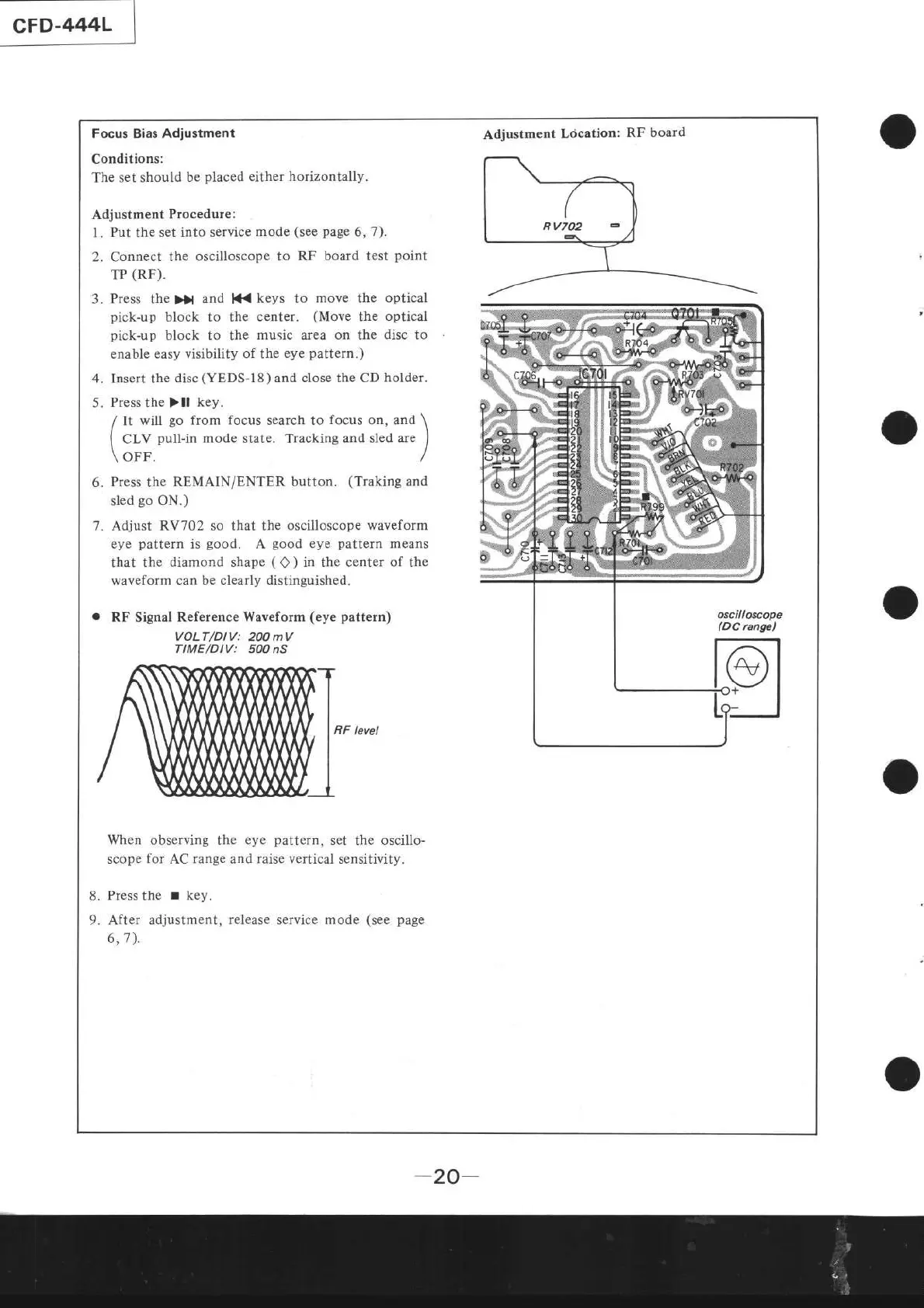
Focus
Bias
Adjustment
Conditions:
The set
should be
placed
either horizontally.
Adjustment
Ldcation:
RF board
Adjustment
Procedure:
l.
Put
the
set into service
mode
(see page
6,7).
2. Connect the
oscilloscope to
RF board test
point
TP
(RF).
3.
Press the
))l
and
lf{
keys to
move
the
optical
pick-up
block to the center.
(Move
the optical
pick-up
block to the
music area on the
disc
to
enable
easy visibility of the
eye
pattem.)
4.
Insert the
disc
(YEDS-I8)
and
close the CD
holder.
5.
Press the
)ll
key.
/
lt
will
go
from focus search to
focus
on. and
\
{
CLV
pull-in
mode state. Tracking and
sled are
I
\-t
\ OFF. /
6.
Press
the
REMAIN/ENTER button.
(Traking
and
sled
go
ON.)
7. Adjust
RV702 so that the
oscilloscope waveform
eye
pattern
is
good.
A
good
eye
pattern
means
that the
diamond shape
(
Q
)
in the center of the
waveform can be clearly distinguished.
o
RF
Signal
Reference Waveform
(eye pattern)
VOLT/DIV:
20O
mV
TIME/DlV: 5OO nS
BF level
8.
9.
When observing the
eye
pattern,
set
the
oscillo-
scope for AC range and raise
vertical
sensitivity.
Press the
!
key.
After adjustment,
release
service
mode
(see page
6,7).
"r""-*
I
o
o
a
o
-20-
o