EasyManua.ls Logo

Sony CFD-460 - Page 4

Sony CFD-460
40 pages
Print Icon
To Next Page IconTo Next Page
To Previous Page IconTo Previous Page
Loading...
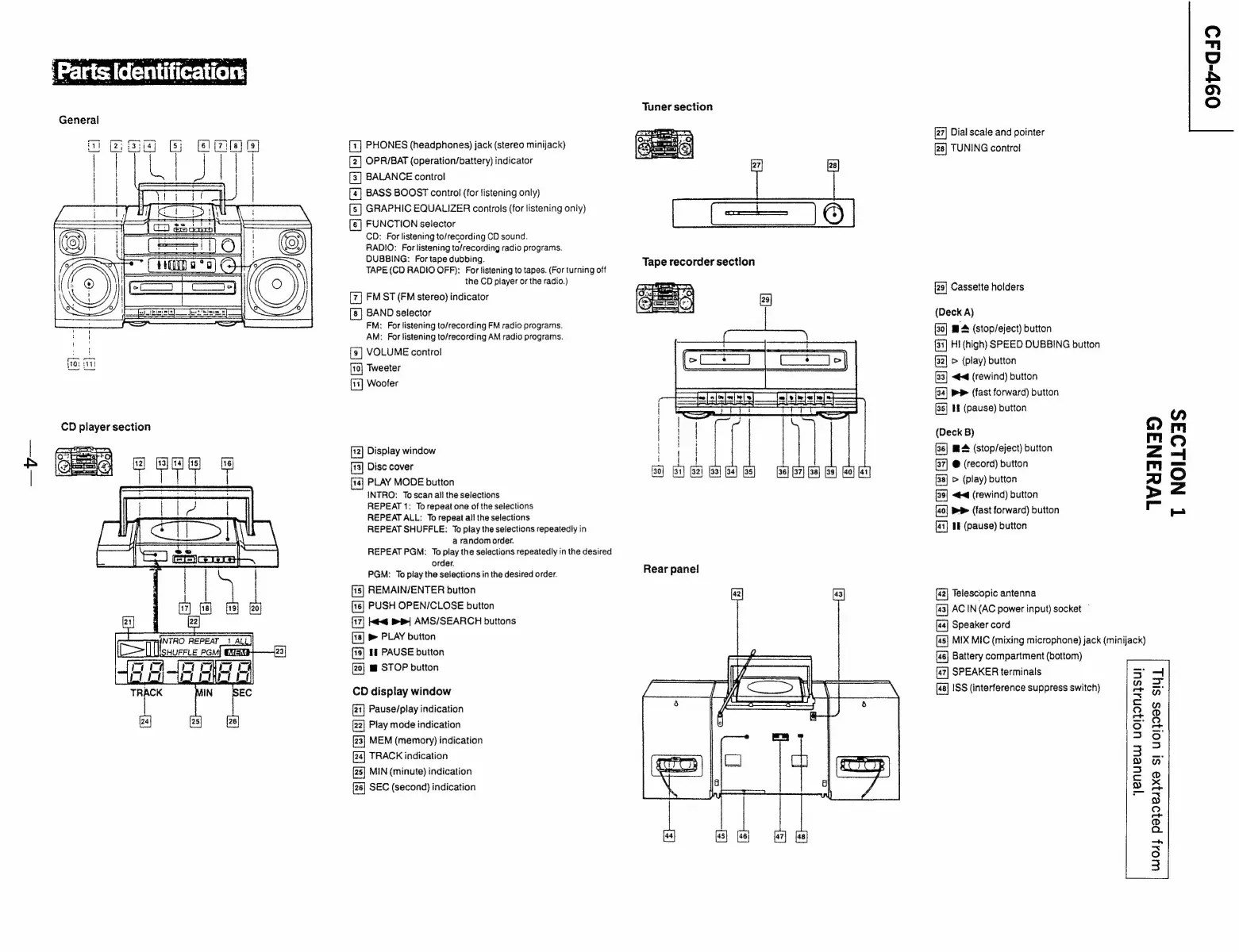
[1]
PHONES
(headphones)
jack
(stereo
minijack)
[2]
OPR/BAT
(operation/battery)
indicator
[3]
BALANCE
control
[4]
BASS
BOOST
control
(for
listening
only)
[s]
GRAPHIC
EQUALIZER
controls
(for
listening
only)
[6]
FUNCTION
selector
CD:
For
listening
to/recording
CD
sound.
RADIO:
For
listening
to/recording
radio
programs.
DUBBING:
For
tape
dubbing.
TAPE
(CD
RADIO
OFF):
For
listening
to
tapes.
(For
turning
off
the
CD
player
or
the
radio.)
FM
ST
(FM
stereo)
indicator
BAND
selector
FM:
For
listening
to/recording
FM
radio
programs.
AM:
For
listening
to/recording
AM
radio
programs.
[3]
VOLUME
control
Tweeter
Woofer
Display
window
[t3]
Disc
cover
PLAY
MODE
button
INTRO:
Toscan
all
the
selections
REPEAT
1:
To
repeat
one
of
the
selections
REPEAT
ALL:
To
repeat
all
the
selections
REPEAT
SHUFFLE:
To
play
the
selections
repeatedly
in
a
random
order.
REPEAT
PGM:
To
play
the
selections
repeatedly
in
the
desired
order.
PGM:
To
play
the
selections
in
the
desired
order.
[15]
REMAIN/ENTER
button
PUSH
OPEN/CLOSE
button
k<q
pp}
AMS/SEARCH
buttons
&
PLAY
button
If
PAUSE
button
mw
STOP
button
CD
display
window
[21]
Pause/play
indication
[22]
Play
mode
indication
[23]
MEM
(memory)
indication
TRACK
indication
[28]
MIN
(minute)
indication
SEC
(second)
indication
Tuner
section
Rear
panel
Dial
scale
and
pointer
TUNING
control
Cassette
holders
(Deck
A)
@
4
(stop/eject)
button
(34]
HI
(high)
SPEED
DUBBING
button
32]
>
(play)
button
[33]
<4
(rewind)
button
PP
(fast
forward)
button
[35]
If
(pause)
button
(Deck
B)
m
(stop/eject)
button
@
(record)
button
>
(play)
button
<4
(rewind)
button
PP
(fast
forward)
button
HE
(pause)
button
Wa4aNda5
T
NOILOAS
Telescopic
antenna
AC
IN(AC
power
input)
socket
©
Speaker
cord
MIX
MIC
(mixing
microphone)
jack
(minijack)
Battery
compartment
(bottom)
SPEAKER
terminals
ISS
(interference
suppress
switch)
‘yenuew
uoljonsjsul
WOd}
pa}oes}Xe
SI
UOI}OES
SIU]
09v-d4d9

Related product manuals