GB
15
GB
x
Memory card that you can use
The following memory cards are compatible with this camera: “Memory Stick
PRO Duo” media, “Memory Stick PRO-HG Duo” media, “Memory Stick
Duo” media, SD memory card and SDHC memory card. MultiMediaCard
cannot be used.
In this manual, the term “Memory Stick Duo” media is used to refer to
“Memory Stick PRO Duo” media, “Memory Stick PRO-HG Duo” media and
“Memory Stick Duo” media.
When recording movies, it is recommended that you use the following
memory cards:
– (“Memory Stick PRO Duo” media)
– (“Memory Stick PRO-HG Duo” media)
– SD memory card or SDHC memory card (Class 2 or faster)
For details on the number of images/time that can be recorded, see page 24.
x
To remove the memory card
• Never remove the memory card/battery pack when the access lamp is lit. This may
cause damage to data in the memory card/internal memory.
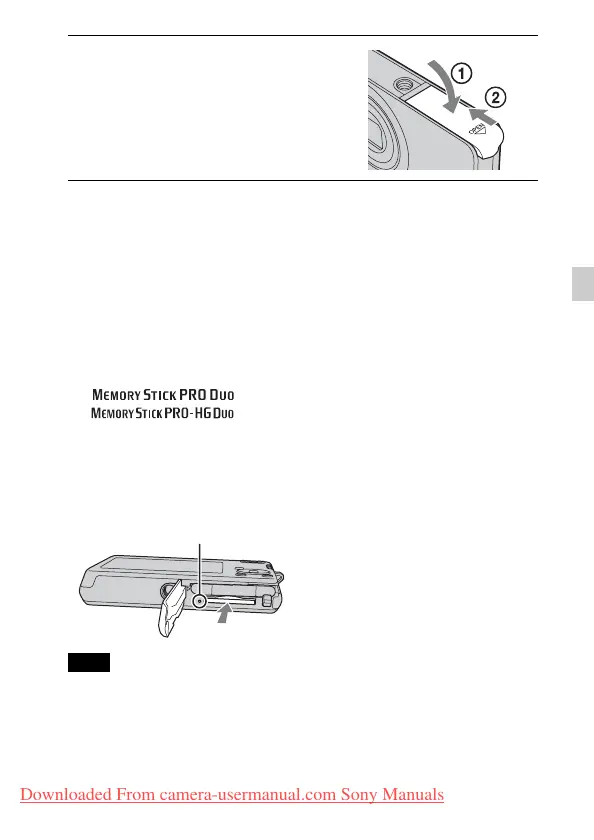
4
Close the cover.
• Closing the cover with the battery
inserted incorrectly may damage the
camera.
Make sure that the access lamp is not lit,
then push the memory card in once.
Note
Access lamp
Downloaded From camera-usermanual.com Sony Manuals






 To Next Page