EasyManua.ls Logo

Sony D-5 - Laser Diode Check Procedure; Procedure 1; Procedure 2

Sony D-5
46 pages
Print Icon
To Next Page IconTo Next Page
To Previous Page IconTo Previous Page
Loading...
in
service
mode
to
step
2.
de.
in
service
mode,
ar
jumper.
Step
2
(Service
Mode
operation)
1.
When
service
mode
is
set,
the
display
will
change
16
times,
and
those
16
changes
will
be
repeated
over
and
over.
Note:
Some
sets
using
MB88541-120M
for
microcomputer
IC801
will
not
perform
LCD
display.
If
this
happens:
1)
Play
a
disc
with
the
set
in
normal
operation.
2)
In
that
state,
solder
jumper
BATT2
point.
(See
Figure
3)
3)
Short
the
RESET
point
once
and
release.
(See
Figure
3)
4)
Plug
in
external
power
supply.
With
this
the
LCD
display
should
be
present
in
service
mode,
Even
if
LCD
does
not
display,
other
operations
will
be
performed.
When
@
key
is
pressed
during
each
operation,
it
will
return
to
the
state
in
step
1.
When
PP
or
Kd
key
is
pressed,
the
FOP
moves
to
the
inside
or
outside
circumference.
Tracking
servo
and
sled
servo
go
off
when
this
is
done,
so
press
MODE
to
turn
on
the
tracking
servo
if
necessary.
When
REMAIN
is
pressed,
the
display
stops.
When
REMAIN
is
released,
the
display
con-
tinues
to
change.
This
allows
check
of
each
segment.
Whenp
key
is
pressed,
focus
search
starts,
then
CLV-S
(run-up
mode)
starts.
When
there
is
no
disc,
focus
search
is
repeated
again
and
again.
Note:
When
MB88541-120M
is
used
for
micro-
computer
IC801,
the
objective
lens
may
remain
up
and
the
disc
table
may
rotate
at
high
speed
when
thep§ffkey
is
pressed,
(Sets
using
MB88541-120M
for
IC801
will
set
FOCUS
ON
FLAG
after
the
focus
on
state
has
been
obtained.)
If
this
happens:
1)
Press
MM
key.
2)
Unplug
external
power
supply
and
press
>
Bikey.
3)
Plug
in
external
power
supply.
4)
Press»
§Hkey
without
disc
inserted.
With
this,
focus
search
will
repeat
over
and
over.
When
MODE
is
pressed,
tracking
servo,
sled
servo
and
CLV-A
(servo
during
PLAY)
go
ON.
When
5
and
6
are
performed,
the
disc
begins
to
play.
At
this
time,
the
top
panel
should
be
D-5/D-50
D-5/D-50
closed
and
S901
and
$902
are
to
be
ON.
When
the
laser
is
not
emitted,
focus
search
is
repeated.
When
S901
is
on
and
S902
is
off,
CLV-S
does
not
work
properly
and
the
disc
rotates
at
high
speed.
Step
3
(Service
Mode
release)
1.
2.
First
be
sure
to
unplug
the
external
power
supply,
then
remove
the
BATT2
point
solder
jumper.
(During
service
mode,
C803
is
discharged
by
unplugging
the
external
power
supply.
There-
fore,
microcomputer
IC801
is
reset
by
next
plugging
in
the
external
power
supply.)
The
set
will
now
operate
normally.
MAIN
BOARD
(double-sided)
CHECK
1.
The
main
board
is
double-sided,
so
there
are
parts
mounted
on
both
sides.
However,
check-
ing
can
be
done from
the
chip
component
mounted
side.
Refer
to
the
mounting
diagram
on
page
43
46.
D/A
coverter
IC’s
are
mounted
underneath
the
DC-DC
converter
unit,
and
these
can
be
check-
ed
from
the
chip
component
mounted
side.
IC’s
under
the
DC-DC
converter
unit:
1C301:
D/A
converter
IC101,
201:
integrator,
sample
hold
1C302:
switcher
When
operating
the
set
with
the
LCD
module
flexible
board
removed,
the
pattern
corre-
sponding
to
each
key
switch
is
to
be
grounded
momentarily,
“€P301
OC=OC,
CONVERTER
ns
ea
-
Det
ere
SW
pattern)
pag
ere”
Move
a2
o
REMAIN__scwrcusii
Ground
—_—esecnn»'’
.
S907
laser
on
(
Laser
Diode
Check
Procedure
The
laser
diode
on
this
set
will
not
emit
unless
the
top
panel
is
closed
and
S901
(terminal
sorting
type),
S902
(leaf
SW
type)
are
turned
on.
Focus
search
can
be
operated
in
service
mode
even
if
$902
is
OFF,
so
that
the
laser
diode
will
emit
if
S901
(terminal
shorting
type)
are
turned
on
in
this
mode.
The
laser
diode
is
checked
using
the
current
value
which
flows
to
the
laser
diode
inside
the
FOP.
Procedure
1
(service
mode
or
normal
operation).
1.
Close
the
top
panel.
2.
Connect
an
ammeter
as
shown
in
Figure
5.
3.
Press
the
PMH
key.
4
.
Confirm
that
the
ammeter
reading
is
within
the
range
given
below.
10-100
mA
If
not,
APC
circuit
or
FOP
is
defective.
If
normal
operation
is
used,
the
laser
diode
goes
on
for
about
3
seconds
due
to
focus
search.
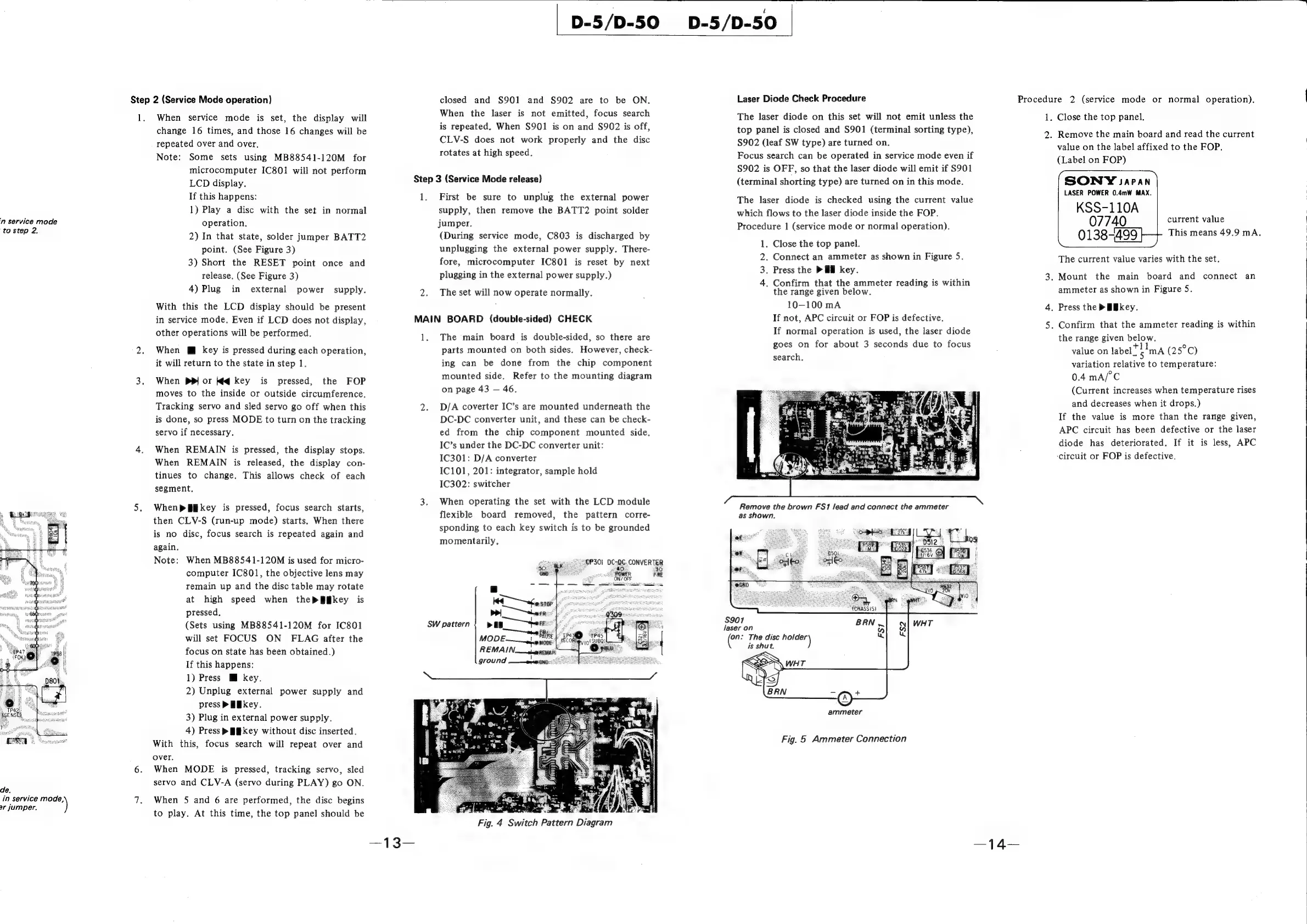
Remove
the
brown
FS1
lead
and
connect
the
ammeter
as
shown.
n:
The
disc
we)
is
shut.
ammeter
Fig.
5
Ammeter
Connection
Procedure
2
(service
mode
or
normal
operation).
1.
Close
the
top
panel.
2.
Remove
the
main
board
and
read
the
current
value
on
the
label
affixed
to
the
FOP.
(Label
on
FOP)
SONYY
Japan
LASER
POWER
0.4mW
MAX.
KSS-110A
current
value
07740
The
current
value
varies
with
the
set.
3.
Mount
the
main
board
and
connect
an
ammeter
as
shown
in
Figure
S.
4.
Press
the
>
Bkey.
5.
Confirm
that
the
ammeter
reading
is
within
the
range
given
below.
value
on
label”
i'ma
(25°C)
variation
relative
to
temperature:
0.4
mA/°C
(Current
increases
when
temperature
rises
and
decreases
when
it
drops.)
If
the
value
is
more
than
the
range
given,
APC
circuit
has
been
defective
or
the
laser
diode
has
deteriorated.
If
it
is
less,
APC
‘circuit
or
FOP
is
defective.
This
means
49.9
mA.

Related product manuals