EasyManua.ls Logo

Sony D-5 - Location and Function of Controls; Front Panel Controls; Display Indicators; Rear Panel Controls

Sony D-5
46 pages
Print Icon
To Next Page IconTo Next Page
To Previous Page IconTo Previous Page
Loading...
LOCATION
AND
FUNCTION
OF
CONTROLS
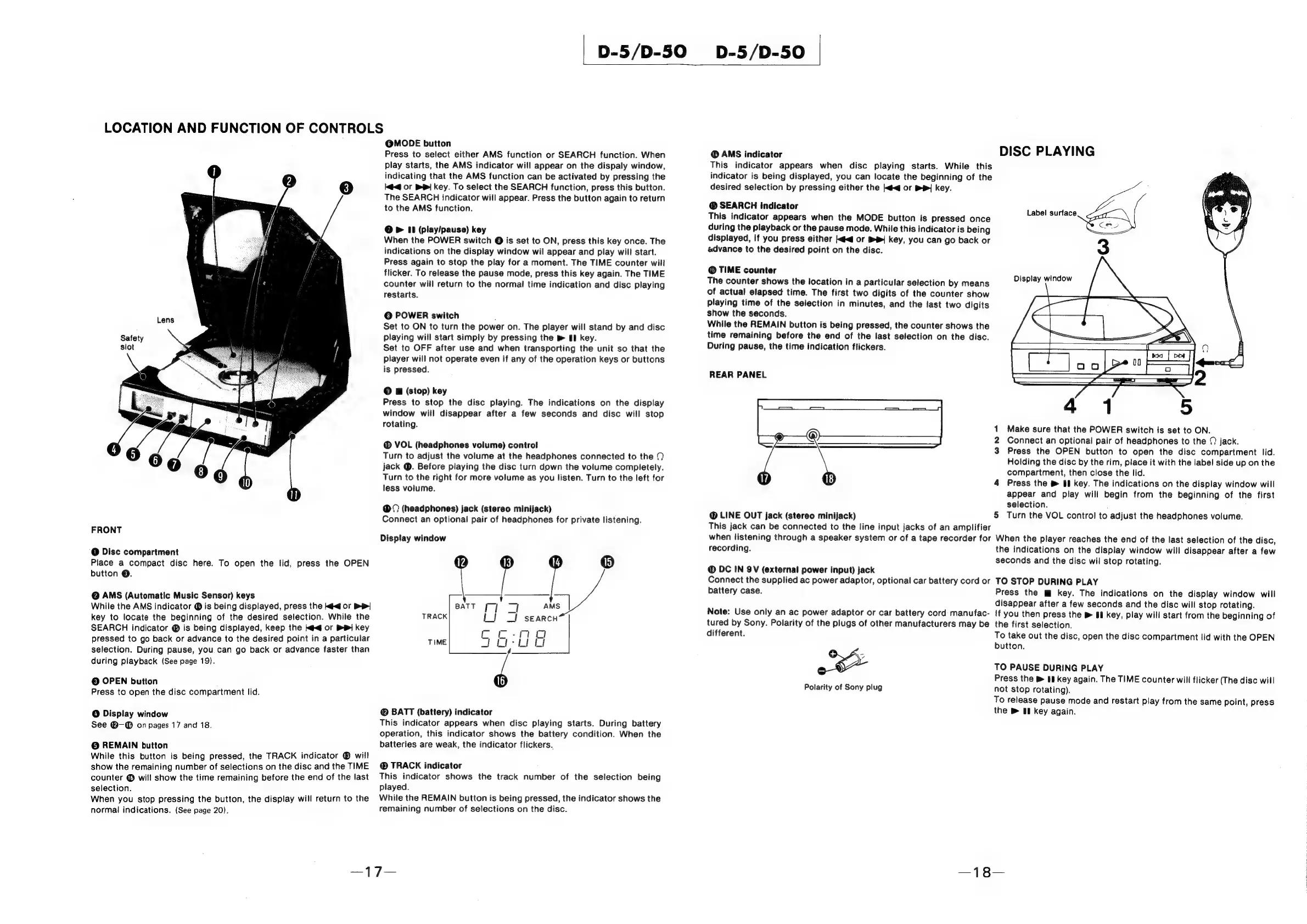
FRONT
@
Disc
compartment
Place
a
compact
disc
here.
To
open
the
lid,
press
the
OPEN
button
©.
@
AMS
(Automatic
Music
Sensor)
keys
While
the
AMS
indicator
©
is
being
displayed,
press
the
kd
or
DP|
key
to
locate
the
beginning
of
the
desired
selection.
While
the
SEARCH
indicator
®
is
being
displayed,
keep
the
ke
or
BR
key
pressed
to
go
back
or
advance
to
the
desired
point
in
a
particular
selection.
During
pause,
you.can
go
back
or
advance
faster
than
during
playback
(See
page
19).
©
OPEN
button
Press
to
open
the
disc
compartment
lid.
@
Display
window
See
@-@
on
pages
17
and
18.
©
REMAIN
button
While
this
button
is
being
pressed,
the
TRACK
indicator
®
will
show
the
remaining
number
of
selections
on
the
disc
and
the
TIME
counter
@
will
show
the
time
remaining
before
the
end
of
the
last
selection.
When
you
stop
pressing
the
button,
the
display
will
return
to
the
normal
indications.
(See
page
20).
D-5/D-50
D-5/D-50
@MODE
button
Press
to
select
either
AMS
function
or
SEARCH
function.
When
play
starts,
the
AMS
indicator
will
appear
on
the
dispaly
window,
indicating
that
the
AMS
function
can
be
activated
by
pressing
the
k@<@
Or
BP
key.
To
select
the
SEARCH
function,
press
this
button.
The
SEARCH
indicator
will
appear.
Press
the
button
again
to
return
to
the
AMS
function.
@
>
11
(play/pause)
key
When
the
POWER
switch
@
is
set
to
ON,
press
this
key
once.
The
indications
on
the
display
window
wil
appear
and
play
will
start.
Press
again
to
stop
the
play
for
a
moment.
The
TIME
counter
will
flicker.
To
release
the
pause
mode,
press
this
key
again.
The
TIME
counter
will
return
to
the
normal
time
indication
and
disc
playing
restarts.
©
POWER
switch
;
Set
to
ON
to
turn
the
power
on.
The
player
will
stand
by
and
disc
playing
will
start
simply
by
pressing
the
»
1
key.
Set
to
OFF
after
use
and
when
transporting
the
unit
so
that
the
player
will
not
operate
even
if
any
of
the
operation
keys
or
buttons
is
pressed.
©
@
(stop)
key
Press
to
stop
the
disc
playing.
The
indications
on
the
display
window
will
disappear
after
a
few
seconds
and
disc
will
stop
rotating.
@
VOL
(headphones
volume)
control
Turn
to
adjust
the
volume
at
the
headphones
connected
to
the
jack
@.
Before
playing
the
disc
turn
down
the
volume
completely.
Turn
to
the
right
for
more
volume
as
you
listen.
Turn
to
the
left
for
less
volume.
(headphones)
jack
(stereo
minijack)
Connect
an
optional
pair
of
headphones
for
private
listening.
Display
window
®
®
®
BATT
(battery)
indicator
This
indicator
appears
when
disc
playing
starts.
During
battery
operation,
this
indicator
shows
the
battery
condition.
When
the
batteries
are
weak,
the
indicator
flickers.
®
TRACK
indicator
This
indicator
shows
the
track
number
of
the
selection
being
played.
While
the
REMAIN
button
is
being
pressed,
the
indicator
shows
the
remaining
number
of
selections
on
the
disc.
®
AMS
indicator
DISC
PLAYING
This
indicator
appears
when
disc
playing
starts.
While
this
indicator
is
being
displayed,
you
can
locate
the
beginning
of
the
desired
selection
by
pressing
either
the
<q
or
PP
key.
@
SEARCH
indicator
This
indicator
appears
when
the
MODE
button
is
pressed
once
during
the
playback
or
the
pause
mode.
While
this
indicator
is
being
displayed,
if
you
press
either
<q
or
BB
key,
you
can
go
back
or
advance
to
the
desired
point
on
the
disc.
Label
surface
ir
as
Rr
@
TIME
counter
The
counter
shows
the
location
in
a
particular
selection
by
means
of
actual
elapsed
time.
The
first
two
digits
of
the
counter
show
4
——\
playing
time
of
the
selection
in
minutes,
and
the
last
two
digits
show
the
seconds.
While
the
REMAIN
button
is
being
pressed,
the
counter
shows
the
time
remaining
before
the
end
of
the
last
selection
on
the
disc.
During
pause,
the
time
indication
flickers.
Display
window
REAR
PANEL
1
Make
sure
that
the
POWER
switch
is
set
to
ON.
2
Connect
an
optional
pair
of
headphones
to
the
©
jack.
3
Press
the
OPEN
button
to
open
the
disc
compartment
lid.
Holding
the
disc
by
the
rim,
place
it
with
the
label
side
up
on
the
compartment,
then
close
the
lid.
4
Press
the
®
If
key.
The
indications
on
the
display
window
will
appear
and
play
will
begin
from
the
beginning
of
the
first
selection.
:
LINE
OUT
jack
(stereo
minijack)
5
Turn
the
VOL
control
to
adjust
the
headphones
volume.
This
jack
can
be
connected
to
the
line
input
jacks
of
an
amplifier
when
tistening
through
a
speaker
system
or
of
a
tape
recorder
for
When
the
player
reaches
the
end
of
the
last
selection
of
the
disc,
recording.
the
indications
on
the
display
window
will
disappear
after
a
few
seconds
and
the
disc
wil
stop
rotating.
DC
IN
9V
(external
power
input)
jack
Connect
the
supplied
ac
power
adaptor,
optional
car
battery
cord
or
TO
STOP
DURING
PLAY
battery
case.
Press
the
key.
The
indications
on
the
display
window
will
disappear
after
a
few
seconds
and
the
disc
will
stop
rotating.
Note:
Use
only
an
ac
power
adaptor
or
car
battery
cord
manufac-
If
you
then
press
the
®
If
key,
play
will
start
from
the
beginning
of
tured
by
Sony.
Polarity
of
the
plugs
of
other
manufacturers
may
be
the
first
selection.
different.
To
take
out
the
disc,
open
the
disc
compartment
lid
with
the
OPEN
button.
TO
PAUSE
DURING
PLAY
Polarity
of
Sony
plug
Press
the
®
El
key
again.
The
TIME
counter
will
flicker
(The
disc
will
not
stop
rotating).
To
release
pause
mode
and
restart
play
from
the
same
point,
press
the
®
I
key
again.

Related product manuals