EasyManua.ls Logo

Sony D-5 - Page 31

Sony D-5
46 pages
Print Icon
To Next Page IconTo Next Page
To Previous Page IconTo Previous Page
Loading...
\CKING
GAIN
ADJUSTMENT
ng
gain
determines
the
pick-up
follow-
and
horizontal)
relative
to
mechanical
echanical
shock
when
the
2-axis
device
these
reciprocate,
the
adjustment
is
at
ere
both
are
satisfied.
1
is
high,
the
noise
when
the
2-axis
device
ncreases,
1
is
low,
it
is
more
susceptible
to
mecha-
k
and
skipping
occurs
more
easily.
ent
is
to
be
performed
when
replacing
,
parts:
(focus
gain
VR),
RV502
(tracking
gain
Method:
1
Adjustment
ent
is
not
performed.
gain
VR
RVSO1
is
turned,
set
to
me-
er
(see
Fig.
6).
}
=
MAX
(high
gain)
/
:
VR
contact
point
|
When
VR
contact
point
is
here,
it is
at
mechanical
center.
p
view)
(side
view)
D-5/D-50 D-5/D-50
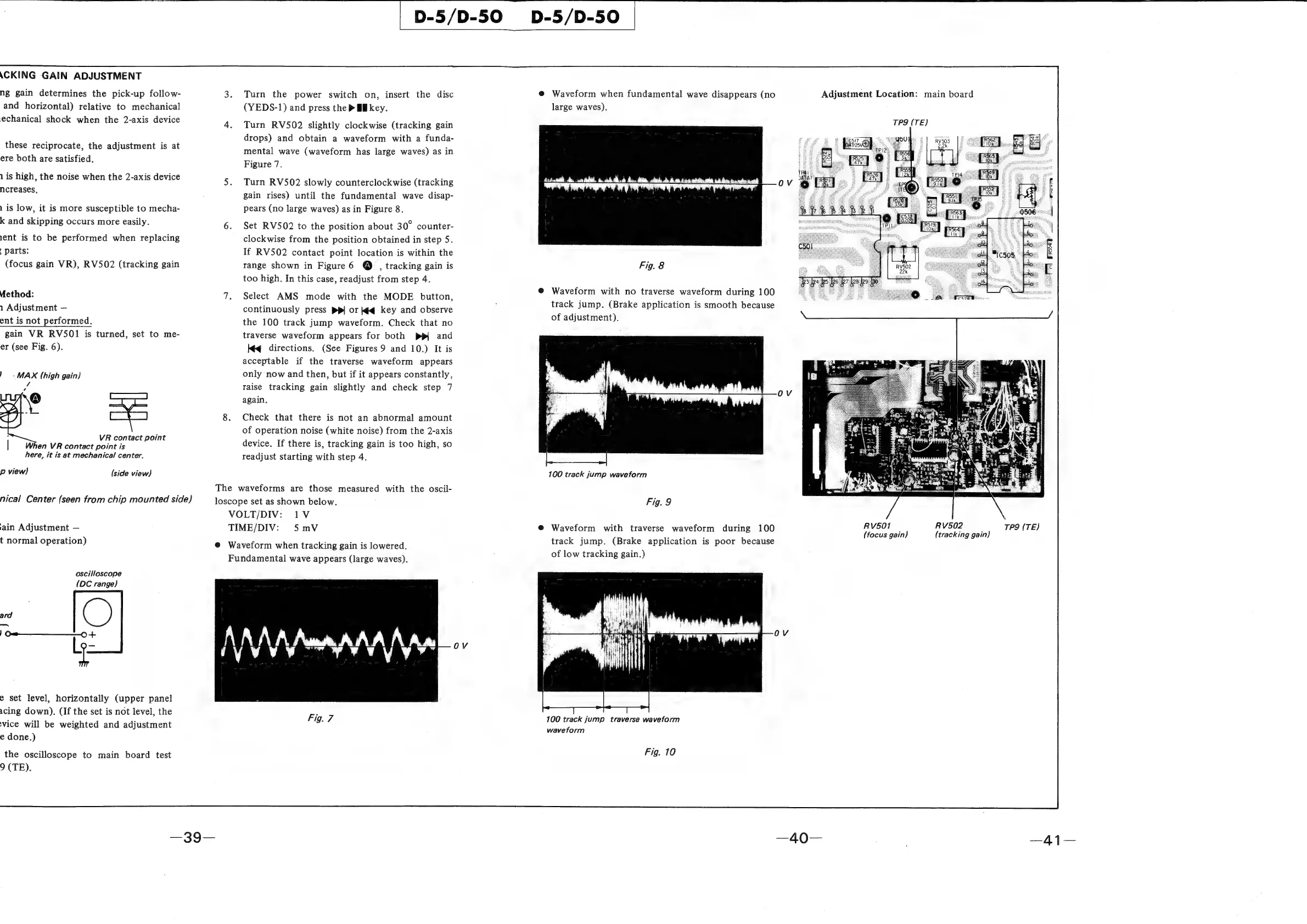
Turn
the
power
switch
on,
insert
the
disc
(YEDS-1)
and
press
the
>
Ml
key.
Turn
RV502
slightly
clockwise
(tracking
gain
drops)
and
obtain
a
waveform
with
a
funda-
mental
wave
(waveform
has
large
waves)
as
in
Figure
7.
Turn
RV502
slowly
counterclockwise
(tracking
gain
rises)
until
the
fundamental
wave
disap-
pears
(no
large
waves)
as
in
Figure
8.
Set
RV502
to
the
position
about
30°
counter-
clockwise
from
the
position
obtained
in
step
5.
If
RV502
contact
point
location
is
within
the
range
shown
in
Figure
6
@
,
tracking
gain
is
too
high.
In
this
case,
readjust
from
step
4.
Select
AMS
mode
with
the
MODE
button,
continuously
press
ppl
or
k¢q
key
and
observe
the
100
track
jump
waveform.
Check
that
no
traverse
waveform
appears
for
both
pp|
and
Kéq
directions.
(See
Figures
9
and
10.)
It
is
acceptable
if
the
traverse
waveform
appears
only
now
and
then,
but
if
it
appears
constantly,
raise
tracking
gain
slightly
and
check
step
7
again.
Check
that
there
is
not
an
abnormal
amount
of
operation
noise
(white
noise)
from
the
2-axis
device.
If
there
is,
tracking
gain
is
too
high,
so
readjust
starting
with
step
4.
@
Waveform
when
fundamental
wave
disappears
(no
large
waves).
@
Waveform
with
no
traverse
waveform
during
100
Fig.
8
track
jump.
(Brake
application
is
smooth
because
of
adjustment).
100
track
jump
waveform
TP9
(TE)
Adjustment
Location:
main
board
The
waveforms
are
those
measured
with
the
oscil-
loscope
set
as
shown
below.
Fig.
9
VOLT/DIV:
1V
TIME/DIV:
5mV
nical
Center
(seen
from
chip
mounted
side)
RV502
TP9
(TE)
(tracking
gain)
@
Waveform
with
traverse
waveform
during
100
RV5OF
:
Ar
E
(focus
gain)
track
jump.
(Brake
application
is
poor
because
of
low
tracking
gain.)
ain
Adjustment
t
normal
operation)
@
Waveform
when
tracking
gain
is
lowered.
Fundamental
wave
appears
(large
waves).
(DC
range)
Seen
Pes
NAAM
Aw
AAA
N
Aw
arr
|
‘he
mr
TPP
ad
Li
iyvvy
y
i
Aa
e
set
level,
horizontally
(upper
panel
acing
down).
(If
the
set
is
not
level,
the
vice
will
be
weighted
and
adjustment
e
done.)
Fig.
7
100
track
jump
traverse
waveform
waveform
the
oscilloscope
to
main
board
test
Fig.
10
9
(TE).
—39—
—40—
—41—

Related product manuals