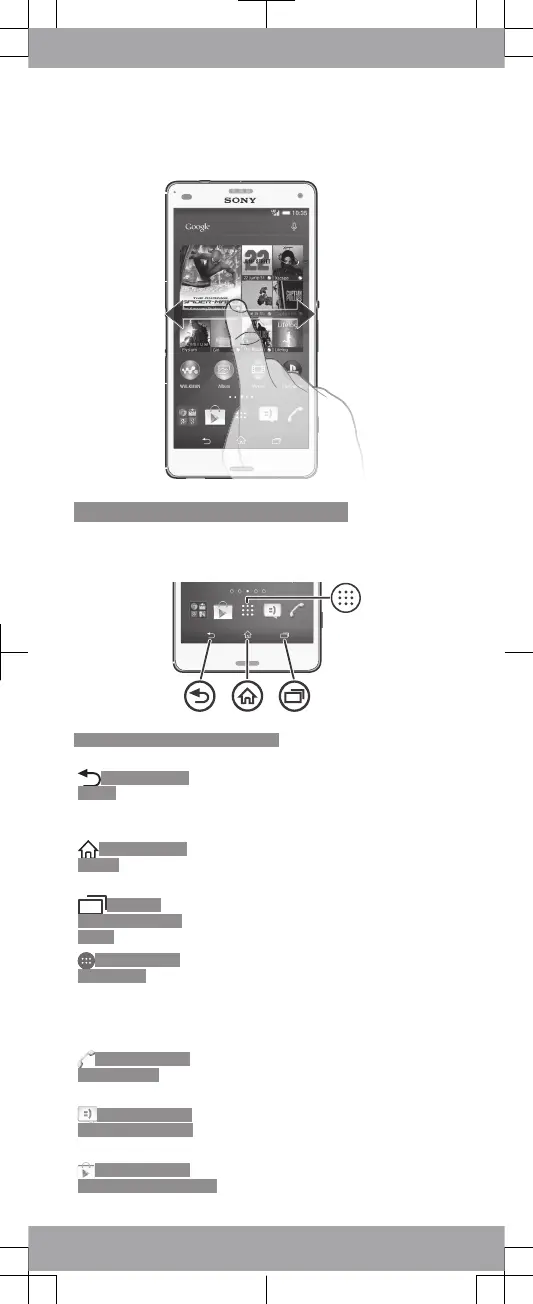
Finding your way
ID: SCR-14AS-HOMESCREEN
Using the keys
ID: ILL-14AS-HARDWARE-KEYS
ID: KEY-AND-
BACK
Back navigation key
•
Go back to the previous screen
within an application or close the
application.
ID: KEY-AND-
HOME
Home navigation key
•
Exit an application and go back to
the Home screen.
ID: KEY-
OPEN-RECENT-
APPS
Task navigation key
•
Open the recently used applications
window and the small apps bar.
ID: ICN-AND-
APP-TRAY
Application screen
•
Open the Application screen.
Basic applications and settings
ID: ICN-SONY-
APP-DIALER
Make phone calls by dialling the
number manually or by using the
smart dial function.
ID: ICN-SONY-
APP-MESSAGING
Use the Messaging application to
send and receive text and
multimedia messages.
ID: ICN-SONY-
APP-MARKET-PLACE
Go to Google Play™ to download
free and paid applications for your
device.









 To Next Page