22
GB
Getting Started
DAV-HDZ278
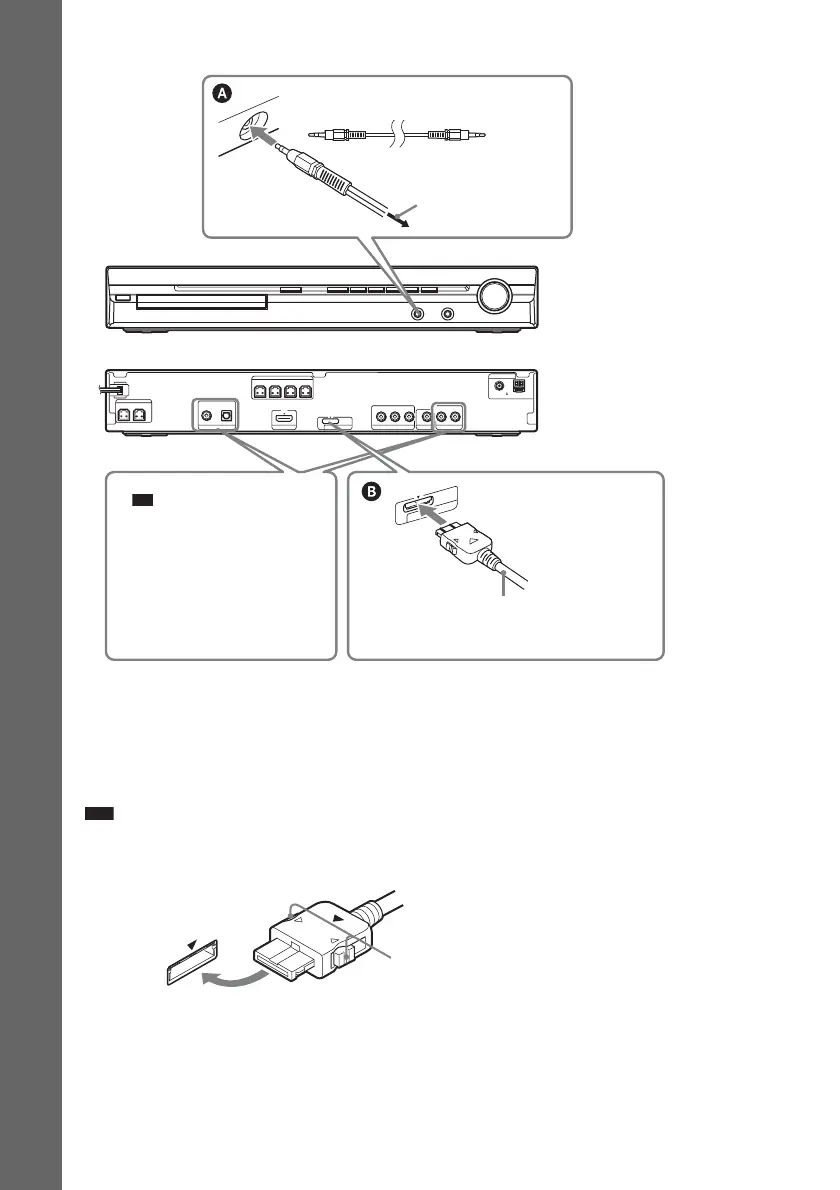
To connect the DIGITAL MEDIA PORT adapter
(DAV-HDZ278 only)
Connect a DIGITAL MEDIA PORT adapter (not supplied) to the DMPORT jack. For details, see
“Using the DIGITAL MEDIA PORT Adapter” (page 76).
Note
• Connect the DIGITAL MEDIA PORT adapter so that the V marks are aligned. When disconnecting, pull out while
pressing A.
CENTER SUBWOOFER
DIGITAL IN
P
B
/C
B
P
R
/C
R
Y
COAXIAL OPTICAL
FRONT R FRONT L SUR R SUR L
SPEAKER
TV/VIDEO HDMI OUT
VIDEO OUT
SPEAKER
COMPONENT VIDEO OUT
COAXIAL 75
AM
FM
ANTENNA
DMPORT
DC5V
0.7A MAX
AUDIO IN LR
TV/VIDEO
D
M
P
O
R
T
D
C
5
V
0
.7A
M
A
X
Rear panel
Front panel
DIGITAL MEDIA PORT adapter
(not supplied)
To the portable audio
source
Stereo mini-plug cord
(not supplied)
Ti
• You can connect another
component, such as VCR,
instead of the TV. For
connection details, see page
18.
A



 To Next Page