3
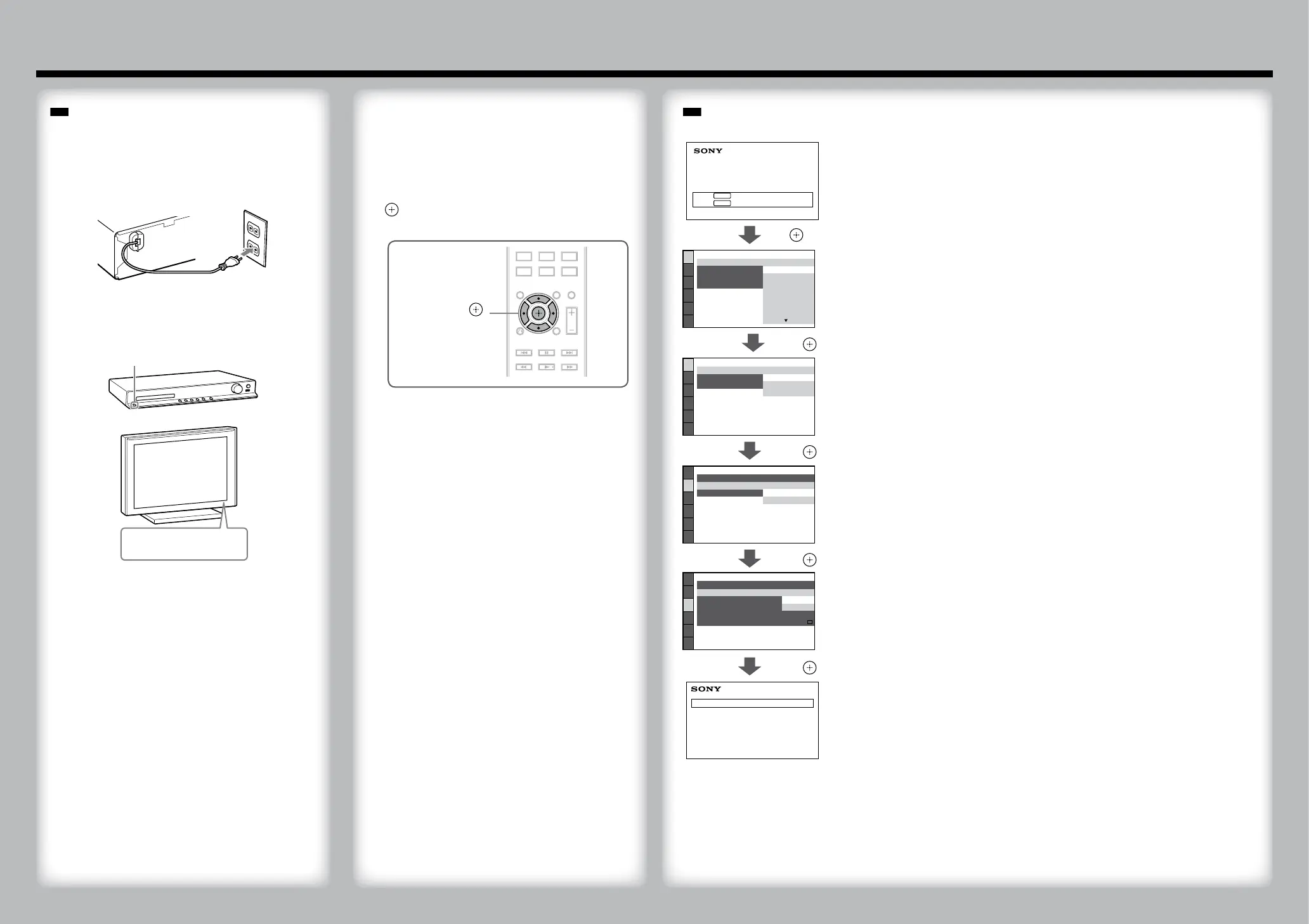
Switch the input selector on your TV to
display “SONY Home Theatre System.”
4
Set each following item, using /// and
.
///,
(ENTER)
Do not insert a disc before performing the Quick Setup.
1
Connect the AC power cord.
The shape of the wall outlet differs depending on the
area.
2
Turn on the power of the main unit and TV.
/
/
(power)
3
Performing the Quick Setup
Displayed items vary depending on the area.
Home Theatre System
Press to run QUICK SETUP.
Press to erase this message.
ENTER
CLEAR
LANGUAGE SETUP
MENU:
OSD:
AUDIO:
SUBTITLE:
ENGLISH
ENGLISH
FRANÇAIS
DEUTSCH
ITALIANO
ESPAÑOL
NEDERLANDS
DANSK
Select an on-screen language.
/,
VIDEO SETUP
LINE:
TV TYPE:
PAUSE MODE:
16:9
16:9
4:3 LETTER BOX
4:3 PAN SCAN
Select the aspect ratio of the connected TV.
/,
VIDEO SETUP
LINE:
TV TYPE:
PAUSE MODE:
16:9
VIDEO
VIDEO
VIDEO
VIDEO
RGB
Select the output method for video signals.
/,
HDMI SETUP
HDMI RESOLUTION:
AUDIO RETURN CHANNEL:
AUTO
(1920x1080p)
OFF
SD
YC
B
C
R
/RGB(HDMI):
YC
B
C
R
JPEG RESOLUTION:
AUDIO(HDMI):
CONTROL FOR HDMI:
OFF
OFF
ON
Select [ON] when you connect the main unit and the TV with an HDMI cable.
/,
QUICK SETUP is complete.
Home Theatre System
Basic setup is complete. Refer to the supplied Operating Instructions for details on how to enjoy
disc playback and many other features.



 To Previous Page