Using Various Additional Functions
53
GB
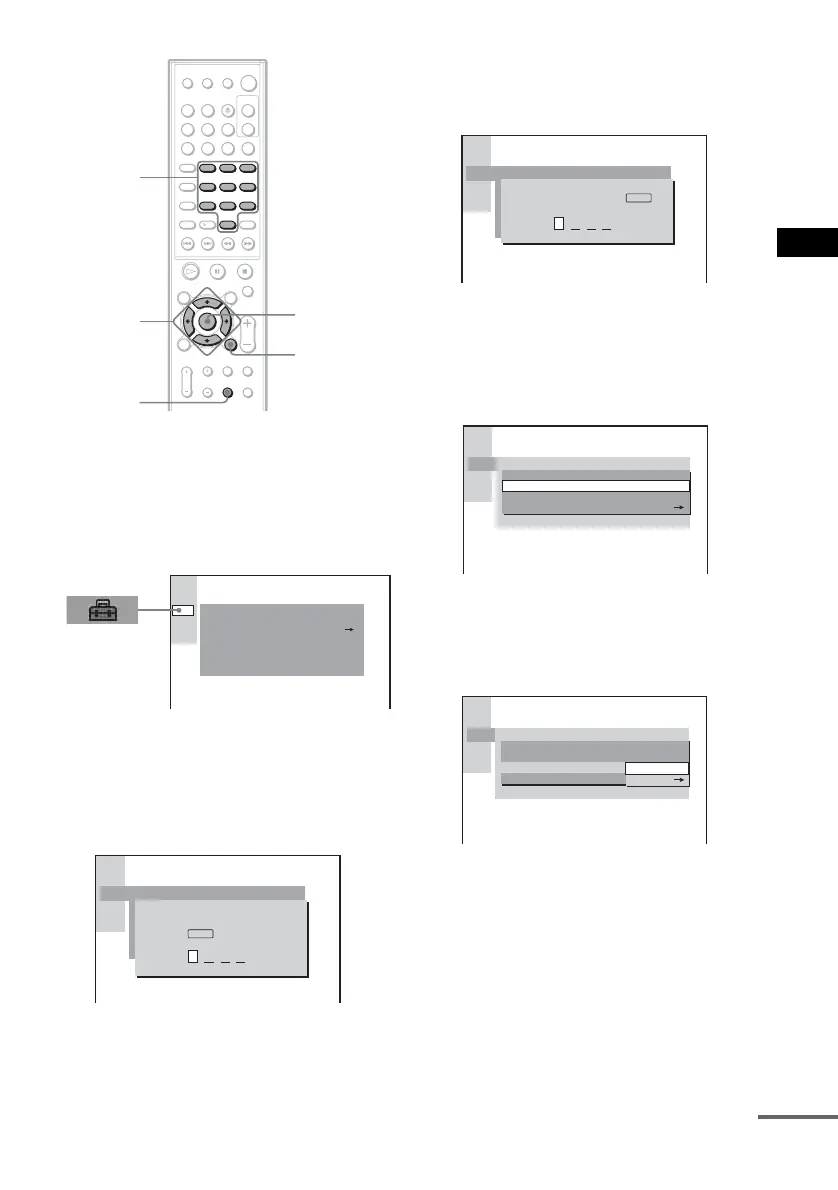
1 In stop mode, press DVD SETUP.
The Setup Display appears.
2 Press X/x to select [CUSTOM SETUP],
then press ENTER or c.
[CUSTOM SETUP] is displayed.
3 Press X/x to select [PARENTAL
CONTROL t], then press ENTER or c.
x If you have not entered a password
The display for registering a new password
appears.
Enter a 4-digit password using the number
buttons, then press ENTER.
The display for confirming the password
appears.
x When you have already registered a
password
The display for entering the password
appears.
4 Enter your password using the number
buttons, then press ENTER.
The display for setting the playback
limitation level and changing the password
appears.
5 Press X/x to select [STANDARD], then
press ENTER or c.
The selection items for [STANDARD] are
displayed.
6 Press X/x to select a geographic area
as the playback limitation level, then
press ENTER.
The area is selected.
If you select [OTHERS t], select and
enter the standard code in the table on
page 55 using the number buttons.
123
45
8
0
6
7
10
9
ENTER
Number
buttons
DVD
SETUP
C/X/x/c
O RETURN
CUSTOM SETUP
OFF
PARENTAL CONTROL
TRACK SELECTION
MP3DATA CD PRIORITY:
MM/DD/YYYYJPEG DATE:
STANDARDAUDIO DRC:
VCD COLOR SYSTEM
CUSTOM SETUP
PARENTAL CONTROL
Enter a new 4-digit password,
then press
.
ENTER
CUSTOM SETUP
PARENTAL CONTROL
Enter password, then press
.
ENTER
CUSTOM SETUP
STANDARD:
CHANGE PASSWORD
USA
LEVEL: OFF
PARENTAL CONTROL
PARENTAL CONTROL
LEVEL:
STANDARD:
CHANGE PASSWORD
OFF
CUSTOM SETUP
OTHERS
USA
continued



 To Next Page