26
GB
After connecting the speakers, IR transmitter,
and the AC power cords (mains leads), adjust
the wireless system for good transmission.
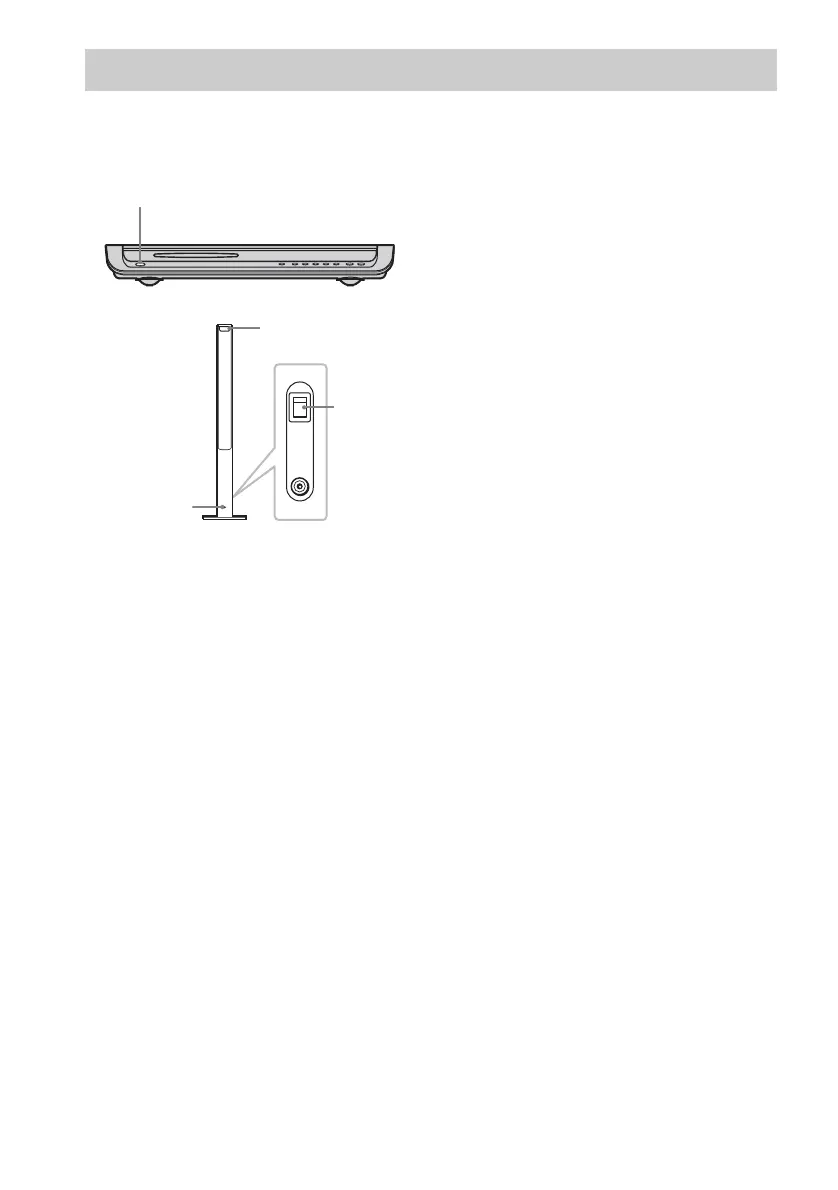
1 Press "/1 on the system and POWER
on the surround speaker (L) to turn on.
The system and surround speaker (L) turn
on and the POWER/ON LINE indicator
turns red.
2 Orient the IR transmitter and the IR
receiver of the surround speaker (L) to
face each other.
Adjust the position until the POWER/ON
LINE indicator turns green.
Tip
The IR transmitter is movable for easy reorientation.
Notes
• Make sure that there is no obstruction such as a
person or object between the IR transmitter and the IR
receiver of the surround speaker (L). Otherwise, the
sound from the surround speakers may be interrupted.
• If the POWER/ON LINE indicator turns red, the
transmission is incomplete. Adjust the position of the
IR transmitter and surround speaker (L) until the
POWER/ON LINE indicator turns green.
• If the POWER/ON LINE indicator flashes in red, the
IR receiver of the surround speaker (L) is receiving an
infrared ray from another Sony’s wireless product.
Move the IR transmitter and/or the surround speaker
(L) so that the POWER/ON LINE indicator turns
green.
Step 5: Adjusting the Wireless System
"/1
ON
OFF
ONLY FOR
POWER
DIR-R2
Rear side of the
surround speaker (L)
IR receiver
POWER
POWER/ON
LINE indicator



 To Next Page