Note
Be careful to line the cable so that it will not interfere with driving, become
entangled with passenger movements, or be damaged by seat adjustments,
etc.
<Example of using the magnet of the antenna for stable installation>
Use the above basic example as a general guideline. Adjust the antenna for the
best reception, depending on your car.
Notes
• Route the antenna cable close to the car antenna. This may help to improve the
reception from this unit.
• For details about the car radio antenna, refer to the car operating instructions.
• If the magnet is attached near movable objects, such as doors or seat rails, make
sure that the antenna cable does not become entangled. This may cause the wire
to break.
• Do not leave floppy disks or personal credit cards with magnetic coding near
the antenna cable magnet.
If the reception from this unit declines
If the reception from this unit declines, even though it was good at the frequency
set in the beginning, solve the problem referring to the following remedies,
according to your circumstances.
After setup, reception from this unit declines while driving.
c FM broadcast reception may be poor in certain locations, such as
underground parking, behind tall buildings, etc. If the car radio and this unit
were set up in such a location; due to poor FM broadcast reception, the
frequency you set for this unit may be already occupied. If so, the occupying
FM broadcast station is received when its reception conditions improve (as
you drive) resulting in interference with this unit’s same set frequency. In
this case, reset the car radio and this unit to another open frequency in a
location where the FM broadcast reception is better.
Reception from this unit is disrupted when you move to a new
location.
c FM broadcast reception conditions vary from one location to another. After
setting an open frequency in one location, as you move to other areas, that
frequency may become occupied by a broadcast station’s signal. In this case,
reset the frequency on both the car radio and this unit to another open
frequency.
Interference or noise occurs.
c Other FM broadcasts or non-licensed broadcastings in a city area may
interfere with the reception of the frequency set for this unit. In this case, set
the car radio and this unit to a less-influenced frequency.
Notes
• Do not attempt to connect this unit, or to operate this unit, a portable audio
device, or a car radio while driving or waiting at a traffic signal. Park in a safe
place first.
• Plug securely into the cigarette lighter socket.
• This unit may not fit, depending on the location or shape of the cigarette lighter
socket.
• Route the antenna cable and the audio cable (with the stereo mini plug at its
end) in a manner that does not interfere with your driving, and is out of the
reach of children.
• Install this unit in a manner that will not hinder the airbag function in an
emergency.
Features
With this unit, you can enjoy listening to audio played on portable audio devices
through a car FM radio. Music from portable audio devices such as an HDD,
flash memory, MD or CD WALKMAN*, etc., is transmitted to the car’s FM
radio via FM radio waves.
Stable clear sound
• Using the flexible transmitting antenna cable, it is possible to transmit a stable
FM radio wave in any kind of car. The flexible transmitting antenna cable has a
magnet to anchor itself to a metal part inside the car.
• Digital frequency selection, rather than analog, assures a more stable and clear
transmission.
Easy operation with the frequency select dial
Select from 12 FM radio frequencies (channels) to transmit.
Compact design
This unit is designed for installation in the cigarette lighter socket.
This unit is designed so as its protruding part is in one direction only, and when
installed can be rotated in order to avoid any obstructions around the cigarette
lighter socket.
No dry batteries
This unit connects to a 12 V or 24 V DC car battery (cigarette lighter socket),
available in many types of cars and trucks.
*“WALKMAN” is a registered trademark of Sony Corporation to represent
Headphone Stereo products.
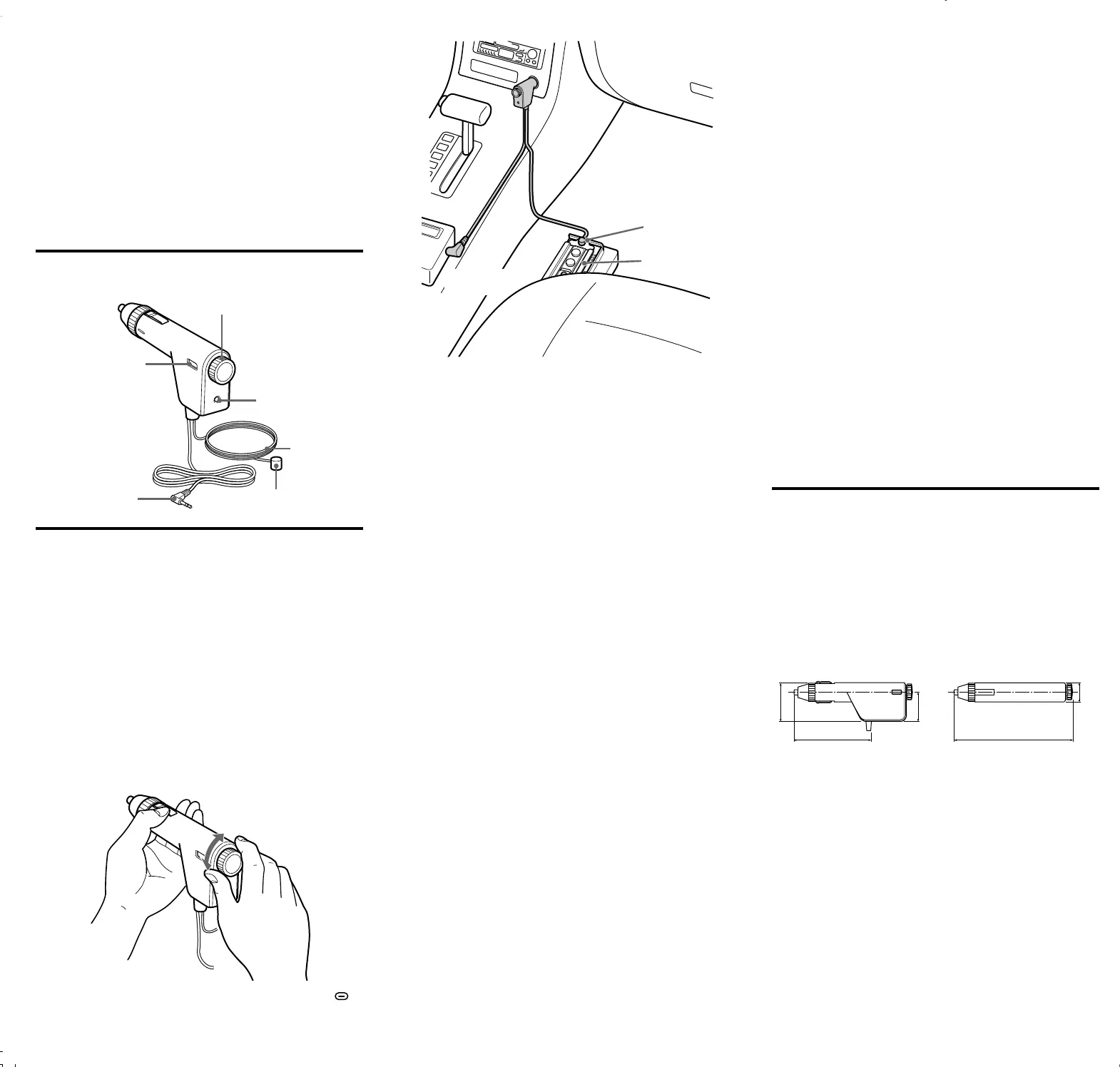
Identifying the parts
Connections
Set the car radio
1 Set your car radio to FM.
2 Select a channel that does not get good FM broadcast reception
from the list below.
88.1 MHz, 88.3 MHz, 88.5 MHz, 88.7 MHz, 88.9 MHz, 106.7 MHz,
106.9 MHz, 107.1 MHz, 107.3 MHz, 107.5 MHz, 107.7 MHz, 107.9 MHz
The FM broadcast reception conditions may change as your location changes.
If the selected frequency becomes occupied by a broadcast signal, select
another open frequency.
Notes
• For details about car radio settings, refer to the car radio operating instructions.
• Turn the car radio volume down before setting the car radio.
Install the unit
1 Rotate the frequency select dial to select the same frequency that
you set on the car radio.
The selected frequency appears in the frequency display window. The
mark appears at the transition point between a low frequency band
(88.1 MHz~88.9 MHz) and a high frequency band (106.7 MHz~107.9 MHz).
The mark is a border between high frequency and low frequency.
The volume is low.
❒ The volume of the portable audio device is set too low.
c Set the volume control of the portable audio device as high as possible but
not so high that the audio signal becomes distorted.
If sound is still low, turn the volume up on the car radio.
The sound is distorted.
❒ The input signal is too high.
c If you connected to the LINE OUT jack on the portable audio device,
disconnect and reconnect to the headphone jack.
❒ The bass boost function on the portable audio device is on.
c Cancel the bass boost function.
Noise is generated.
❒ The frequency of the unit does not coincide with the FM car radio.
c Set the unit and the FM car radio to the same frequency.
❒ The reception from this unit is not good.
c Route the antenna cable for the unit inside the car. Position the antenna close
to the car antenna, or stabilize the antenna cable with the magnet to the
passenger’s seat rail, and so on. This may help to improve the reception
from this unit.
❒ The FM car radio receives a broadcast signal.
c Select an empty frequency (a non-broadcast frequency, indicated by a static
hissing sound).
❒ The selected frequency is occupied or the signal is jammed.
c Select another open or frequency which is less influenced by jamming (a
non-broadcast frequency, indicated by a static hissing sound).
The sound is interrupted.
❒ The signal is jammed locally.
c Select another frequency which is less influenced by jamming (a non-
broadcast frequency, indicated by a static hissing sound).
The Power lamp does not light.
❒ This unit is not completely plugged into the cigarette lighter socket.
c Insert this unit correctly and securely.
❒ Depending on the car type, the engine must be started for electric current to
flow to the cigarette lighter socket.
c Start the engine.
❒ The fuse is blown.
c Replace the fuse.
Specifications
Transmission system
multiplex stereo
Transmission frequency
88.1 MHz, 88.3 MHz, 88.5 MHz, 88.7 MHz, 88.9 MHz, 106.7 MHz,
106.9 MHz, 107.1 MHz, 107.3 MHz, 107.5 MHz, 107.7 MHz, 107.9 MHz
Electric strength
less than 250 µV/m (3 m)
Power voltage
DC 12/24 V (only for negative # grounded cars)
Input
ø3.5 mm (stereo mini plug)
Dimensions
Signal cable length
Approx.1 m (3.3 ft)
Antenna cable length
Approx.1.5 m (4.9 ft)
Mass
Approx. 40 g (1.42 oz) (without cables)
Supplied accessories
Operating Instructions (1)
Warranty Card (1)
Design and specifications are subject to change without notice.
Unit: mm
Frequency select dial
POWER lamp
Magnet
Antenna cable
Stereo mini plug
Frequency display
window
41
81
31
123
21
fréquence libre dans un end
meilleures.
c La réception de l’appareil
s
Les conditions de réception
déplacez. Si une autre émis
cet appareil lorsque vous v
appareil à une autre fréque
c Des interférences ou des pa
D’autres émissions FM ou
interférer avec la réceptio
n
Dans ce cas, réglez l’autor
susceptible d’être perturb
é
Remarques
• N’essayez pas de brancher ce
t
audio portable ou un autoradi
Parquez-vous d’abord dans u
n
• Branchez correctement l’appa
• Il est possible que cet apparei
forme de l’allume-cigare.
• Faites cheminer le câble d’an
t
conduire et qu’il soit hors de p
• Faites cheminer les câbles de
• Installez l’appareil de sorte q
u
d’urgence.
Remplacem
Si cet appareil ne fonctionne pa
cigare.
Si le fusible a fondu, remplace
z
1 Retirez cet appareil de l’
2 Détachez l’extrémité de
des aiguilles d’une mont
3 Retirez le fusible.
4 Vérifiez le fusible.
Si le fusible a fondu, passez
Si le fusible n’a pas fondu, p
5 Installez un nouveau fus
Utilisez un fusible dont l’am
fusibles de cet appareil (1 A
6 Insérez le fusible.
7 Remettez en place l’extr
dans le sens des aiguille
Remarques
• Lorsque vous remplacez le f
u
correct, comme indiqué dans
20 mm)
• L’utilisation d’un fusible d’a
m
importants ou un incendie.
• N’utilisez pas un morceau de
• Si le fusible remplacé fond d
e
gq
2 Sélectionnez une fréquence qui ne reçoit pas d’émissions dans la
liste ci-dessous.
88,1 MHz, 88,3 MHz, 88,5 MHz, 88,7 MHz, 88,9 MHz, 106,7 MHz,
106,9 MHz, 107,1 MHz, 107,3 MHz, 107,5 MHz, 107,7 MHz, 107,9 MHz
Les conditions de réception peuvent changer au fur et à mesure que vous
vous déplacez. Si la fréquence sélectionnée devient occupée par un signal
d’émission, sélectionnez une autre fréquence libre.
Remarques
• Pour plus de détails sur les réglages de l’autoradio, reportez-vous au mode
d’emploi de celui-ci.
• Baissez le volume avant de régler l’autoradio.
Installez l’appareil
1
Faites tourner la molette de sélection des fréquences pour
sélectionner la même fréquence que celle réglée sur l’autoradio.
La fréquence sélectionnée s’affiche dans la fenêtre d’affichage des
fréquences. La marque
apparaît au point de transition entre une bande
basse fréquence (88,1 MHz~88,9 MHz) et une bande haute fréquence
(106,7 MHz~107,9 MHz).
Considérez la marque comme une limite entre les fréquences hautes et les
fréquences basses.
2 Raccordez la minifiche stéréo à la prise casque de l’appareil audio
portable.
Il se peut que le son soit déformé si elle est raccordée à la prise LINE OUT
de l’appareil audio portable, étant donné que le signal d’entrée vers cet
appareil est trop élevé.
3 Insérez l’appareil dans l’allume-cigare.
Appareil audio
portable
vers un allume-cigare
Allume-cigare
Appareil audio
portable
Magnet
Seat rail
Portable audio
device



 To Previous Page
 Loading...