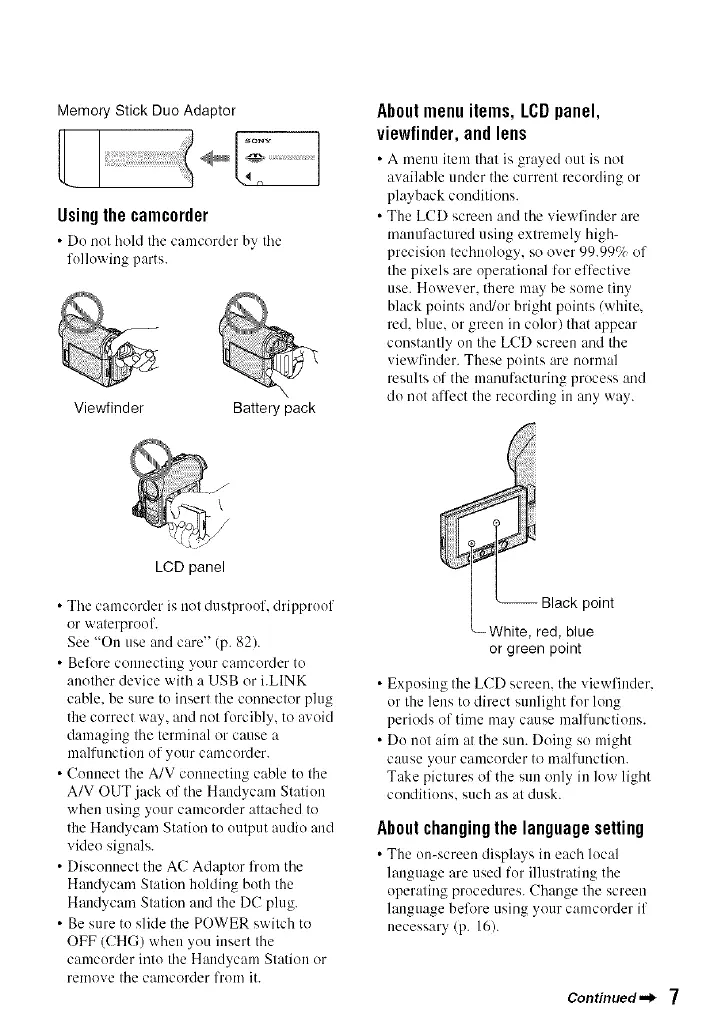
Memory Stick Duo Adaptor
sony
Usingthecamcorder
• Do not hohl the camcorder hy the
fullowing parts.
Viewfinder Battery pack
About menu items, LCD panel,
viewfinder,and lens
• A meuu item that is gra_ed e/it is Rot
awdlable under the currem recording or
playback conditions.
• The LCD screen and the viewfiuder are
manufactured using extremely high-
precision techuulogy, so over 99.99% of
the pixels are operational for effective
use. Huwever. there may be some tiny
black points and/or bright puints (white.
red. blue. or green in color) that appear
constantly un tile LCD screen and tile
viewt'inder. These puiuts are nunnal
results of the manufacturing process and
do not affect the recording in any way.
LCD panel
• Tile camcorder is not dustprouf, drippruof
or waterproof.
See "On use and care" (p. 82).
• Befl)re connecting your camcorder to
another device with a USB or i.LINK
cable, be sure to insert the connector plug
the correct way, and not forcibly, to avoid
damaging the terminal or cause a
malfunction of your camcerder.
• Connect the A/V connecting cable to the
A/V OUT jack of the Haudycam Statiuu
when using your camcurder attached to
the Haudycam Station tu uutput audio and
video signals.
• Disconnect the AC Adaptor from the
Haudycam Station holding both the
Handycam Station and the DC plug.
• Be sure to slide the POWER switch to
OFF (CHG) when you insert the
camcorder into the Haudycam Station or
remove tile camcerder from it.
or green point
• Exposing the LCD screen, tile viewfinder.
or the lens to direct sunlight for lung
periods of time may cause malfunctions.
• Do not aim at tile sun. Doing so might
cause your camcorder to m:llfunction.
Take pictures of the sun only in low light
ceuditiuus, such as at dusk.
Aboutchangingthelanguagesetting
• The on-screen displa}s in each h)c:,l
language are used for illustrating the
operating procedures. Change the screen
language before using your camcorder if
necessary (p. 16).
Continued") 7






 To Next Page