EasyManua.ls Logo

Sony DCX-930 - Page 20

Sony DCX-930
158 pages
Print Icon
To Next Page IconTo Next Page
To Previous Page IconTo Previous Page
Loading...
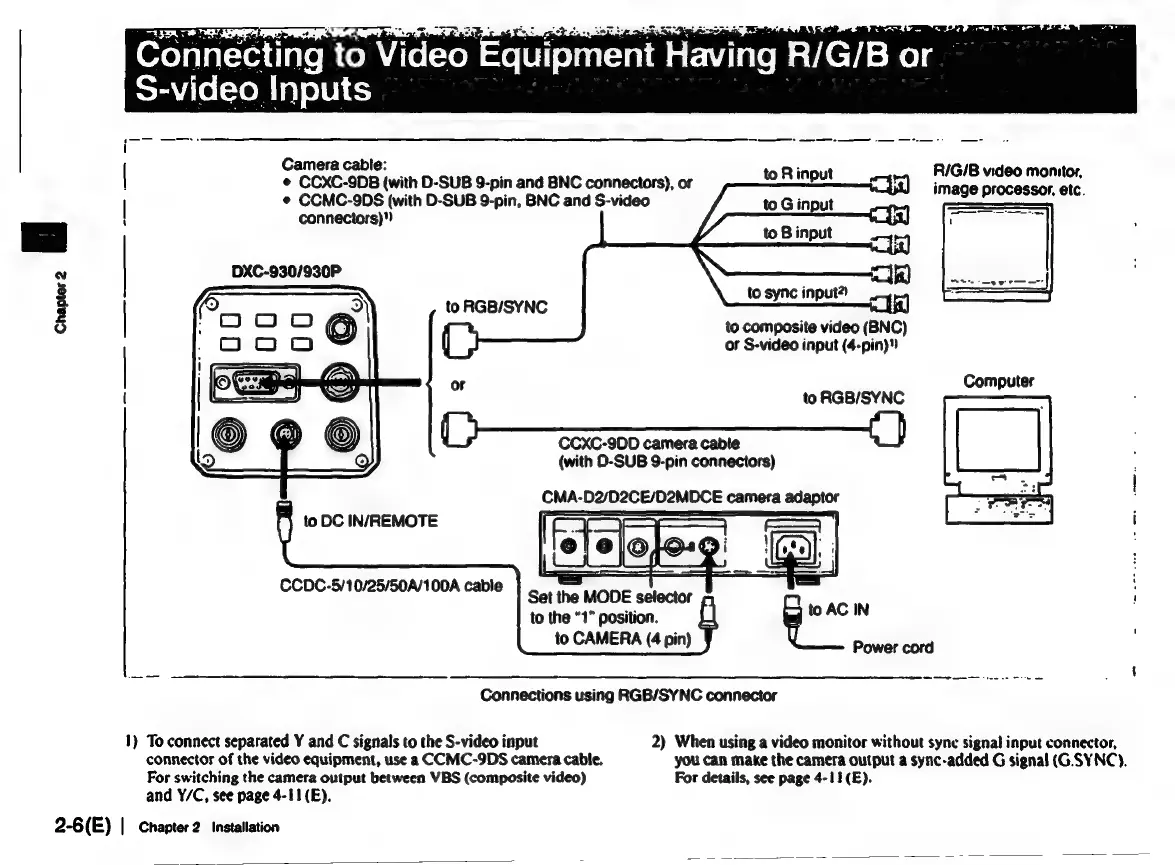
Connecting
to
V
Video
Equipment
Having
R/G/B
or
S-video
Inputs
rr
SS
Camera
cable:
:
*
CCXC-9DB
(with
D-SUB
9-pin
and
BNC
connectors),
or
mB
input
VIE
1000
NIOINIOF,
¢
CCMC-9DS
(with
D-SUB
9-pin,
BNC
and
S-video
connectors)"
image
processor,
etc.
to
G
input
to
B
input
to
sync
input?)
to
RGB/SYNC
Chapter
2
7
to
composite
video
(BNC)
of
S-video
input
(4-pin)”
or
Computer
to
RGB/SYNC
CCXC-9DD
camera
cable
(with
0-SUB
9-pin
connectors)
CMA-
D2/D2CE/D2MDCE
¢
camera
adaptor
to
DC
IN/REMOTE
CCDC-5/10/25/50A/100A
cable
Set
the
MODE
selector
to
the
“1”
position.
to
CAMERA
(4
pin)
Connections
using
RGB/SYNC
connector
1)
To
connect
separated
Y
and
C
signals
to
the
S-video
input
2)
When
using
a
video
monitor
without
sync
signal
input
connector,
connector
of
the
video
equipment,
use
a
CCMC-9DS
camera
cable,
you
can
make
the
camera
output
a
sync-added
G
signal
(G.SYNC).
For
switching
the
camera
output
between
VBS
(composite
video)
For
details,
see
page
4-11(E).
and
Y/C,
see
page
4-11(E).
2-6(E)
|
Chapter
2
Installation

Related product manuals