EasyManua.ls Logo

Sony DCX-930 - Page 31

Sony DCX-930
158 pages
Print Icon
To Next Page IconTo Next Page
To Previous Page IconTo Previous Page
Loading...
Adjusting
the
Black
Balance
ee
GE
ST
EY
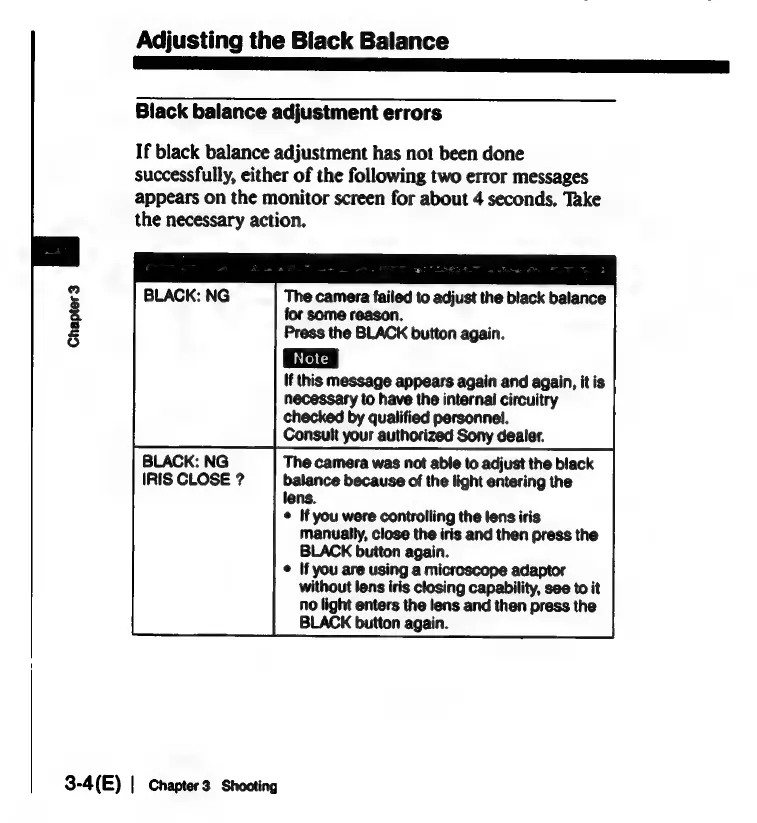
Black
balance
adjustment
errors
If
black
balance
adjustment
has
not
been
done
successfully,
either
of
the
following
two
error
messages
appears
on
the
monitor
screen
for
about
4
seconds.
Take
the
necessary
action.
The
camera
failed
to
adjust
the
black
balance
for
some
reason.
Press
the
BLACK
button
again.
If
this
message
appears
again
and
again,
it
is
necessary
to
have
the
internal
circuitry
checked
by
qualified
personnel.
Consult
your
authorized
Sony
dealer.
BLACK:
NG
The
camera
was
not
able
to
adjust
the
black
IRIS
CLOSE
?
balance
because
of
the
light
entering
the
lens.
©
If
you
were
controlling
the
lens
iris
manually,
close
the
iris
and
then
press
the
BLACK
button
again.
¢
If
you
are
using
a
microscope
adaptor
without
lens
iris
closing
capability,
see
to
it
no
light
enters
the
lens
and
then
press
the
BLACK
button
again.
Chapter
3
3-4(E)
|
Chapter3
Shooting

Related product manuals