EasyManua.ls Logo

Sony DCX-930 - Page 34

Sony DCX-930
158 pages
Print Icon
To Next Page IconTo Next Page
To Previous Page IconTo Previous Page
Loading...
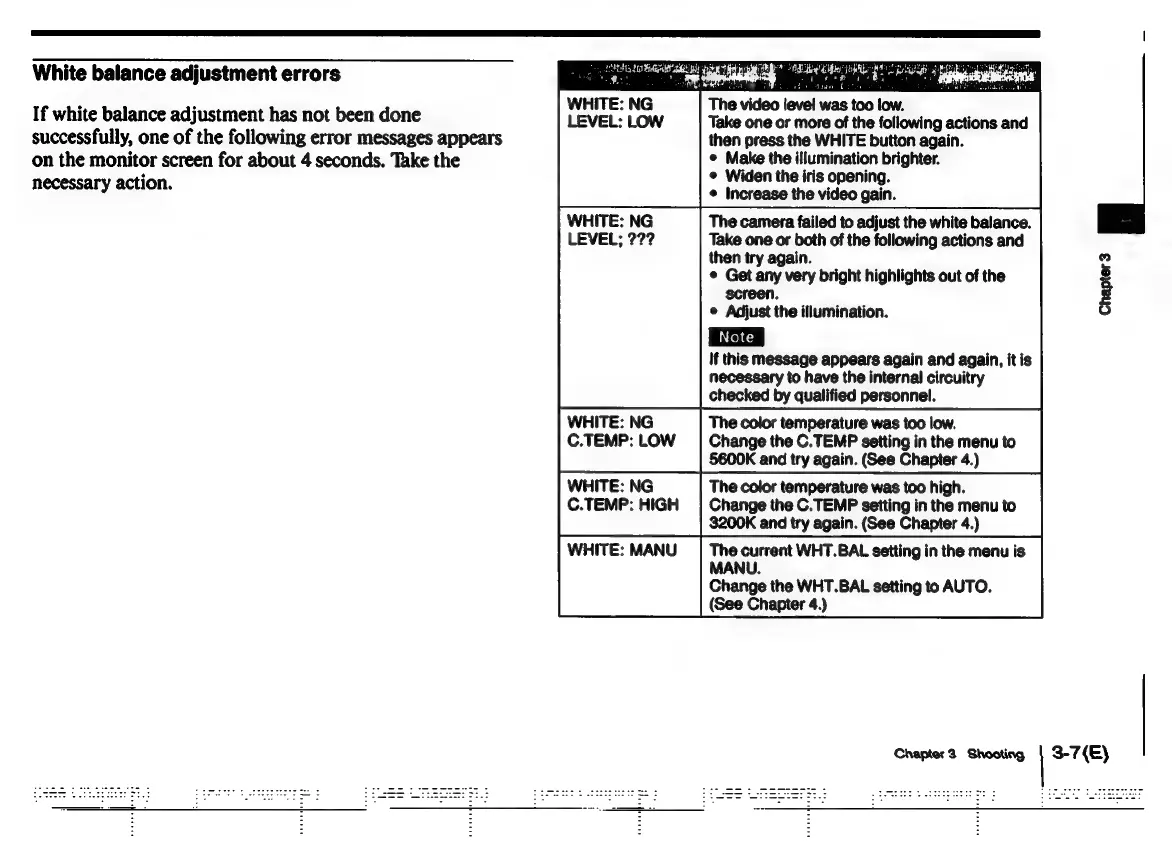
White
balance
adjustment
errors
If
white
balance
adjustment
has
not
been
done
successfully,
one
of
the
following
error
messages
appears
on
the
monitor
screen
for
about
4
seconds.
Take
the
necessary
action.
ee
iT
oD
UAT
on
ee
TRIG
Bd
veneees
<i
wed
er
WHITE:
NG
C.TEMP:
LOW
aan
et
:
eh
data
bite
The
video
level
was
too
low.
Take
one
or
more
of
the
following
actions
and
then
press
the
WHITE
button
again.
©
Make
the
illumination
brighter.
©
Widen
the
iris
opening.
¢
Increase
the
video
gain.
The
camera
failed
to
adjust
the
white
balance.
Take
one
or
both
of
the
following
actions
and
then
try
again.
©
Get any
very
bright
highlights
out
of
the
screen.
e
Adjust
the
illumination.
If
this
message
appears
again
and
again,
itis
necessary
to
have
the
internal
circuitry
checked
by
qualified
personnel.
The
color
temperature
was
too
low.
Change
the
C.TEMP
setting
in
the
menu
to
§600K
and
try
again.
(See
Chapter
4.)
The
color
temperature
was
too
high.
Change
the
C.TEMP
setting
in
the
menu
to
3$200K
and
try
again.
(See
Chapter
4.)
The
current
WHT.BAL
setting
in
the
menu
is
MANU.
Change
the
WHT.BAL
setting
to
AUTO.
(See
Chapter
4.)
Chapter
3
Shooting
Chapter
3
3-7(E)

Related product manuals