EasyManua.ls Logo

Sony DCX-930 - Page 38

Sony DCX-930
158 pages
Print Icon
To Next Page IconTo Next Page
To Previous Page IconTo Previous Page
Loading...
Chapter
4
acorer-tolUl¢-mcelm
Oiar-larellale
mrs
aelele
to
You
can
easily
change
any
camera
operational
settings
up
video
gain
and
white
balance
as
examples,
which
are
through
simple
button
manipulation
while
seeing
the
two
of
the
adjustment
items
requiring
a
change
of
setting
menu
display
on
the
monitor
screen.
most
frequently.
All
the
items
whose
settings
can
be
This
section
describes
how
to
change
settings
by
taking
changed
using
the
menu
are
listed
up
on
page
4-7(E).
Example
1:
Changing
the
Video
Gain
Setting
When
shooting
in
very
low
light,
fully
opening
the
lens
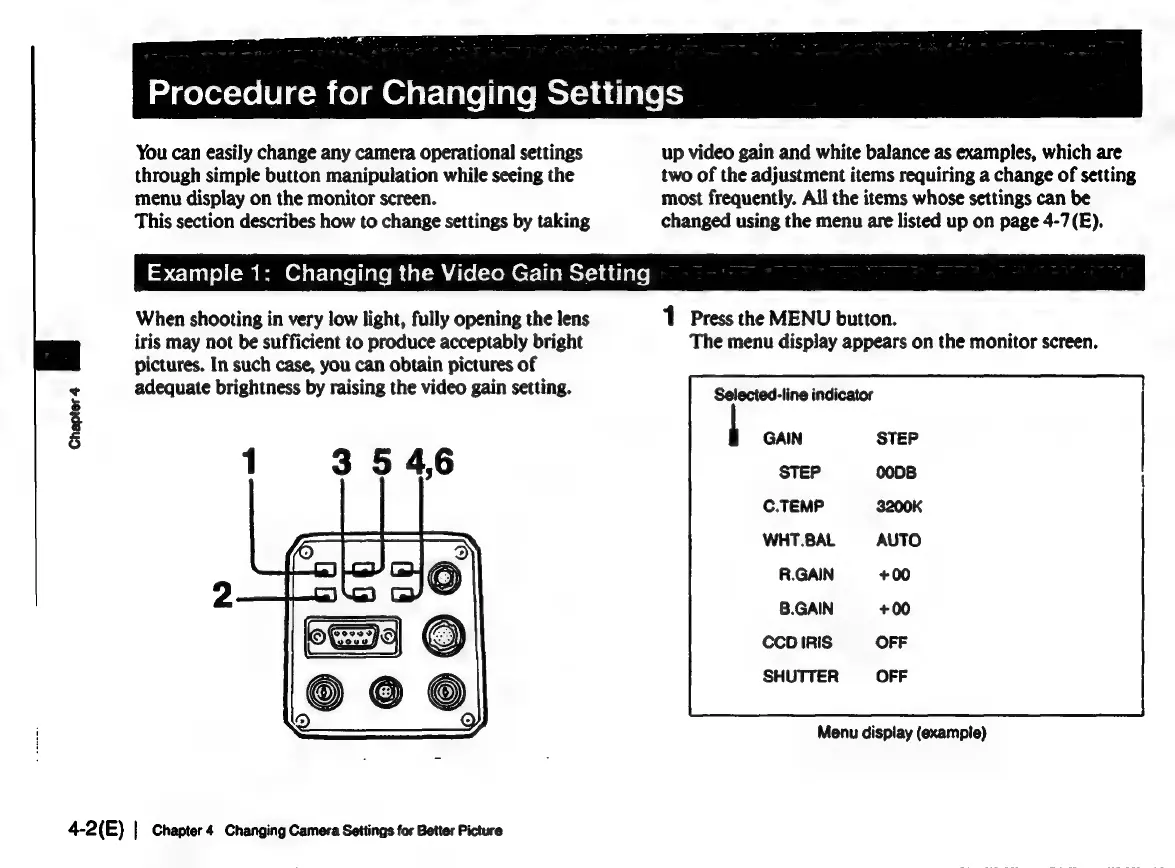
1
Press
the
MENU
button.
iris
may
not
be
sufficient
to
produce
acceptably
bright
The
menu
display
appears
on
the
monitor
screen.
pictures.
In
such
case,
you
can
obtain
pictures
of
adequate
brightness
by
raising
the
video
gain
setting.
Selected-line
indicator
GAIN
STEP
C.TEMP
WHT.BAL
R.GAIN
B.GAIN
CCD
IRIS
SHUTTER
Menu
display
(example)
4-2(E)
|
Chapter
4
Changing
Camera
Settings
for
Better
Picture

Related product manuals